00197728-12_IM_SE3.11_EN.pdf - 第85页
Installation and Configuration Guide Index Edition 11/2020 EN 85 Index A Add Equipment . . . . . . . . . . . . . . . . . . . . . . . . . . 45 Add Line . . . . . . . . . . . . . . . . . . . . . . . . . . . . . . . 6 5 Add…
4 Configuration Installation and Configuration Guide SIPLACE Explorer
4.3 Database Settings Edition 11/2020 EN
84
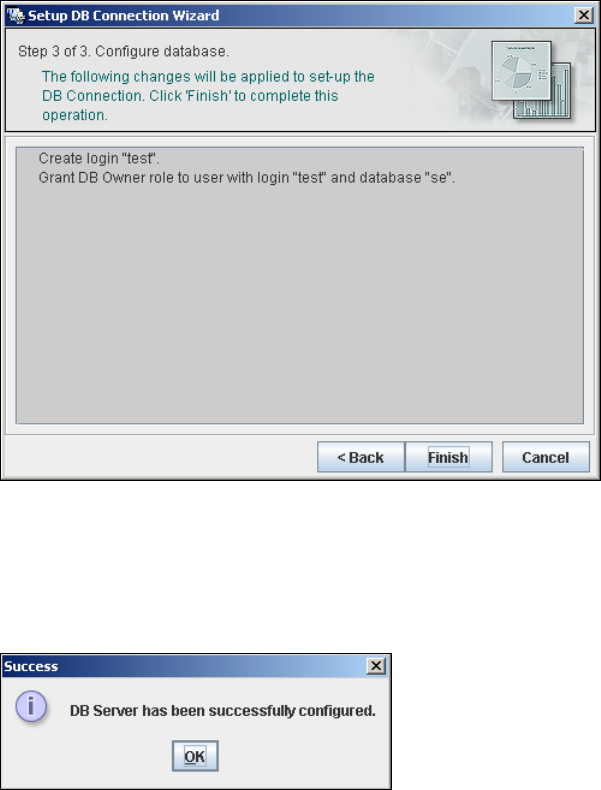
– Step 3- Configure Database
Step 3 takes your modifications from Step 2 and uses them to configure the database
connection.
4
Fig. 4 - 57 Step 3 database connection wizard
Click on Finish and the wizard will carry out the required configuration. The DB settings are
now correctly specified for your project. and the database and set user will be created.
You will receive a success message.
4
Fig. 4 - 58 Step 3 database connection wizard
Click OK. You can now configure your system database.
4

Installation and Configuration Guide Index
Edition 11/2020 EN
85
Index
A
Add Equipment
. . . . . . . . . . . . . . . . . . . . . . . . . .45
Add Line
. . . . . . . . . . . . . . . . . . . . . . . . . . . . . . .65
Add User
. . . . . . . . . . . . . . . . . . . . . . . . . . . . . . .71
Administrator Privileges
. . . . . . . . . . . . . . . 25, 33
Adobe Reader
. . . . . . . . . . . . . . . . . . . . . . . . . . .23
Available For
. . . . . . . . . . . . . . . . . . . . . . . . . . . .47
C
Calendar
. . . . . . . . . . . . . . . . . . . . . . . . . . . . . . .48
Changing Tomcat Port Number
. . . . . . . . . . . . .37
Choose Destination Location, SIPLACE Explorer
Setup
. . . . . . . . . . . . . . . . . . . . . . . . . . . . . .29
Choose Folder’ Dialog Box, SIPLACE Explorer Set-
up
. . . . . . . . . . . . . . . . . . . . . . . . . . . . . 29, 32
Client LAN
. . . . . . . . . . . . . . . . . . . . . . . . . . . . . .11
Configuration
. . . . . . . . . . . . . . . . . . . . . . . . . . . .39
Configuration of the System Database
. . . . . . . .82
Configurations
. . . . . . . . . . . . . . . . . . . . . . . . . . .11
Configure Production Line
. . . . . . . . . . . . . . . . .45
Configuring Production Lines
. . . . . . . . . . . . . . .64
Connect to the Microsoft SQL Server
. . . . . . . . .82
Connection to Database
. . . . . . . . . . . . . . . 50, 61
Creation of Custom Applications
. . . . . . . . . . . . .39
D
Database Connection Wizard
. . . . . . . . . . . 80, 82
Database Settings
. . . . . . . . . . . . . . . . . . . . . . . .80
DB Administrator
. . . . . . . . . . . . . . . 54, 55, 76, 77
DB Administrator Login
. . . . . . . 53, 54, 55, 75, 76
DB Error
. . . . . . . . . . . . . . . . . . . . . . . . . . . 50, 62
DB Maintenance
. . . . . . . . . 53, 54, 55, 75, 76, 77
Default Maintenance Schedule
. . . . . . . . . . . . . .53
Default User Rights
. . . . . . . . . . . . . . . . . . . . . . .73
Default Web Server
. . . . . . . . . . . . . . . . . . . . . . .37
Development Environment
. . . . . . . . . . . . . . . . .21
Development Environment, Installation Option
. .30
E
Edit Line List
. . . . . . . . . . . . . . . . . . . . . . . . . . . 41
Edit Logbook Entries
. . . . . . . . . . . . . . . . . . . . . 70
F
Factory Calendar
. . . . . . . . . . . . . . . . . . . . . . . . 68
Factory Configuration Utility
. . . . . . . . . . . . 21, 60
Factory Configuration Utility - Add Production Lines
. . . . . . . . . . . . . . . . . . . . . . . . . . . . . . . . . . . 66
Factory Configuration Utility - DB Maintenance
75
Factory Configuration Utility - Factory Calendar
68
Factory Configuration Utility - Production Lines
65
Factory Configuration Utility - reports
. . . . . . . . 69
Factory Configuration Utility - SMTP Server
. . . 74
Factory Configuration Utility - User Details
. . . . 72
Factory Configuration Utility - Users
. . . . . . . . . 71
Factory Configuration Utility, Installation Option
30
Factory Configuration Utility, Starting
. . . . . . . . 60
Factory Database
. . . . . . . . . . . . . . . . . . . . . . . 75
Factory Host
. . . . . . . . . . . . . . . . . . . . . . . . . . . 64
Factory Website
. . . . . . . . . . . . . . . . . . 13, 70, 80
G
Generate Website
. . . . . . . . . . . . . . . . . . . . . . . 78
Generate website - Factory Configuration Utility
78
Generating the Website
. . . . . . . . . . . . . . . . . . 57
I
Import line configuration
. . . . . . . . . . . . . . . . . . 31
Import OIS Lines
. . . . . . . . . . . . . . . . . . . . . . . . 42
Initial Installation, SIPLACE Explorer
. . . . . 25, 33
Installation Complete, SIPLACE Explorer Setup
33
Installation Variants
. . . . . . . . . . . . . . . . . . . . . . 15
Installing SIPLACE Explorer
. . . . . . . . . . . . . . . 21
J
Java SE Runtime Environment
. . . . . . . . . . . . . 23

Index Installation and Configuration Guide
Edition 11/2020 EN
86
L
License Agreement
. . . . . . . . . . . . . . . . . . . . . . 27
License Agreement, SIPLACE Explorer
. . . . . . 27
Line Configuration, Starting
. . . . . . . . . . . . . . . . 40
Line Host
. . . . . . . . . . . . . . . . . . . . . . . . . . . . . . 64
M
Machine Type
. . . . . . . . . . . . . . . . . . . . . . . . . . 43
Mail Server Configuration
. . . . . . . . . . . . . . . . . 74
Microsoft Internet Explorer
. . . . . . . . . . . . . . . . 23
Microsoft SQL Server
. . . . . . . . . . . . . . . . . . . . 81
Microsoft SQL Server Properties
. . . . . . . . . . . 36
Modify Application Parameters
. . . . . . . . . . . . . 56
Modify Application Settings
. . . . . . . . . . . . . . . . 70
Monitor Production Line
. . . . . . . . . . . . . . . . . . 70
Monitor Production Lines
. . . . . . . . . . . . . . . . . 39
O
OIS
. . . . . . . . . . . . . . . . . . . . . . . . . . . . . . . . 8, 13
OIS Import
. . . . . . . . . . . . . . . . . . . . . . . . . . . . . 41
OIS Machine Driver
. . . . . . . . . . . . . . . . . . . . . . 43
Operator Information System
. . . . . . . . . . . . . . 13
Options
. . . . . . . . . . . . . . . . . . . . . . . . . . . . 24, 25
P
Production Line Websites
. . . . . . . . . . . . . . . . . 80
R
Remarks
. . . . . . . . . . . . . . . . . . . . . . . . . . . . . . . 9
Reports
. . . . . . . . . . . . . . . . . . . . . . . . . . . . . . . 69
Reports On Demand
. . . . . . . . . . . . . . . . . . . . . 69
Review Application Features
. . . . . . . . . . . . . . . 47
Runtime Environment
. . . . . . . . . . . . . . . . . . . . 21
Runtime Environment, Installation Option
. . . . . 30
S
Scope of Delivery
. . . . . . . . . . . . . . . . . . . . . . . . 5
SE Security Manager
. . . . . . . . . . . . . . . . . 40, 60
Select Features Dialog Box, SIPLACE Explorer Set-
up
. . . . . . . . . . . . . . . . . . . . . . . . . . . . . . . . 30
Select SQL Server instance
. . . . . . . . . . . . . . . 42
Set Up Production Line Schedule
. . . . . . . . . . . 48
Settings, Database
. . . . . . . . . . . . . . . . . . . . . . 80
Setup and Configuration of the System Database
81
Setup DB Connection
. . . . . . . . . . . . . . . . . 50, 62
Setup Information System
. . . . . . . . . . . . . . . . . 13
SIPLACE Explorer Architecture
. . . . . . . . . . . . . 11
SIPLACE Explorer Factory Host
. . . . . . . . . . . . 64
SIPLACE Explorer Line Host
. . . . . . . . . . . . . . . 64
SIPLACE Explorer Options
. . . . . . . . . . . . . 24, 25
SIPLACE Explorer Setup - 'Choose Folder' Dialog
Box
. . . . . . . . . . . . . . . . . . . . . . . . . . . . 29, 32
SIPLACE Explorer Setup - 'Select Features' Dialog
Box
. . . . . . . . . . . . . . . . . . . . . . . . . . . . . . . 30
SIPLACE Explorer Setup - Choose Destination Lo-
cation
. . . . . . . . . . . . . . . . . . . . . . . . . . . . . 29
SIPLACE Explorer Setup - Customer Installation
.
28
SIPLACE Explorer Setup - import line configuration
. . . . . . . . . . . . . . . . . . . . . . . . . . . . . . . . . . . 31
SIPLACE Explorer setup - Installation Complete
33
SIPLACE Explorer, Initial Installation
. . . . . . . . 25
SIPLACE Explorer, Installing
. . . . . . . . . . . . . . . 21
SIPLACE Explorer, Standard Installation
. . . . . 15
SIPLACE LAN
. . . . . . . . . . . . . . . . . . . . . . . . . . 11
SIPLACE Maintenance Manager
. . . . . . . . 24, 25
SIPLACE OIS Database
. . . . . . . . . . . . . . . . . . 45
SIPLACE Pro
. . . . . . . . . . . . . . . . . . . . . . . . . . . 13
SIPLACE Traceability Option
. . . . . . . . . . . 24, 25
SIS
. . . . . . . . . . . . . . . . . . . . . . . . . . . . . . . . . . 13
SMA
. . . . . . . . . . . . . . . . . . . . . . . . . . . . . . . . . . 39
SMA Features
. . . . . . . . . . . . . . . . . . . . . . . . . . 39
SMA with Line Configuration
. . . . . . . . . . . . . . . 39
SMTP Server
. . . . . . . . . . . . . . . . . . . . . . . . . . . 74
Standard Monitoring Application (SMA)
. . . . . . 39
Start Screen
. . . . . . . . . . . . . . . . . . . . . . . . . . . 26
Starting SIPLACE Explorer
. . . . . . . . . . . . . . . . 60
Starting SIPLACE Explorer in Windows
. . . 35, 40
Station Software
. . . . . . . . . . . . . . . . . . . . . . . . 13
Step 1 - Edit Line List
. . . . . . . . . . . . . . . . . . . . 41
Step 1- Connection to Database
. . . . . . . . . . . . 81
Step 2 - Perform Configuration Test
. . . . . . . . . 83
Step 3 - Review Application Features
. . . . . . . . 47
Step 3 Configure Database
. . . . . . . . . . . . . . . . 84
Step 4 - Set Up Production Line Schedule
. . . . 48
Step 5 - Configure System Database
. . . . . . . . 49
Step 6 - Modify Application Parameters
. . . . . . 56
Step 7
Generating the Website
. . . . . . . . . . . . . . . 57