第1章 MMI错误码和问题解决.pdf - 第54页
1-54 。 $a61 1 Lead Gloup ( ) Lead [ ] 识别部品时,在 V isio n Monitor 上,上面 Lead Gloup 中右侧的 L ead 的识别失败 的情况。 [ ] 执行 $a610 的措施方法。 $a612 Lead Gloup ( ) Lead [ ] 识别部品时,在 V isio n Monitor 上,左面 Lead Gloup 中上侧的 L ead 的识别失败 的情况。 …
1-53
同样的 Fiducial 登记为多个时,统一登记为一个。
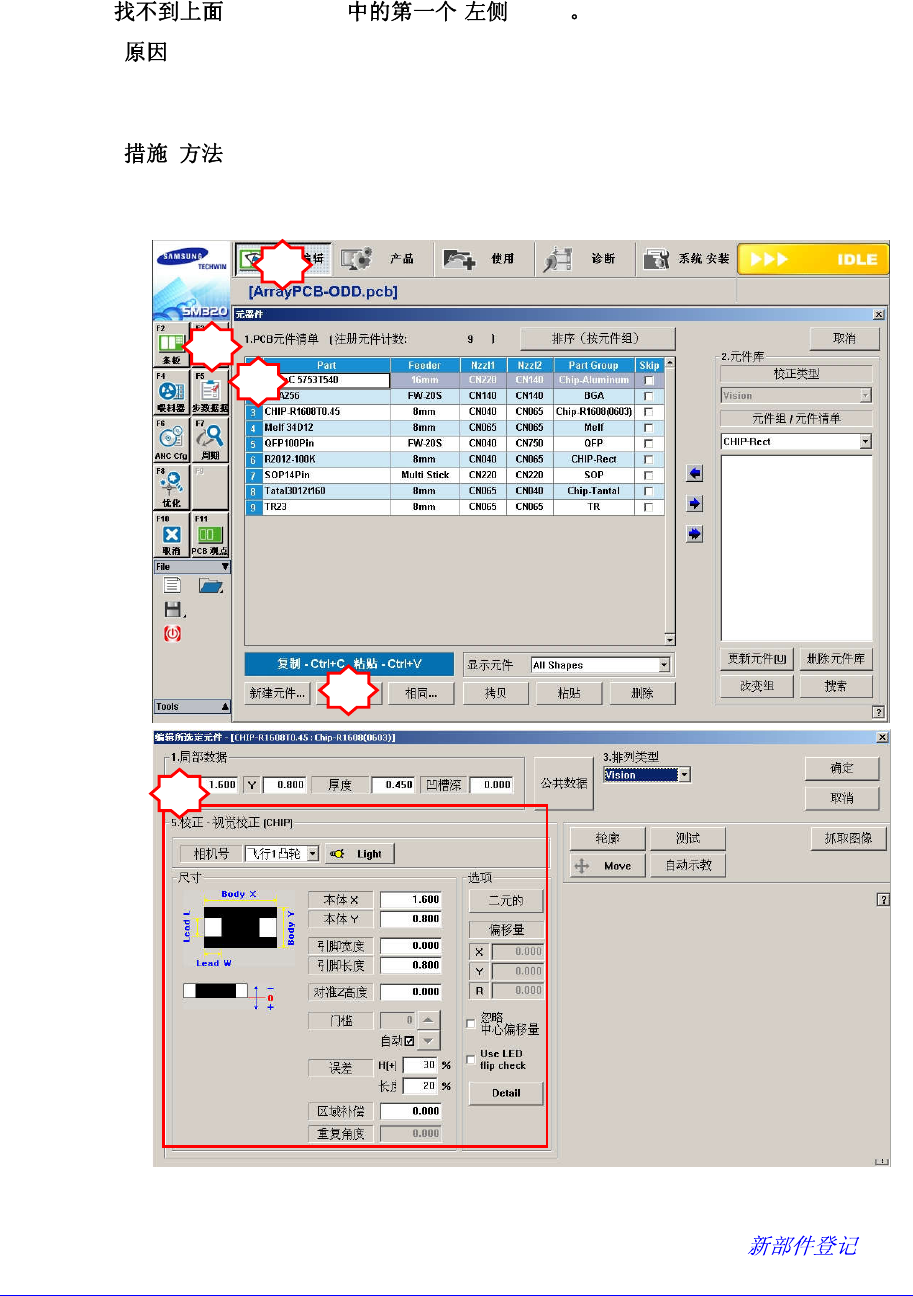
$a610 Lead Gloup ( ) Lead
[ ]
识别部品时,在 Vision Monitor 上,上面 Lead Gloup 中左侧的 Lead 的识别失败
的情况。
[ ]
为确认部件数据是否正常 , 在PCB Edit菜单的“Part”中选择错误发生部件后在
Profile Editor确认<Align Data>领域的信息设定是否准确。
<另外,为确认并重新设置相应部件的照明水平点击<Light Control>按钮则显示
可调节照明亮度的对话框。请在这里变更照明值使显示在VisFrame窗口的部件
形象更加鲜明。详细事项请参照Administrator’s Guide的 “7.1 ”部分
5
2
3
1
4
1-54
。
$a611 Lead Gloup ( ) Lead
[ ]
识别部品时,在 Vision Monitor 上,上面 Lead Gloup 中右侧的 Lead 的识别失败
的情况。
[ ]
执行$a610的措施方法。
$a612 Lead Gloup ( ) Lead
[ ]
识别部品时,在 Vision Monitor 上,左面 Lead Gloup 中上侧的 Lead 的识别失败
的情况。
[ ]
执行$a610的措施方法。
$a613 Lead Gloup ( ) Lead
[ ]
识别部品时,在 Vision Monitor 上,左面 Lead Gloup 中下侧的 Lead 的识别失败
的情况。
[ ]
执行$a610的措施方法。
$a614 Lead Gloup ( ) Lead
[ ]
识别部品时,在 Vision Monitor 上,下面 Lead Gloup 中左侧的 Lead 的识别失败
的情况。
[ ]
执行$a610的措施方法。
$a615 Lead Gloup ( ) Lead
[ ]
识别部品时,在 Vision Monitor 上,下面 Lead Gloup 中右侧的 Lead 的识别失败
的情况。
[ ]
执行$a610的措施方法。
1-55
$a616 Lead Gloup ( ) Lead
[ ]
识别部品时,在 Vision Monitor 上,右面 Lead Gloup 中上侧的 Lead 的识别失败
的情况。
[ ]
执行$a610的措施方法。
$a617 Lead Gloup ( ) Lead
[ ]
识别部品时,在 Vision Monitor 上,右面 Lead Gloup 中下侧的 Lead 的识别失败
的情况。
[ ]
执行$a610的措施方法。
$a620 Lead Gloup(%d) Pitch (%d)
[ ]
Vision 识别的部品间距(Pitch)值比登记的值数(%d)大的情况。
部品的 Lead 弯曲的情况。
部品的间距(Pitch)值输入有错误的情况。
照明度的设定不适当的情况。
[ ]
确认部品的 Lead 是否弯曲。
执行$a610的措施方法。
$a621 Lead Gloup(%d) Pitch (%d)
[ ]
Vision 识别的部品间距(Pitch)值比登记的值数(%d)小的情况。
部品的 Lead 弯曲的情况。
部品的间距(Pitch)值输入有错误的情况。
照明度的设定不适当的情况。
[ ]
确认部品的 Lead 是否弯曲。
执行$a610的措施方法。
$a631 Lead Gloup ( )Lead (%d)
[ ]