Nordson_EFD_RV_Series_Operating_Manual.pdf - 第56页
RV Series Automated Dispensing Systems 56 www.nordsonefd.com info@nordsonefd.com +1-401-431-7000 Sales and service of Nordson EFD dispensing systems are available worldwide. Robot Initial Setup (Step6 T ab): T esting th…
RV Series Automated Dispensing Systems
55www.nordsonefd.com info@nordsonefd.com +1-401-431-7000 Sales and service of Nordson EFD dispensing systems are available worldwide.
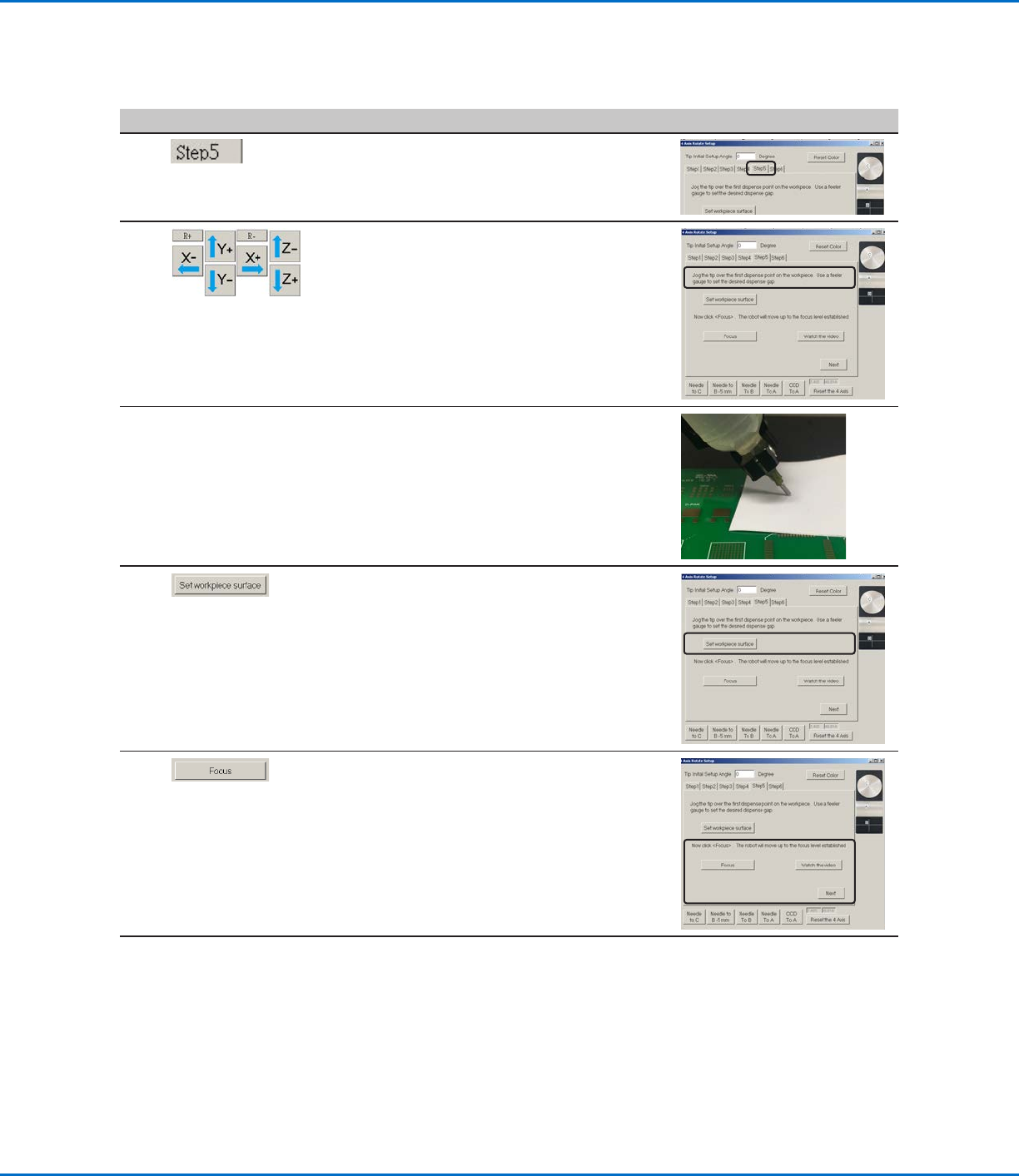
Robot Initial Setup (Step5 Tab): Setting the Tip-to-Workpiece Offset
# Click Step Reference Image
1
• Ensure that the STEP5 tab is open.
2
• Jog the tip to a good reference point on the
workpiece.
• Jog the tip down until it is as close to the
workpiece as possible without touching the
surface.
3 • Using a feeler gauge, set the desired
distance between the bottom of the tip and
the workpiece.
4 • Click SET WORKPIECE SURFACE.
5 • Click FOCUS.
The tip moves to the correct focus height.
• Click NEXT.
6 • Continue to “Robot Initial Setup (Step6
Tab): Testing the System Setup and
Calibration” on page56.
Setting Up the System Using the Robot Initial Setup Wizard (continued)
RV Series Automated Dispensing Systems
56 www.nordsonefd.com info@nordsonefd.com +1-401-431-7000 Sales and service of Nordson EFD dispensing systems are available worldwide.
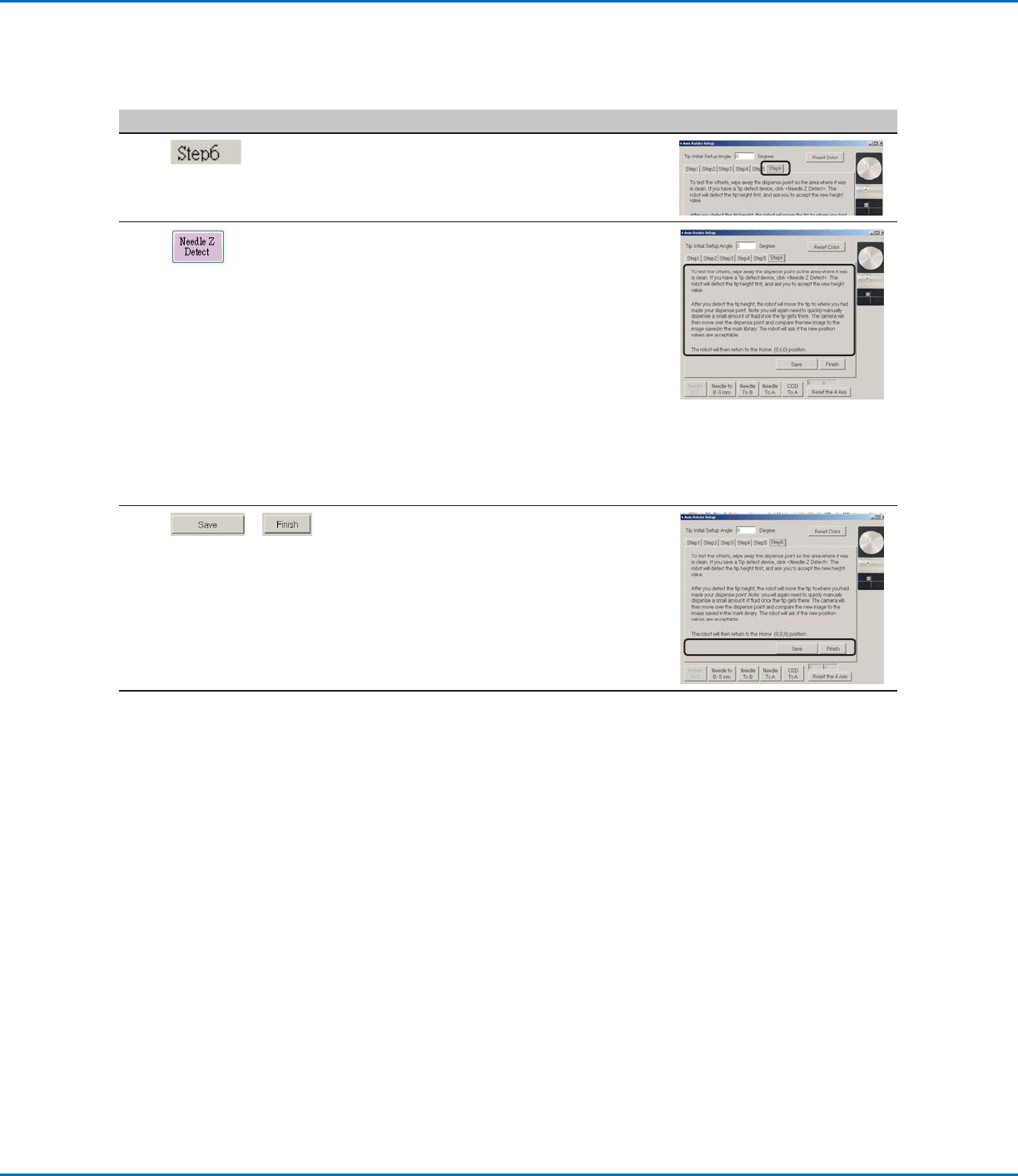
Robot Initial Setup (Step6 Tab): Testing the System Setup and Calibration
# Click Step Reference Image
1
• Ensure that the STEP6 tab is open.
2 • Click NEEDLE Z DETECT to test the setup.
• Click YES/OK when prompted for
confirmations.
NOTES:
• When the system performs a Needle Z
Detect, it automatically performs a Needle
XY Adjust directly after performing the
Needle Z Detect.
• Refer to “How the System Responds to
Needle Z Detect or Needle XY Adjust” on
page57 for a detailed description of
the system response to a Needle Z Detect
selection.
3
>
• Click SAVE.
• Click FINISH.
The system is now properly set up and
calibrated. Refer to “Programming” on
page62 to create programs.
Setting Up the System Using the Robot Initial Setup Wizard (continued)
RV Series Automated Dispensing Systems
57www.nordsonefd.com info@nordsonefd.com +1-401-431-7000 Sales and service of Nordson EFD dispensing systems are available worldwide.
How the System Responds to Needle Z Detect or Needle XY Adjust
NOTE: On systems with the optional tip detector or tip aligner, both the Needle XY Adjust and Needle Z Detect
buttons are present. On systems without these devices, only the Needle XY Adjust button is present.
When you click NEEDLE Z DETECT, the system performs the following actions:
• Moves the dispensing tip over the tip detector sensor and lowers it until it touches the sensor.
• Measures and compares the difference between the last measurement and the current measurement.
• Requests confirmation for any change in the tip-to-workpiece offset (Z clearance).
• Realigns all points in the currently open program to the new tip-to-workpiece offset (Z clearance).
• Automatically performs a Needle XY Adjust sequence (shown below).
When you click NEEDLE XY ADJUST, the system performs the following actions:
• Moves the dispensing tip to a preset location on the workpiece.
• Dispenses a dot of fluid.
• Moves the camera over the deposited dot of fluid.
• Compares the alignment of the dot with the mark image saved in the Mark Library.
• Requests confirmation for any change in the camera-to-tip offset (XY offsets).
• Realigns all points in the currently open program to the new XY offsets.
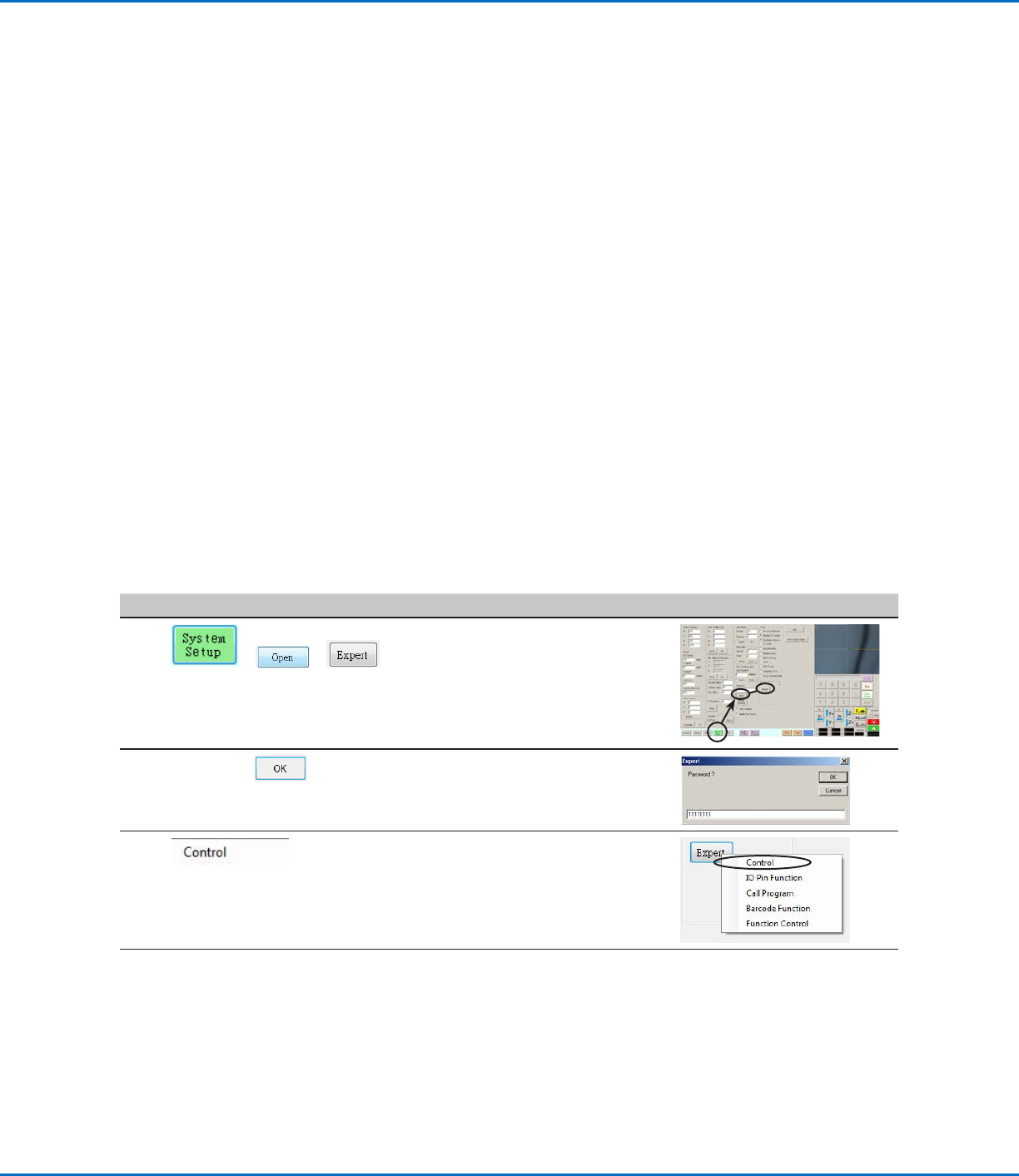
Changing the Robot Model Selection
The correct robot model must be selected for the system to operate properly. Follow this procedure to change the
robot model selection as needed.
# Click Step Reference Image
1
> >
• Click SYSTEM SETUP > OPEN >
EXPERT.
2
11111111 >
• Enter 11111111, then click OK.
3 • Click CONTROL.
Continued on next page