00198171-02_Technical_Training_FSE_TX-Series_EN.pdf - 第73页
6 Conveyor System 6.5 Parts Exchange / Settings / Calibration Technical Training FSE SIPLACE TX-Series 01/2018 73 6.5.2 Calibration after Repair / Adjustment 6.5.2.1 Explanation of the conveyor calibrations Calibrating t…

6 Conveyor System
6.5 Parts Exchange / Settings / Calibration
72 Technical Training FSE SIPLACE TX-Series 01/2018
* For the defined measuring position please refer to the service manual.
** For detailed information about installing the fiducial bars refer to the service manual.
*** For detailed information how to setup the vacuum tooling refer to the ACT user manual, order
number 00196351-01 or the installation guide "Basic-Pack Vacuumtooling TX-Serie", order number
00198328-01.
Shuttle Parts Exchange Tools/ Setting Calibration
Conveyor Synchronize Belt Belt tension device
216 +/- 10hz
DC-Gear Motor with Synchron-
izing Disc
Toothed belt-Synchroflex
5+-0.1 AT3 /150
Belt tension device
287~351 Hz
Width and aligning the fixed rail
calibration
Toothed Belt-
(PCB Transport Belt Drive)
see DC-Gear Motor
Toothed Belt-Synchroflex
(Width Adjustment)
5+-0.1 AT3 /201
Belt tension device
220~268 Hz
Width adjustment motor see Toothed Belt Width and aligning the fixed rail
calibration
Shuttle Motor See Toothed Belt Width and aligning the fixed rail
calibration
Shuttle Toothed Belt-Syn-
chroflex
see Toothed Belt
For further detailed information refer to the service manual.
6 Conveyor System
6.5 Parts Exchange / Settings / Calibration
Technical Training FSE SIPLACE TX-Series 01/2018 73
6.5.2 Calibration after Repair / Adjustment
6.5.2.1 Explanation of the conveyor calibrations
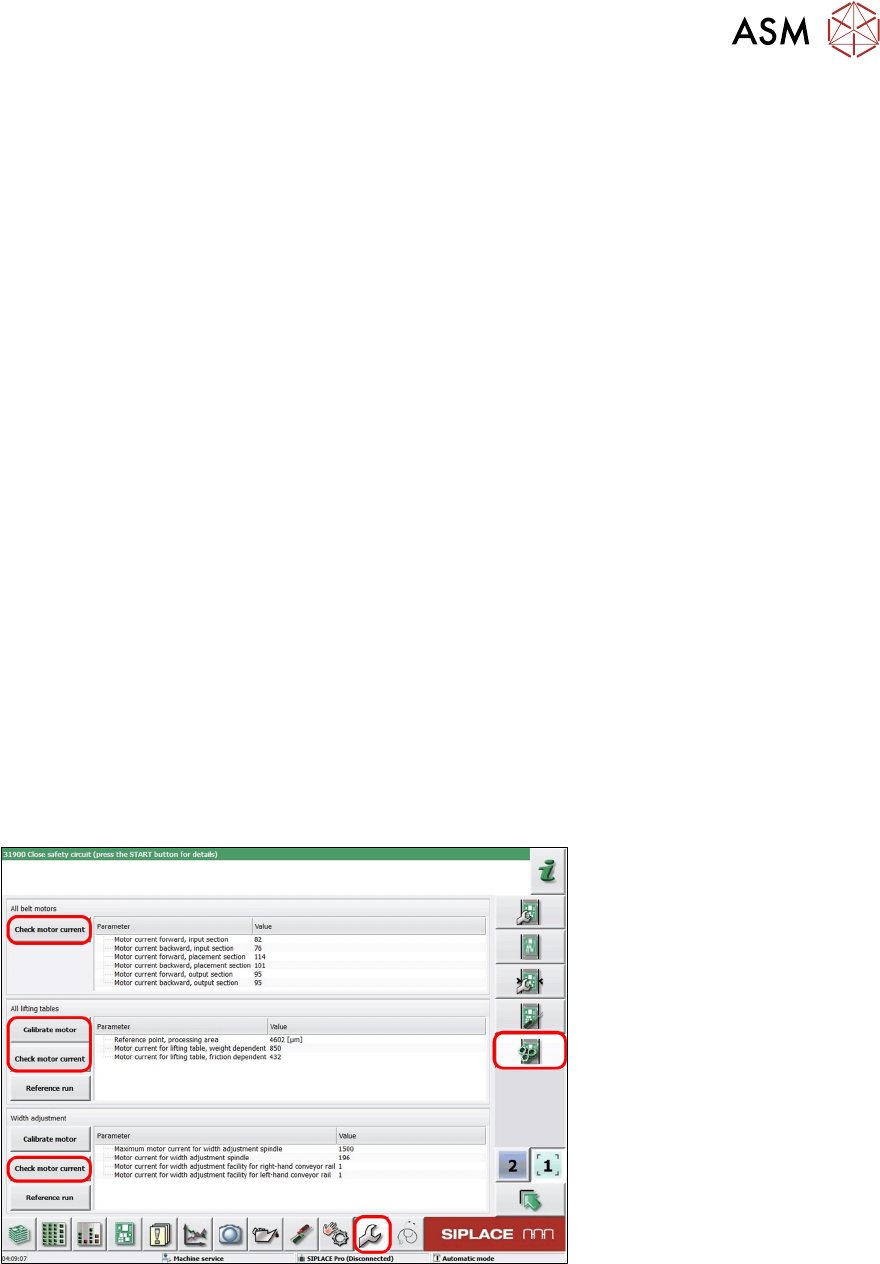
Calibrating the motor (lifting motor)
The reference run point of the motor is determined.
Checking the motor current (lifting motor)
The lifting table is moved slowly up and down. The motor current is determined and stored, the cur-
rent value will be used to determine that board is clamped tightly or not.
Checking the motor current (transport)
Transport motor is moved, then the motor current is determined and stored. This function can be
used to check that the conveyor is moving uniformly. Can also be done in the Maintenance GUI.
The Maintenance GUI will indicate if the value is good or bad.
Checking the motor current (width)
The motor current during width adjustment is determined and stored.
Calibrating the width of conveyor
This determines the difference between the set width and the measured width. The results are
saved in the conveyor controller as correction values and taken into account later when setting and
measuring the conveyor lane width.
Board reference corner
Measure fiducial in conveyor rail to determine board stopping position in PA.
Teaching the sensor
Reset the sensor light sensitivity to make sure that the board can be monitored by the sensor.
6.5.2.2 Calibrating the motor (Lifting)/ Checking the motor current (Lifting/ Transport/
Width)
Check and calibrate and check motor menu
1. Log on as Machine Service.
2. Select Calibration menu.
3. Select Conveyor configuration.
4. Select required motor to calibration.
6 Conveyor System
6.5 Parts Exchange / Settings / Calibration
74 Technical Training FSE SIPLACE TX-Series 01/2018
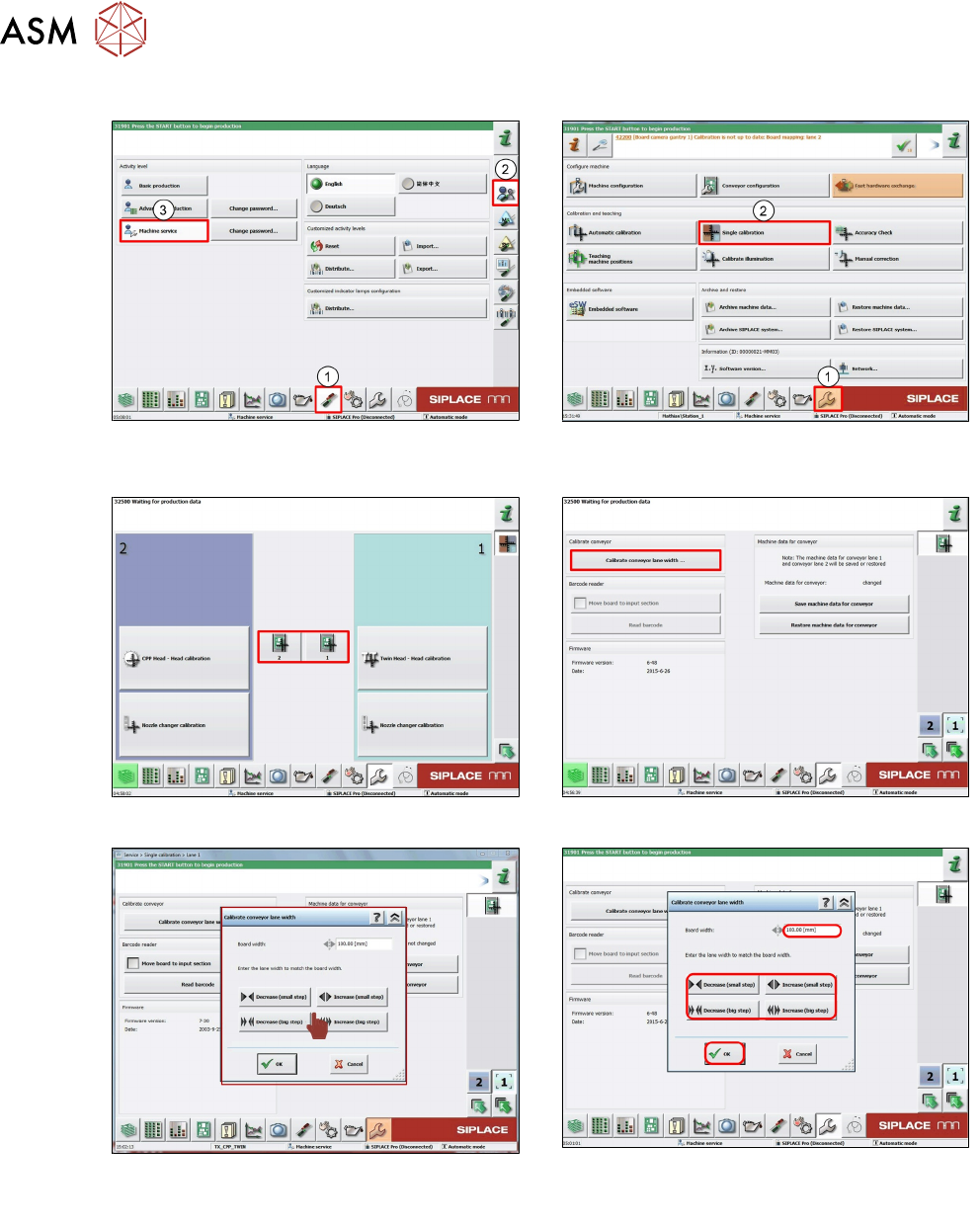
6.5.2.3 Calibrating the conveyor width
1. Log on as Machine Service (1-3). 2. Click Calibration (1).
Select Single calibration (2).
3. Click Required conveyor. 4. Click Calibrate conveyor width….
5. Click Decrease or Increase to adjust the
conveyor to the value.
5a. Input actual measured conveyor width.
Click OK.