User Manual SIPLACE MeasuringFeeder X.pdf - 第26页
4 Operation 4.1 Settings in the Line Software 26 User Manual SIPLACE MeasuringFeeder X 03/2020 4.1.6 Using Special Nozzles for Measuring Small Components Small chip components of the types 0201, 0402, 0603, 0805, 1206, a…
4 Operation
4.1 Settings in the Line Software
User Manual SIPLACE MeasuringFeeder X 03/2020 25
The „Discard gray zone“ check box(3) is cleared.
All components from the Gray Zone are placed. The machine first places the remaining compon-
ents from the old tape and then from the new tape until the estimated "Gray Zone" is completed.
Afterwards a measurement with a component from the new tape is performed.
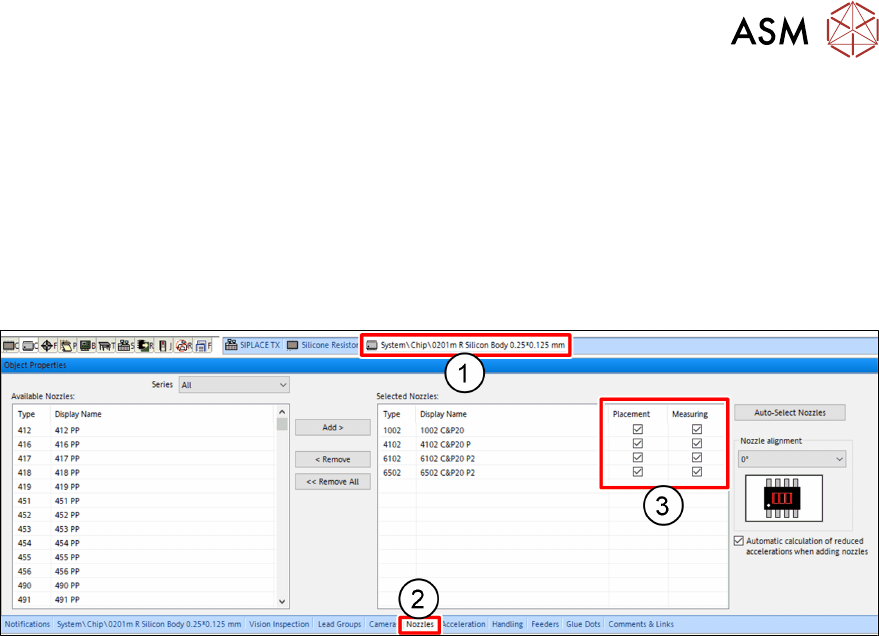
4.1.5 Selecting the Nozzles for Measuring and Placement
For each particular component shape, one or more nozzles must be selected to operate that
component shape. If a component is marked for electrical verification, at least one nozzle must be
selected for measuring:
► Click on the tab(1) of the particular component shape.
► Click on the Nozzles tab(2) of the Object Properties view.
The Selected Nozzles table shows all nozzles that have been selected to operate this particular
component shape.
► For every selected nozzle, mark if it shall be used for placement and / or measuring(3) this
particular component shape.
4 Operation
4.1 Settings in the Line Software
26 User Manual SIPLACE MeasuringFeeder X 03/2020
4.1.6 Using Special Nozzles for Measuring Small Components
Small chip components of the types 0201, 0402, 0603, 0805, 1206, and 1210 can typically not be
measured using a standard nozzle, because their contacts extend to the top side. The available
standard nozzles usually have a low resistance. If such a nozzle touches one or both contacts of
the component, then a fraction of the measurement current can flow through the nozzle. This im-
pairs the result of the measurement. To avoid this problem, there is a set of special nozzles avail-
able that have a very high resistance.
NOTICE
Special Measuring Nozzles in SIPLACE Pro
The special nozzles for measuring small chip components are not part of the standard
nozzle set in SIPLACE Pro. They need to be defined in the nozzles editor. See the
SIPLACE Pro documentation about how to do this.
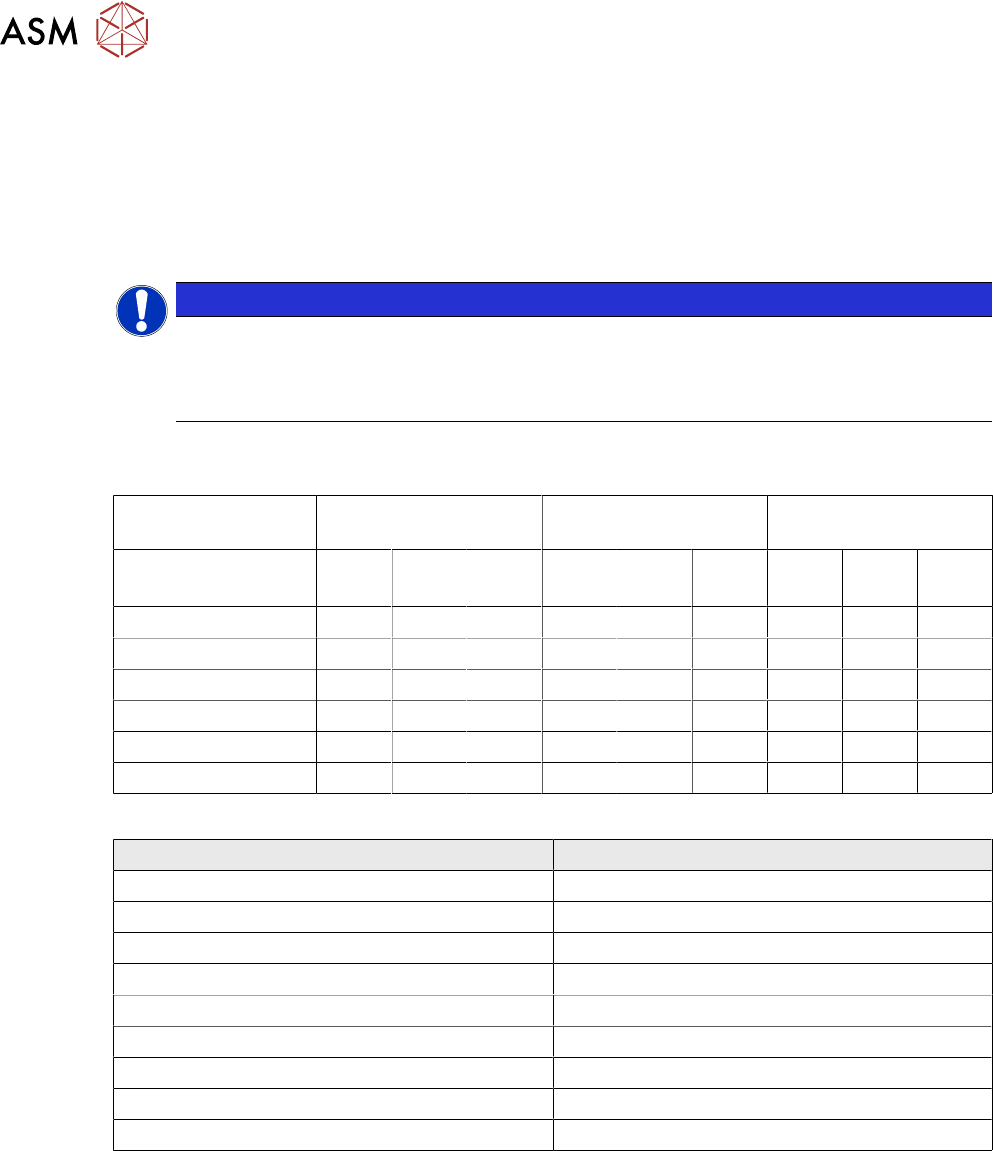
The following table lists the suggested combinations of component shapes, placement heads and
special measuring nozzles:
Placement Head CPP / CPPM CP20 / CP20A / CP20M CP20P / CP20M /
CP20M2 / CP20P2
Nozzle
Component
2403
M
2404
M
2406
M
1403
M
1404
M
1406
M
4403
M
4404
M
4406
M
0201 ✓ ✓ ✓
0402 ✓ ✓ ✓
0603 ✓ ✓ ✓
0805 ✓ ✓ ✓
1206 ✓ ✓ ✓
1210 ✓ ✓ ✓
The following table lists the item numbers of the special measuring nozzles:
Nozzle Type Item Number
2403 cpl. M/ ceramic 03206825-xx
2404 cpl. M/ ceramic 03206826-xx
2406 cpl. M/ ceramic 03206827-xx
1403 cpl. M/ ceramic 03206822-xx
1404 cpl. M/ ceramic 03206823-xx
1406 cpl. M/ ceramic 03206824-xx
4403 cpl. M/ ceramic 03206829-xx
4404 cpl. M/ ceramic 03206828-xx
4406 cpl. M/ ceramic 03206830-xx
4 Operation
4.2 Handling the MeasuringFeeder X
User Manual SIPLACE MeasuringFeeder X 03/2020 27
4.2 Handling the MeasuringFeeder X
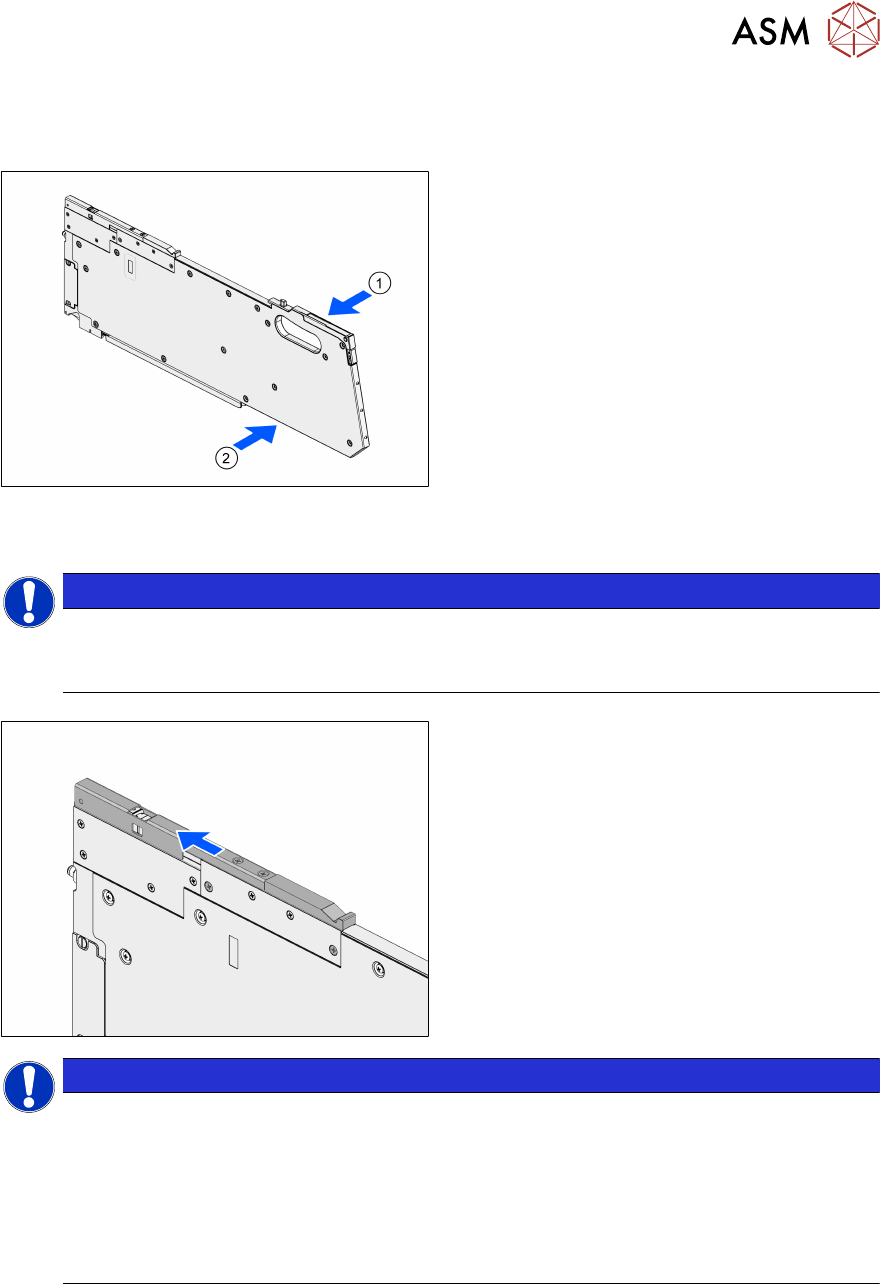
The MeasuringFeeder X provides a carrying handle for easy and safe transport.
► Grab the MeasuringFeeder X with one
hand at the carrying handle(1).
► If necessary, support the MeasuringFeeder
X with the other hand at the position indic-
ated in the image(2).
4.3 Positioning and Docking the MeasuringFeeder X
NOTICE
Positioning the MeasuringFeeder X in the correct guide rail
► Position the MeasuringFeeder X in the guide rail that was selected in the setup (see
chapter 4.1.1 "Setting up the MeasuringFeeder X" [}19]).
► Open the protective cover.
NOTICE
Protective cover is closed during operation or optical sensor is defect
The open-state of the protective cover is monitored by an optical sensor. If the protective
cover is still closed after initialization, the station software displays an error message (error
code 45100: Shutter of MeasuringFeeder X closed).
► Open the protective cover
► Check the optical sensor for defect, if the message is displayed although the protect-
ive cover is open.