User Manual SIPLACE MeasuringFeeder X.pdf - 第34页
4 Operation 4.5 Handling Measurement Failures 34 User Manual SIPLACE MeasuringFeeder X 03/2020 4.5.1 Exchanging the faulty Component and Repeating the Measurement ► Replace the feeder with the faulty component by a new o…
4 Operation
4.5 Handling Measurement Failures
User Manual SIPLACE MeasuringFeeder X 03/2020 33
4.5 Handling Measurement Failures
If the measurement of a component delivers a value that is outside the defined tolerance range,
this indicates that at least some of components in the feeder are faulty.
The following actions are executed by the machine:
●
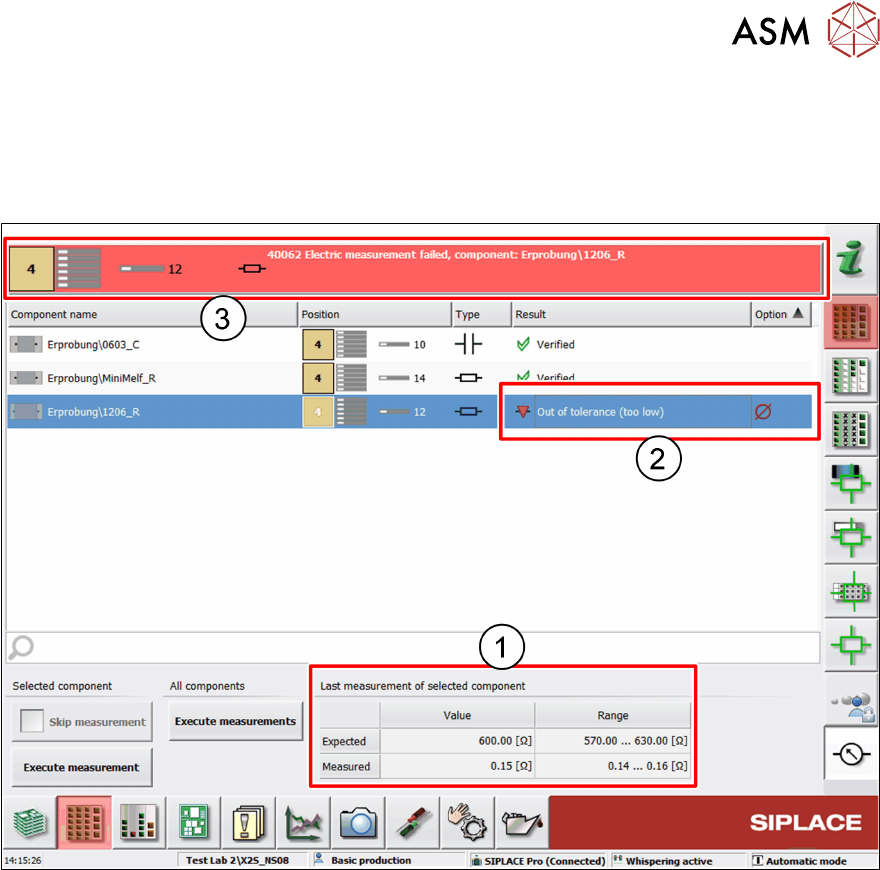
The measurement values are displayed in the Last measurement of selected component
table (1)
●
The result of the failed measurement is displayed in the components list (2)
– Out of tolerance (too low): the measurement result is below the expected range
– Out of tolerance (too high): the measurement result is above the expected range
●
An error message is displayed in the message bar (3) identifying the feeder with the faulty
component
●
That feeder is blocked, and the placement of the components is stopped
●
The placement of all other components finishes
●
Production stops with the board not completed
The board stays in the placement position and can be ejected manually. Instead, if the board is to
be completed, there are two possibilities to continue (see chapters 4.5.1 "Exchanging the faulty
Component and Repeating the Measurement" [}34] and 4.5.2 "Skipping the Measurement of a
faulty Component" [}35]).
4 Operation
4.5 Handling Measurement Failures
34 User Manual SIPLACE MeasuringFeeder X 03/2020
4.5.1 Exchanging the faulty Component and Repeating the Measurement
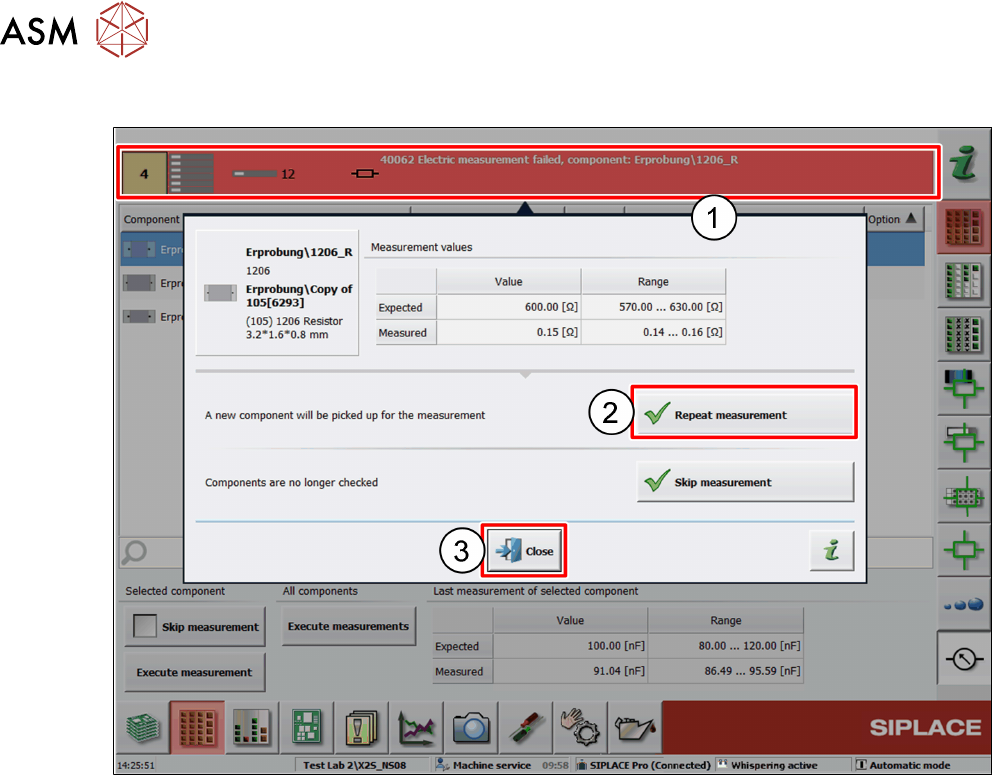
► Replace the feeder with the faulty component by a new one
► Click on the error message in the message bar (1).
A dialog window is displayed:
► Click on Repeat measurement (2).
A component will be picked up from the new feeder for measurement.
If the measurement of that component passes, production continues and the board will be com-
pleted.
If the measurement of that component fails again, repeat the steps.
► Click on Close (3).
4 Operation
4.5 Handling Measurement Failures
User Manual SIPLACE MeasuringFeeder X 03/2020 35
4.5.2 Skipping the Measurement of a faulty Component
There might be situations where a component is faulty but shall still be placed. Or a component
cannot be measured because of a short circuit problem or dirty nozzles. In such cases, it might be
useful to exclude that component from measurement:
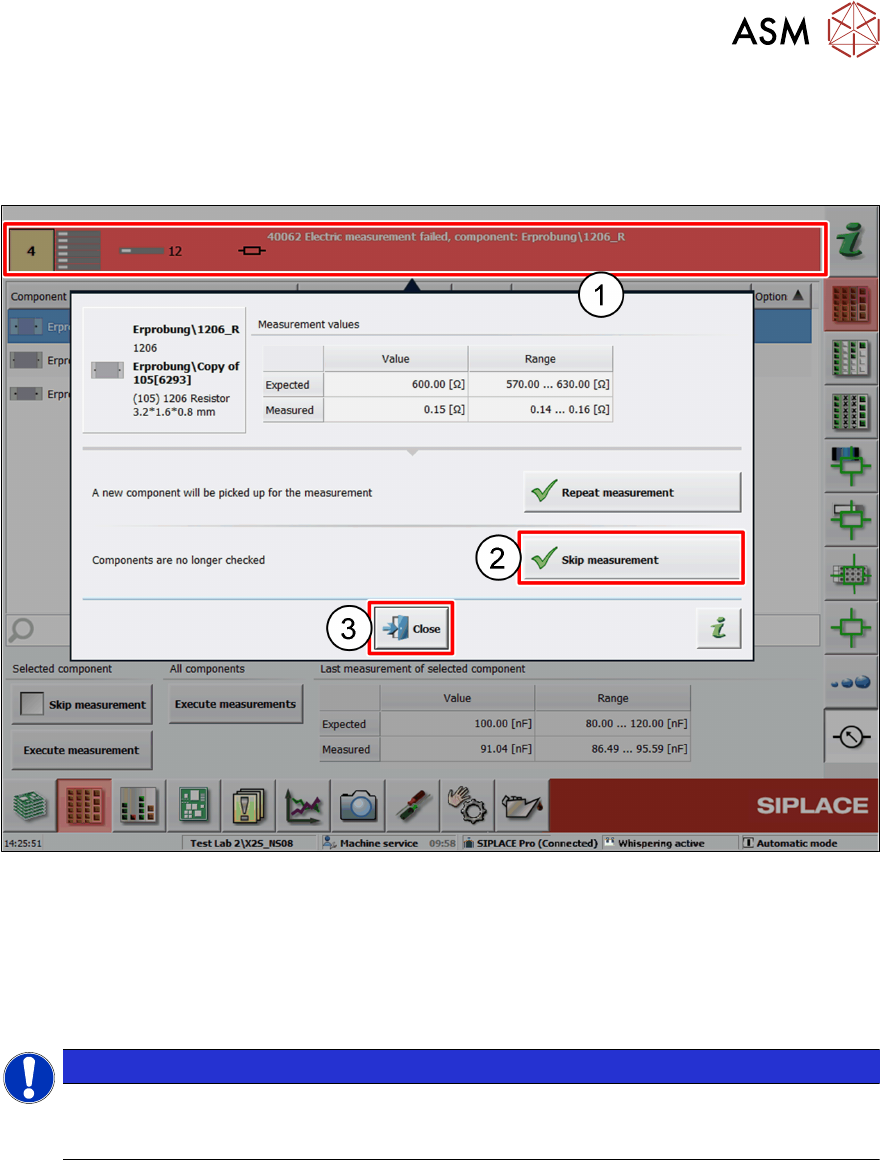
► Click on the error message (1).
A dialog window is displayed.
► Click on Skip measurement (2).
The component is excluded from measurement. Production continues, and the board will be fin-
ished.
► Click on Close (3).
NOTICE
If a component is set up on more than one feeder (track), only the track which pro-
voked the measurement failure is excluded from measurement. The same compon-
ents on the other tracks are still measured.