00196771-04_IM_SSW_705_04_SP2_DE_EN.pdf - 第25页
Station Software 705.04 SP2 / Installation Manual Ausgabe 06/2012 Edition 5 Installing the machine computer 5.1 Installation sequence See separate Installation Manuals for d etails on installing the Windows XP or Windows…
Station Software 705.04 SP2 / Installation Manual Ausgabe 06/2012 Edition
4.3 Network configuration
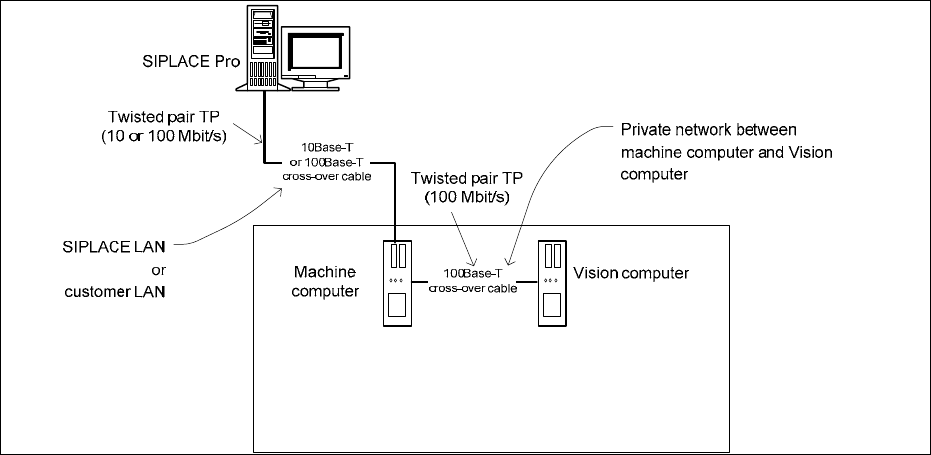
Figure 4-5: Network connections between the machine and SIPLACE Pro
In two-computer operation a separate private network (100 Mbit/s) is set up between the machine
computer and the Vision computer via a subnet mask.
Fixed IP addresses for the machine computer and the Vision computer can thus be assigned for all
SIPLACE machines. These IP addresses are not known outside the private network, for instance in
the SIPLACE LAN or customer LAN.
These IP addresses need not be further configured by the operator while the station software is
being installed.
24
Station Software 705.04 SP2 / Installation Manual Ausgabe 06/2012 Edition
5 Installing the machine computer
5.1 Installation sequence
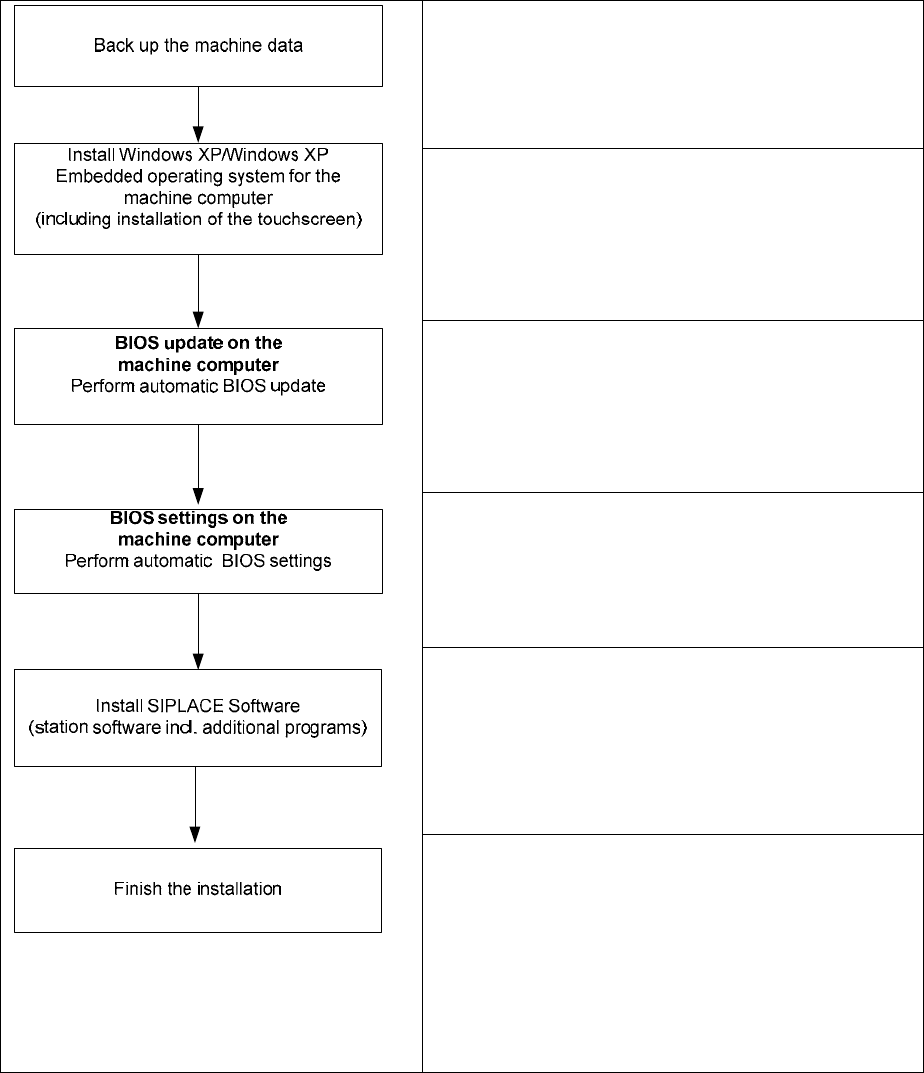
See separate Installation Manuals for details on
installing the Windows XP or Windows XP Embedded
operating system (item no. 00196151-xx and
00196737-xx respectively)
For details on calibrating the touchscreen, see section
5.2.3.
See section 5.3.
See section 5.3.
See section 5.4.
See section 5.4.7.
Figure 5-1: Installation sequence
25

Station Software 705.04 SP2 / Installation Manual Ausgabe 06/2012 Edition
5.2 Preparations for installing the software
5.2.1 Requirements
Requirements for installing the SIPLACE software and the Vision computer software:
– The Windows XP embedded operating system with Service Pack 2 must be installed on the
machine computer and in two-computer operation on the Vision computer (see "Installation
Manual Operating System Windows XP Embedded SP2 for 70x", item number 00196737-xx)
NOTICE
Error message after installation of the operating system
After installation of the operating system an error message
W
indows Out of Virtual
Memory might appear after the station computer is booted.
► In this case, perform the steps that are described in the Technical Information
TI2011-02C06.pdf.
Or
– The Windows XP Professional operating system with
Service Pack 3 and all current
hotfixes (SIPLACE Hotfix CD) must be installed on the machine computer and in two-computer
operation on the Vision computer (see the Installation Manual for the Windows XP operating
system, item number 00196151-xx).
NOTICE
The Windows XP Embedded operating system is only used for new installations. On
upgrading to station software version 704 or higher, there will be no operating system
change from Windows XP Professional to Windows XP Embedded.
Under Windows XP Professional the default Windows display settings have to be changed and
the touch screen has to be calibrated. Under Windows XP Embedded only the touch screen has
to be calibrated. You must be logged in as Administrator
in order to be able to carry out this
work.
26