00196578-03_AI_Pipettenwechsler_SX12_DE_EN.pdf - 第66页
3 Installation 3.2 Fitting the nozzle changer 66 Assembly Instructions / Montageanleitung SIPLACE SX1/SX2 Nozzle Changer Pipettenwechsler 06/2020 3.2 Fitting the nozzle changer 3.2.1 Preparation ► If present: Check the s…
3 Installation
3.1 Preparatory work
Assembly Instructions / Montageanleitung SIPLACE SX1/SX2 Nozzle Changer Pipettenwechsler 06/2020 65
3 Installation
3.1 Preparatory work
► Undock the component trolley.
► Switch off the machine, disconnect it from the power supply and secure it to prevent
unauthorized reactivation.
1.2 "Preparatory work..." [}50]
► Remove all nozzles and component reject bins from the relevant location.
► If a stationary camera is fitted at the relevant location, remove the upper part of the camera.
Make sure that the machine has been switched off for this!
3.1.1 Setting the height of the nozzle changer
The contact surfaces for the NC basic structure at positions 1 and 2 are on the COT insert. The in-
stallation height is set via the shims and should be checked before assembly.
NOTICE
Scratching the magnetic strip
During the following inside measurement make sure that the tip of the measuring scale
does not touch the magnetic strip as this might scratch it!
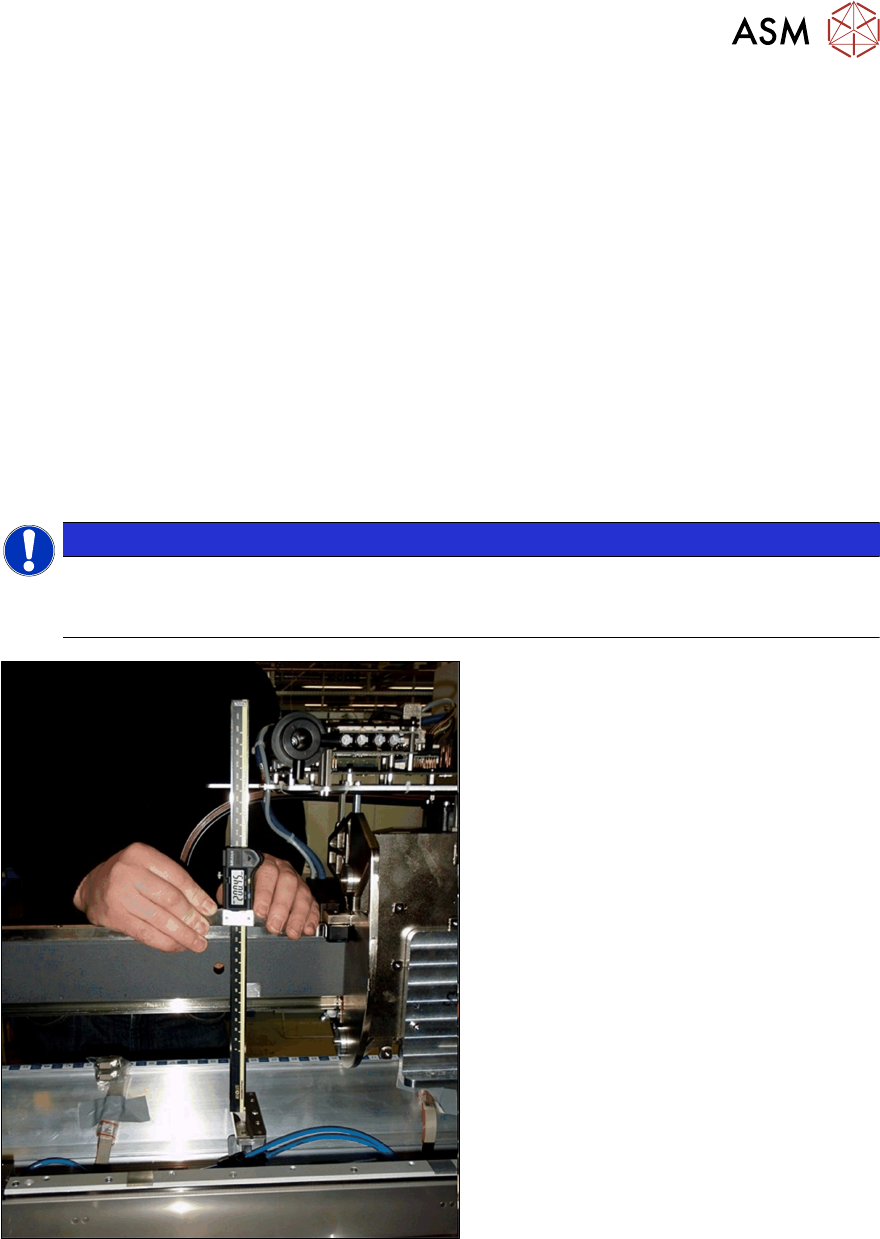
Fig.16: Distance measurement
► Measure the distance between the con-
tact surface of the nozzle changer and
the guide rail of the gantry.
– The distance for standard gantries
must be 199.8+/‑0.2mm.
– The distance for 40mm gantries
with VHF must be 211.8+/‑0.2mm.
► Adjust the distance by inserting shim
plates (0.3 mm) where required.
3 Installation
3.2 Fitting the nozzle changer
66 Assembly Instructions / Montageanleitung SIPLACE SX1/SX2 Nozzle Changer Pipettenwechsler 06/2020
3.2 Fitting the nozzle changer
3.2.1 Preparation
► If present: Check the switch on the nozzle changer.
3.2.1.1 Setting the jumpers on the nozzle changer
NOTICE
Setting before installation
Due to the design, this setting must be performed before installation in the machine.
► If the nozzle changer is fitted as a spare part, you will need to always insert the jumper
at pin 2-3 of the SIPLACE SX1/SX2 V3.
Overview
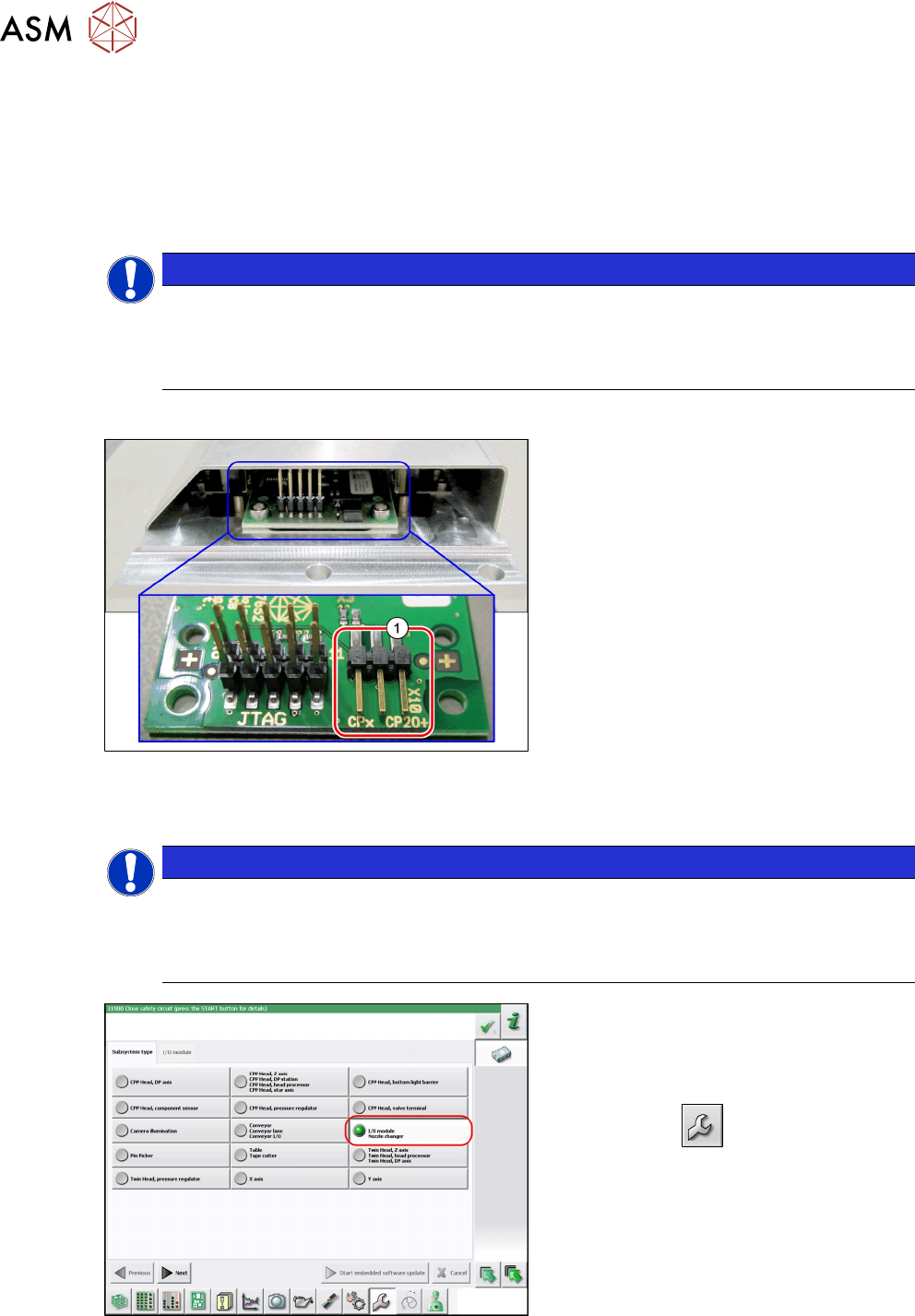
Fig.17: Jumpers on the nozzle changer
1. Jumper X10
The jumper X10 needs to be set at the fol-
lowing nozzle changers:
●
Nozzle changer basic structure
CPx - short assembly [03147925‑xx]
(replaces [03103649‑xx],
[03062463‑xx])
●
Nozzle changer basic structure
CPx – long assembly [03147324-xx]
●
Nozzle changer basic structure
CPx – long assembly [03103514-xx]
Preparation
NOTICE
Before installation
Due to the design, this setting must be performed before installation in the machine.
► If the new nozzle changer is being fitted as a spare part in a machine with I/O module
control, you will need to reconnect the jumper to pin 1-2.
Fig.18: Checking the I/A module control
To check whether the machine has I/O mod-
ule control, proceed as follows:
► Switch over to the operator level Ser-
vice.
► Click on the button.
► Click on the Embedded software but-
ton.
► Click the Update subsystem button.
► If an I/O module control is present, you
will see the entry Nozzle Changer at I/
O Module.
3 Installation
3.2 Fitting the nozzle changer
Assembly Instructions / Montageanleitung SIPLACE SX1/SX2 Nozzle Changer Pipettenwechsler 06/2020 67
Adjustment
► Set the correct value on the jumper for your head type, software and control method.
Jumper X10
Head SW <= 706.x SW >= 707.x
I/O controller XFCU I/O controller XFCU
CPx, DLM 1-2 1-2 1-2 2-3
C&P20P --- --- --- 2-3 (factory settings)
3.2.2 Installation
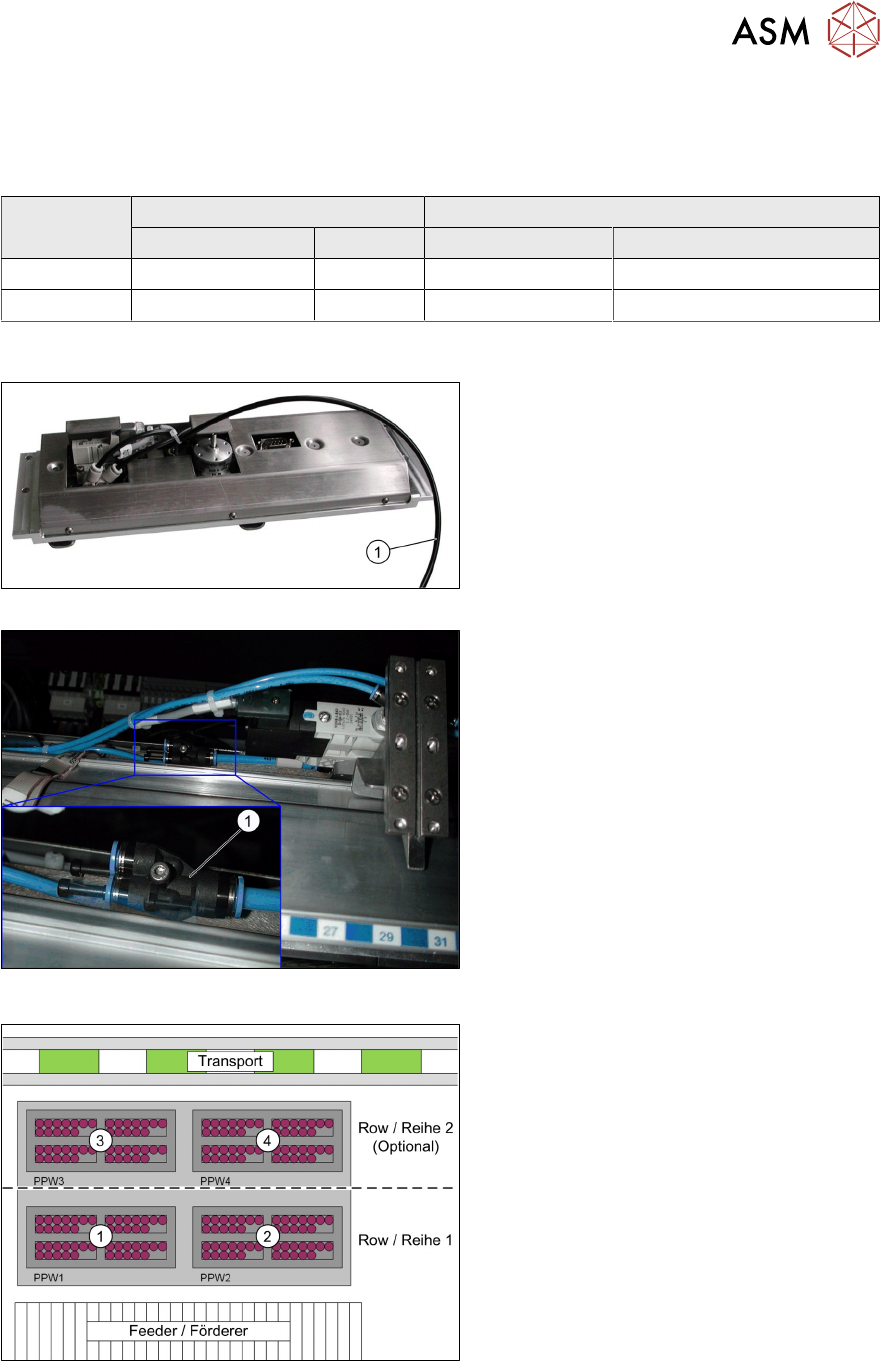
Fig.19: Compressed air hose
Fig.20: Compressed air hose connected
► Connect the compressed air hose(1) to
the nozzle changer.
The nozzle changer is supplied with
4.5bar air pressure.
Fig.21: Connections on the nozzle changer
► Connect the connection cable to the
nozzle changer according to the follow-
ing allocation:
1. Nozzle changer 1
2. Nozzle changer 2
3. Nozzle changer 3
4. Nozzle changer 4