00193688-03.pdf - 第23页
Installation and Configuration Guide SIPLAC E Explorer 3 Installing SIPLACE Explorer Edition 02/2005 EN 3.1 Standard Installation Variants 23 3.1 S t andard Installation V ariant s SIPLACE Explorer V2.0 provides various …

3 Installing SIPLACE Explorer Installation and Configuration Guide SIPLACE Explorer
Edition 02/2005 EN
22
NOTE
Before installing Tomcat 5.0, make sure that all versions of Tomcat < 5.0 have been
deinstalled. 3
– MSXML Core Services 4.0
Install these components if you wish to generate factory reports and reports for certain lines.
Install MSXML Core Services 4.0 on the same computer as Tomcat 5.0. 3
– Microsoft Internet Explorer 6.0
Microsoft Internet Explorer 6.0 is required to view and edit websites. This component can
be installed on a computer of your choice. 3
– MSDE 2000 (see page 50)
Install this component if you do not wish to work with MS SQL Server 2000. Install MSDE
2000 on the computer on which the system databases are to be installed. 3
– Adobe Reader 6.0
This component is needed for reading the SIPLACE Explorer V.2.0 documentation. 3
– SIPLACE Explorer V.2.0 options
The two options Closed Loop V1.0 and Backflush V1.0 are not included in the SIPLACE
Explorer V2.0 delivery package and must be ordered (installed) separately. 3

Installation and Configuration Guide SIPLACE Explorer 3 Installing SIPLACE Explorer
Edition 02/2005 EN 3.1 Standard Installation Variants
23
3.1 Standard Installation Variants
SIPLACE Explorer V2.0 provides various configuration options for the different components. This
section explains the four installation variants. 3
– Stand-alone (see page 23)
– Server (see page 24)
– Line (see page 25)
– Island installation (see page 27)
We recommend that you use one of these four installation variants for your system 3
3.1.1 Stand-alone
This installation variant installs all components on one computer. 3
NOTE
To ensure optimum performance, we recommend that you only install the software required for
SIPLACE Explorer V2.0 on this computer. Reason: this computer may need to support up to 5
applications for monitoring up to 20 machines. 3
Software Requirements:
– System environment - one of the following versions:
– Windows 2000 Server with SP4
– Windows 2003 Server
– MS SQL-Server (not MSDE)
Hardware Requirements:
– Computer with 2.4 GHZ CPU
– 2 GB memory
– 30 GB available hard drive capacity
3
3 Installing SIPLACE Explorer Installation and Configuration Guide SIPLACE Explorer
3.1 Standard Installation Variants Edition 02/2005 EN
24
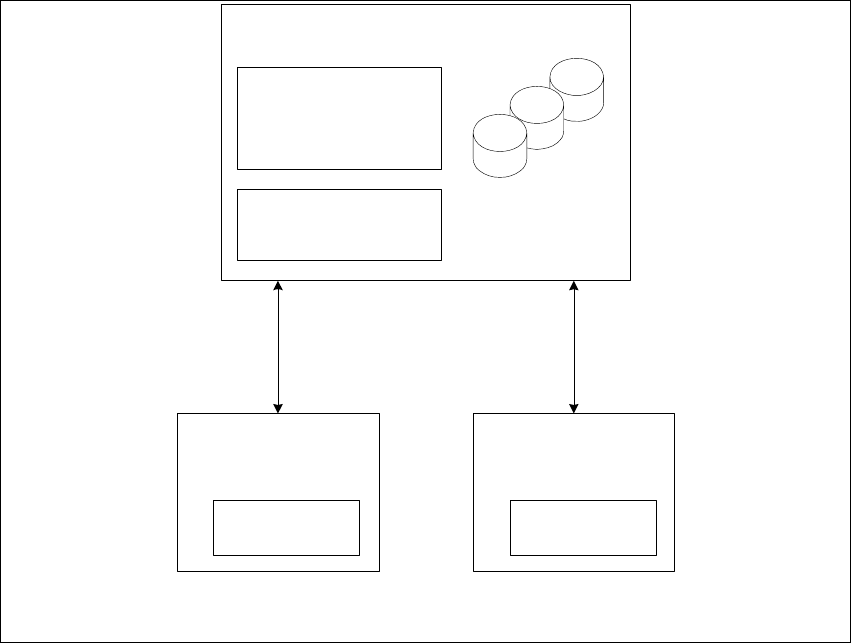
3.1.2 Server
This installation variant installs the software on N computers for up to 20 machines. These
computers (N) act as the SIPLACE Explorer hosts. An additional computer must be available as
central database/web server. 3
Software Requirements:
– System environment - one of the following versions:
– Windows 2000 Server with SP4
– Windows 2003 Server
– MS SQL-Server (not MSDE) for the computer which is used as central database server
Hardware Requirements:
– Computer with 2.4 GHZ CPU
– 2 GB memory
– 30 GB available hard drive capacity
3
Fig. 3 - 1 Installation variants: Server
5 Applications for up to
20 machines
SIPLACE
Explorer Host
- RTE
- Java 2 SDK
SIPLACE
Explorer Host
- RTE
- Java 2 SDK
Central Database/Web Server
- MS SQL
- Tomcat
- Factory Configuration
- Java 2 SDK
Report Generation:
- MSXM
- Excel
all databases, all line
databases