00193688-03.pdf - 第90页
4 Configuration Installation and Configuration Guide SIPLACE Explorer 4.1 Standard Monitoring Application (SMA) Edition 02/2005 EN 90 4.1.2.6 Step 5 - Rev iew and Select Application Features A list of Features will be pr…
Installation and Configuration Guide SIPLACE Explorer 4 Configuration
Edition 02/2005 EN 4.1 Standard Monitoring Application (SMA)
89
→ You will need to specify the 'machine properties' for each machine in the line, as follows:
– Select the machine from the Equipment list on the left.
– Specify the machine properties from the window on the right.
→ For each type of equipment, you will be presented with a different box of properties. You will
need to specify the following values:
– IP address
– The IP address and scan period for equipment available via SIPLACE OIS database. We
recommend a scan period of at least 60 secs.
→ When all machines in the production line have been defined, click on the Next button to
continue with the next step.
4 Configuration Installation and Configuration Guide SIPLACE Explorer
4.1 Standard Monitoring Application (SMA) Edition 02/2005 EN
90
4.1.2.6 Step 5 - Review and Select Application Features
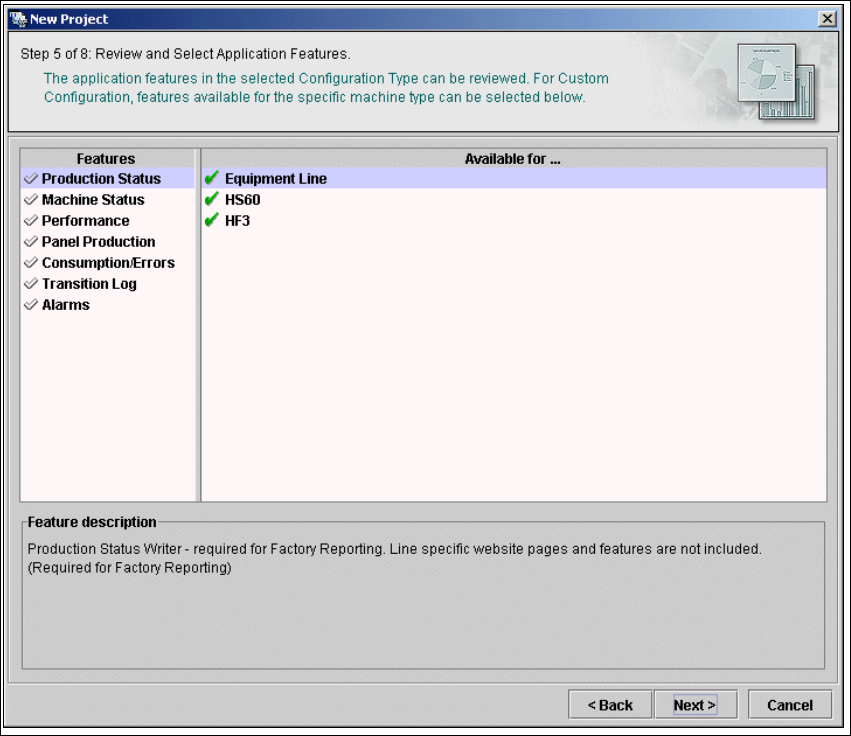
A list of Features will be presented in the left box. If you chose custom configuration, any feature
can be selected from the list. Otherwise, a minimum or maximum list of features will be shown. 4
A list of machines for the chosen feature will be shown in the box on the right. An icon next to the
machine name indicates whether the selected feature is implemented for this machine or not. The
Feature Description window shows a comment for the selected feature. 4
4
Fig. 4 - 28 Step 5: review and select application features
→ From the list in the left box, you can select the application features you want to add to the
application to be generated. To select a feature, mark the check box next to the feature name.
After selecting all the features for all the machines, click Next to continue with the next step.
Installation and Configuration Guide SIPLACE Explorer 4 Configuration
Edition 02/2005 EN 4.1 Standard Monitoring Application (SMA)
91
4.1.2.7 Step 6 - Set Up Production Line Schedule
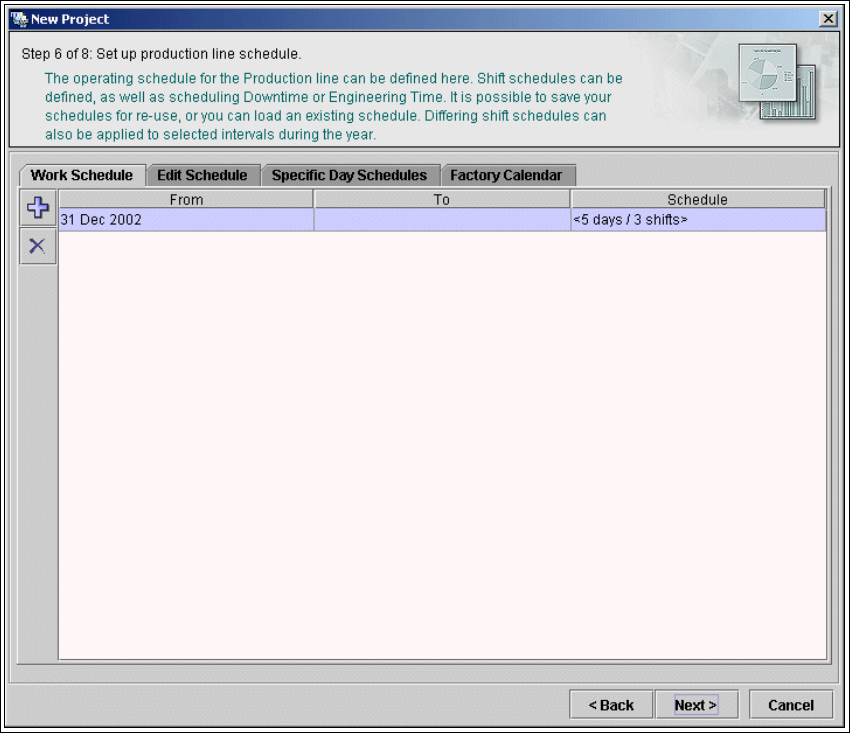
The SIPLACE Explorer Calendar allows you to specify a production line schedule: 4
– Define a weekly shift schedule,
– Plan engineering and scheduled downtime for machines in the line and
– Apply the schedule to a time interval.
4
Fig. 4 - 29 Step 6: setup production line schedule
→ You can skip this step and do it later while editing the generated application in SIPLACE
Explorer.
→ After the production line schedule has been set up or if you decide to skip this step, click Next
to continue with the next step.
4