HOST.pdf - 第10页
BM 122/ 123 /1 33/ 221/2 31 HOST COMPUTER SYSTEM 2. LAN IN TER FACE SPECI FICATIONS E35HEC -4A-AA1-A0 2-1 2. L A N INT ERF A CE SPECIFI C A TI ON S
BM122/123/133/221/231
HOST COMPUTER SYSTEM
1.1 How to Use This Manual
E35HEC-06-011-A0
1.1-2
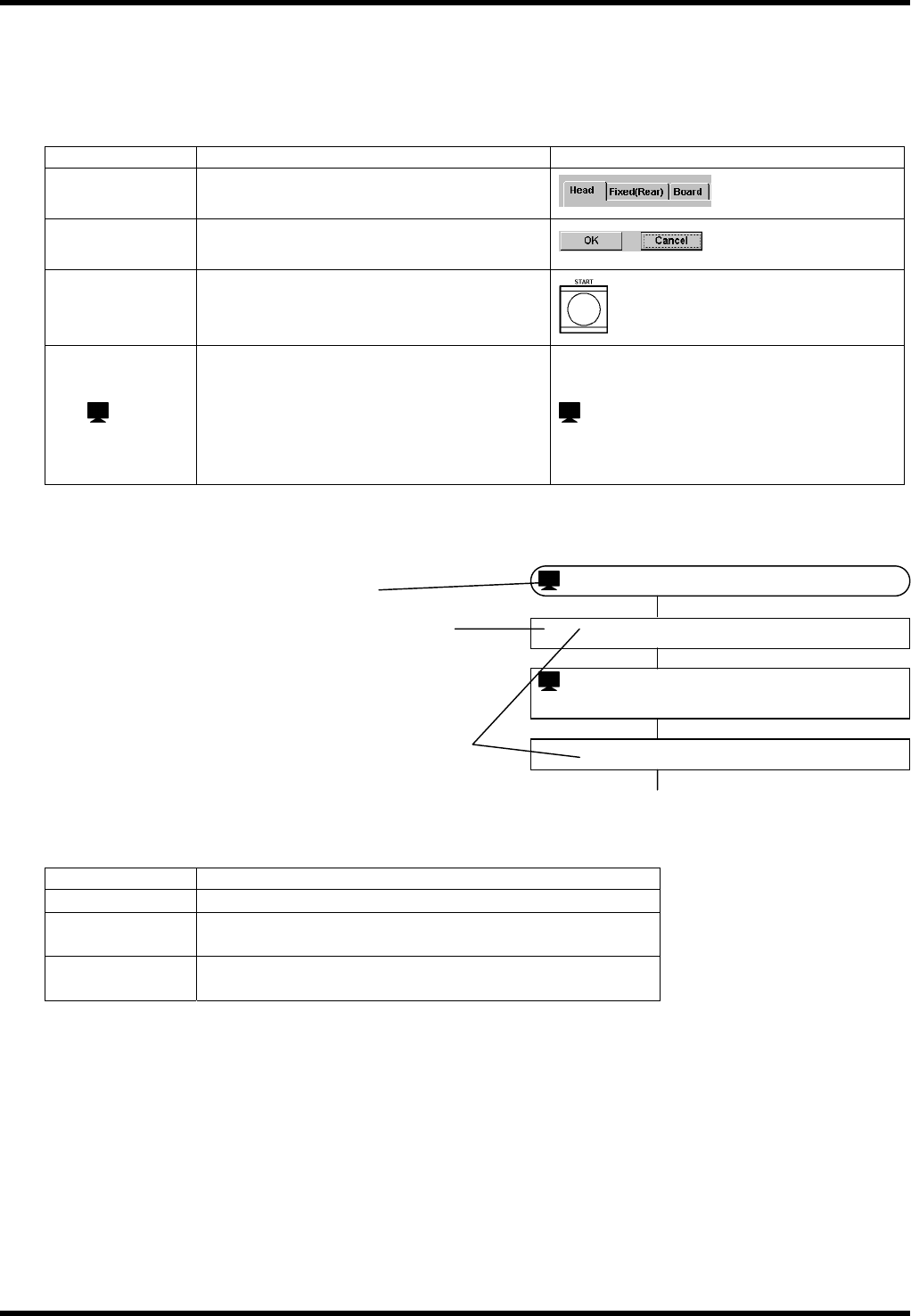
1.1.2 Conventions Used
Symbols
This manual uses the following conventions for easy readability.
The following symbols are mainly used.
Symbol Meaning Example
[ ]
Square brackets indicate tabs on the
screens.
[Head]
< >
Angle brackets denote buttons on the
screens.
<OK>, <Cancel>
“ ”
Double quotation marks represent
switches on the control panel, sub-control
panel and power control panel, etc.
“START”
: ‘ ’
Single quotation marks following a display
icon show the titles of the screens being
displayed or to be displayed.
If the window to be displayed has no
specific title, general name, such as
‘Confirmation of Input' may appear.
: ‘NC Data’
Flowcharts are used to explain the procedures of operations mainly done on the screens.
Indicates the title of the screen.
Describes required operation or machine
movement step by step.
This number agrees with the one in the screen
transition chart.
When only button (< >), tab ([ ]) or switch
(“ ") is shown in this field, press or click the
one concerned.
Cautionary Statements
Cautionary statements and cross-references are entitled or marked with an icon as follows:
Notation Meaning
=REMARKS=
Matters requiring attention in operation
=HINT=
Helpful suggestions or available operations other than
those described here.
==
Supplementary information for learning more about
operations.
These titles may be numbered as ‘=HINT=1’ in figures and footnoted.
Abbreviations
The names of the referential manuals are abbreviated as follows:
Ope.: Operation Manual
Prg.: Programming Manual
Ref.: Reference Manual
Mtn.: Maintenance Manual
The manuals are cross-referenced with the notation ‘Manual Name / Chapter Title / Section Title’.
Ex.) == Refer to ‘Ope. / VARIOUS FUNCTIONS / Move Axis’ for details.
: ‘Password’
2.
Input the password.
1.
<Password >
: ‘Menu’
3.
<OK>

BM122/123/133/221/231
HOST COMPUTER SYSTEM
2. LAN INTERFACE SPECIFICATIONS
E35HEC-4A-AA1-A0
2-1
2. LAN INTERFACE
SPECIFICATIONS
BM122/123/133/221/231
HOST COMPUTER SYSTEM
2. LAN INTERFACE SPECIFICATIONS
E35HEC-4A-AA1-A0
2-2
E35HEC-4A-AA1-A0
2. LAN INTERFACE
SPECIFICATIONS