HOST.pdf - 第15页
BM 122/ 123 /1 33/ 221/2 31 HOST COMPUTER SYSTEM 2.2 Net work Set ting E35HEC- 4A-141- A0 2.2- 2 =RE MA RKS = Connect ion wi th mul tiple host c omput ers Do not c onnect the m achine wit h multi ple host comput ers. C…
BM122/123/133/221/231
HOST COMPUTER SYSTEM
2.2 Network Setting
E35HEC-4A-141-A0
2.2-1
2.2. Network Setting
E35HEC-4A-141-A0
2.2.1 Network Setting
To effectively use the LAN function, first it is necessary to establish network setting.
Consult with the network manager to determine the parameters used for setting.
The PanaProtocol LAN function uses TCP/IP protocol only.
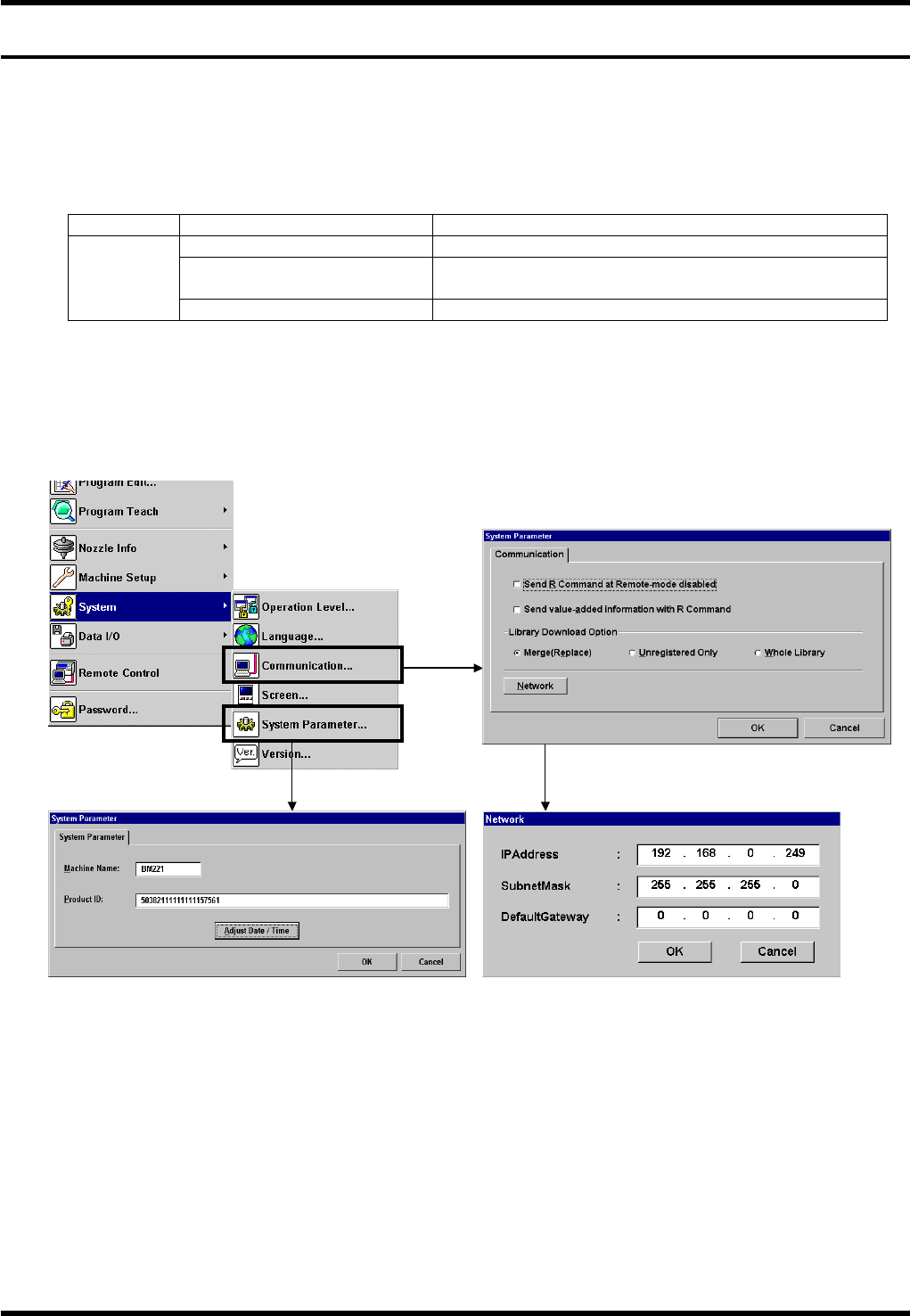
Choose ‘System’ – ‘Communication’ to access to the following setting:
Protocol Item Description
TCP/IP IP address Set the address assigned by the network manager.
Subnet Mask Set the sub-net value assigned by the network
manager.
Default Gateway Set the address assigned by the network manager.
=REMARKS=
Before connecting the network cable, be sure to complete the IP address and machine name setting.
Starting up the machine without the setting or if the setting is incorrect, proper operation may be disabled.
== Refer to ‘Communication’ and ‘System parameter’ in ‘Ref / SYSTEM SETTING’ for details.

BM122/123/133/221/231
HOST COMPUTER SYSTEM
2.2 Network Setting
E35HEC-4A-141-A0
2.2-2
=REMARKS=
Connection with multiple host computers
Do not connect the machine with multiple host computers.
Communication will be enabled only with the host computer connected last.

BM122/123/133/221/231
HOST COMPUTER SYSTEM
3. PANAPROTOCOL LAN SPECIFICATIONS
E35HEC-4A-BB1-A0
3-1
3. PANAPROTOCOL LAN
SPECIFICATIONS