HOST.pdf - 第55页
BM 122/ 123 /1 33/ 221/2 31 HOST COMPUTER SYSTEM 4.1 Comm and Tabl e E35HEC- 4A-161- A0 4.1- 4 4.1. 5 R Commands STD: Comm ands a v a il able in standar d speci fi cati on PP: Commands avail abl e i n Panasonic Pack age …
BM122/123/133/221/231
HOST COMPUTER SYSTEM
4.1 Command Table
E35HEC-4A-161-A0
4.1-3
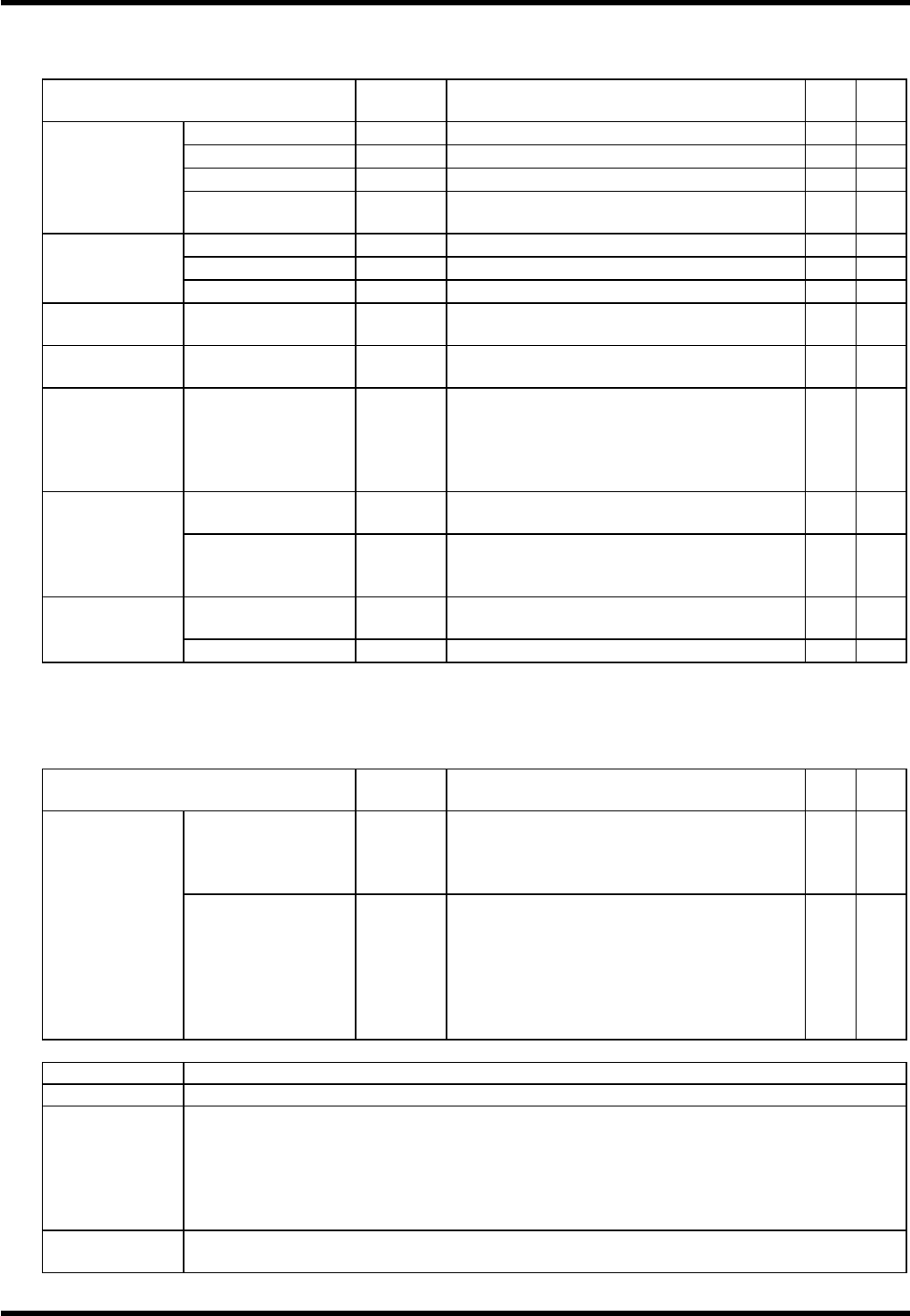
Control commands
STD: Commands available in standard specification
PP: Commands available in Panasonic Package (option)
Function
Com-
mand
Description
STD
PP
Start
C5ST
Starts production in the current stop mode.
×
1Block mode
C5STBL
Starts production in the 1 Block mode.
×
EOP mode
C5STEP
Starts production in the EOP mode.
×
Start
CONT mode
C5STCT
Starts production in the CONT
(continuous) mode.
×
1Block mode
C5SPBL
Sets the 1 Block stop mode.
×
EOP mode
C5SPEP
Sets the EOP stop mode.
×
Stop
CONT mode
C5SPCT
Sets the CONT (continuous) mode.
×
Operation
prohibition
C5SPHT
Disables operation via the control panel.
×
Reset
C5RE
Initializes the machine condition and clears
the errors.
×
PCB handling
C5UP
Prohibits PCB loading from the upstream
process and stops the machine after the
production with the PCBs in the machine
has been completed (including unloading
to the subsequent process).
×
Product program
C5SEP
Selects the program for production from
among those stored in the machine.
×
Program
selection
Feeder carriage
selection
C5SEZ
Selects the operation mode of the feeder
carriage.
Not available for BM122.
×
Moving command
C5WC
Adjusts the rail width to the size of the
board size set in the selected program.
×
Width
adjustment
Origin return
C5WCOG
Returns the width adjust axis to origin.
×
4.1.4 D Commands
STD: Commands available in standard specification
PP: Commands available in Panasonic Package (option)
Function
Com-
mand
Description
STD
PP
Data transfer
D0
Returns command accompanied by the
requested data.
(Refer to the communications sequence of
each command.)
Data transfer
Status information
D1mmn
Returns the machine status requested by a
C2ST command.
mm: 00 Run
01 Ready
02 Error (Error stop)
n : 0 On-line
1 Remote
×
Status Information
Run Machine running in AUTO mode
Ready Normal stop (Machine being stopped with no errors occurred)
From when the Error status is cleared (by RESET, etc.) until when the Run status is
engaged.
From when the machine stops due to a pickup error or a recognition error until when the
Run status is engaged.
SEMI or MANU mode
Error From when the machine in the Run status stops due to an error until when the RESET
switch is pressed. (Pickup error and recognition error excluded.)
BM122/123/133/221/231
HOST COMPUTER SYSTEM
4.1 Command Table
E35HEC-4A-161-A0
4.1-4
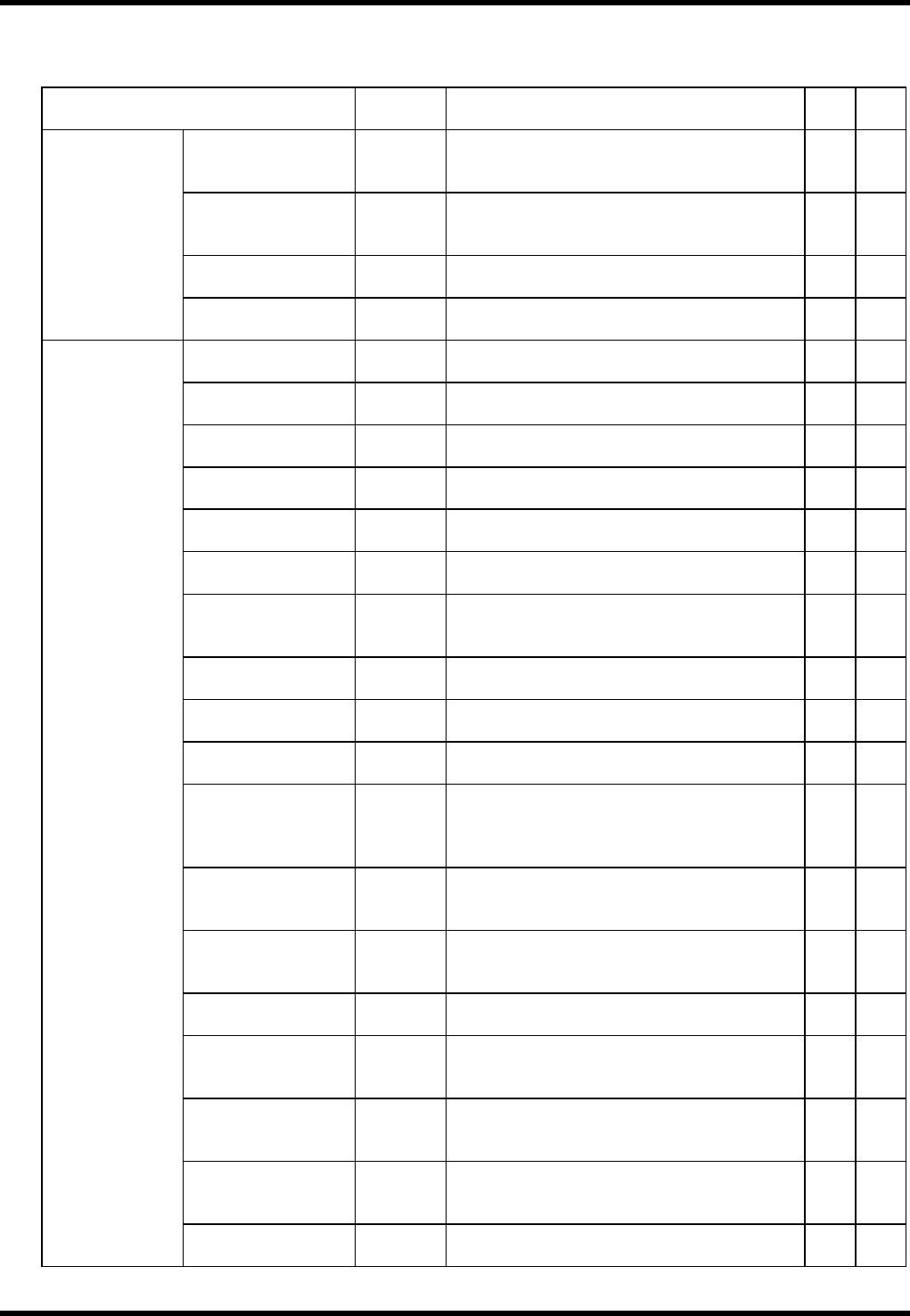
4.1.5 R Commands
STD: Commands available in standard specification
PP: Commands available in Panasonic Package (option)
Function
Com-
mand
Description
STD
PP
EOP pass
R0CT
Generated when production has been
completed up to the final block of the
program. However, production continues.
×
EOP stop
R0EP
Generated the machine has stopped after
completing the production up to the final
block of the program.
×
Production
possible
R0BDG
Generated when a board has been judged
to be OK by bad mark detection.
×
Production
information
Production
impossible
R0BDNG
Generated when a board has been judged
to be NG by bad mark detection.
×
Remote mode
R1OL
Generated when the communications
mode has been switched to REMOTE.
×
On-line mode
R1FL
Generated when the communications
mode has been switched to ON-LINE.
×
Emergency stop
R1ES
Generated when power has been turned
OFF.
×
Start
R1ST
Generated when production has been
started.
×
1BLOCK stop
R1SP
Generated when the machine has come to
a 1 block stop.
×
Reset
R1RE
Generated when a resetting has been
made.
×
PCB loading wait
R1PW
Generated when no PC board has been
loaded/unladed even after a given length
of time.
×
PCB loading wait
cancel
R1PE
Generated when the above wait condition
has been cleared.
×
PCB stock
R1PS
Generated when a PC board has been
stocked in the loader.
×
Loading complete
R1LD
Generated when loading of a PC board to
the table has been completed.
×
Last PCB
unloading
complete
R1UP
Generated when all PC boards in the
machine has been finished and unloaded
to the downstream process in the L.STOP
mode (by a C5UP command).
×
Last PCB
production
complete
R1OG
Generated when the production with the
final PC board in the L.STOP mode (by a
C5UP command) has been completed.
×
Recovery start
R1RC
Generated when the machine has started
recovery for a pickup error, a recognition
error or a parts exhaust error.
×
Width adjustment
complete
R1TE
Generated when width adjustment has
been completed.
×
Run
R1RU
Machine status notification: Generated
when the machine status has changed
from Error or Ready to Run
×
Ready
R1RD
Machine status notification: Generated
when the machine status has changed
from Run or Error to Ready.
×
Error stop
R1ER
Machine status notification: Generated
when the machine status has changed
from Run to Error.
×
Operation
information
Wire-break check
R1HB
Generated as a response to the wire-break
check by a C2HB command.
×
BM122/123/133/221/231
HOST COMPUTER SYSTEM
4.1 Command Table
E35HEC-4A-161-A0
4.1-5
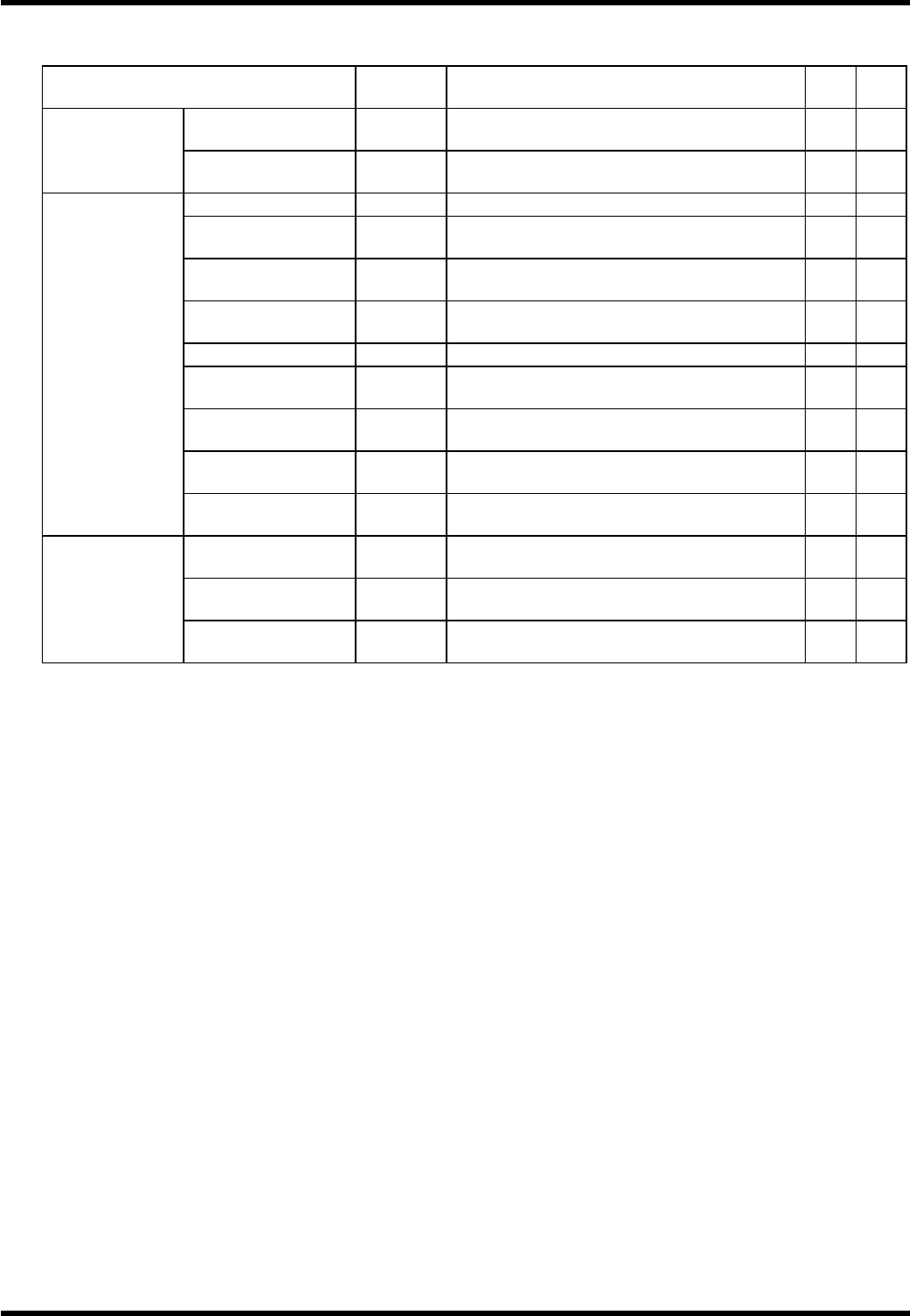
STD: Commands available in standard specification
PP: Commands available in Panasonic Package (option)
Function
Com-
mand
Description
STD
PP
Normal end
R1SE
Generated when program selection has
been completed successfully.
×
Program
selection result
Abnormal end
R1SENG
Generated when program selection has
ended abnormally.
×
Pickup information
R2E02
Information of a pickup error
×
Parts exhaust
information
R2E03
Information of a parts exhaust error
×
Transfer
information
R2E05
Information of a board transfer error
×
Overrun
information
R2E07
Information of an overrun
×
Other information
R2E08
Information of other error
×
Interlock
information
R2E10
Information of an interlock error
×
Warning
information
R2E16
Information of a warning error
×
Recognition
information
R2E18
Information of a recognition error
×
Error
information
Width adjustment
information
R2TE
Information of a width adjustment error
×
OK
R3GDCT
Generated when recovery has been
completed successfully.
×
NG (Continue)
R3NGCT
Generated when recovery has failed
(recovery will continue).
×
Recovery
information
NG (Stop)
R3NGEP
Generated when recovery has failed (the
machine will stop).
×