HOST.pdf - 第13页
BM 122/ 123 /1 33/ 221/2 31 HOST COMPUTER SYSTEM 2.1 LAN I nterf ace Specifi c ations E35HEC- 4A-131- A0 2.1- 2 2.1. 2 Software S peci fications Connecti ng t he machi ne and our host cont rol soft ware such as LMV2 on a…
BM122/123/133/221/231
HOST COMPUTER SYSTEM
2.1 LAN Interface Specifications
E35HEC-4A-131-A0
2.1-1
2.1. LAN Interface Specifications
E35HEC-4A-131-A0
The PanaProtocol LAN function is provided by means of TCP/IP socket method to accomplish high-speed
data communication between the machine and host computer.
As main features, it includes data download/upload and machine operation control, as well as real-time
commands for status monitoring.
It use block data transfer and separates real-time commands from control and data transfer commands to
enhance the communications efficiency.
2.1.1 LAN Specifications
Accomplish the wiring using LAN cable and switching HUB the same as those for general OA application.
Item Description Remarks
Interface 10/100BASE-T Ethernet RJ45J connector
Connected win CAT5 cable
Protocol TCP/IP Socket System Message conforms to PanaProtocol.
Win Sock Ver2.0 (NT 4.0)
Network function Mounted on CPU board
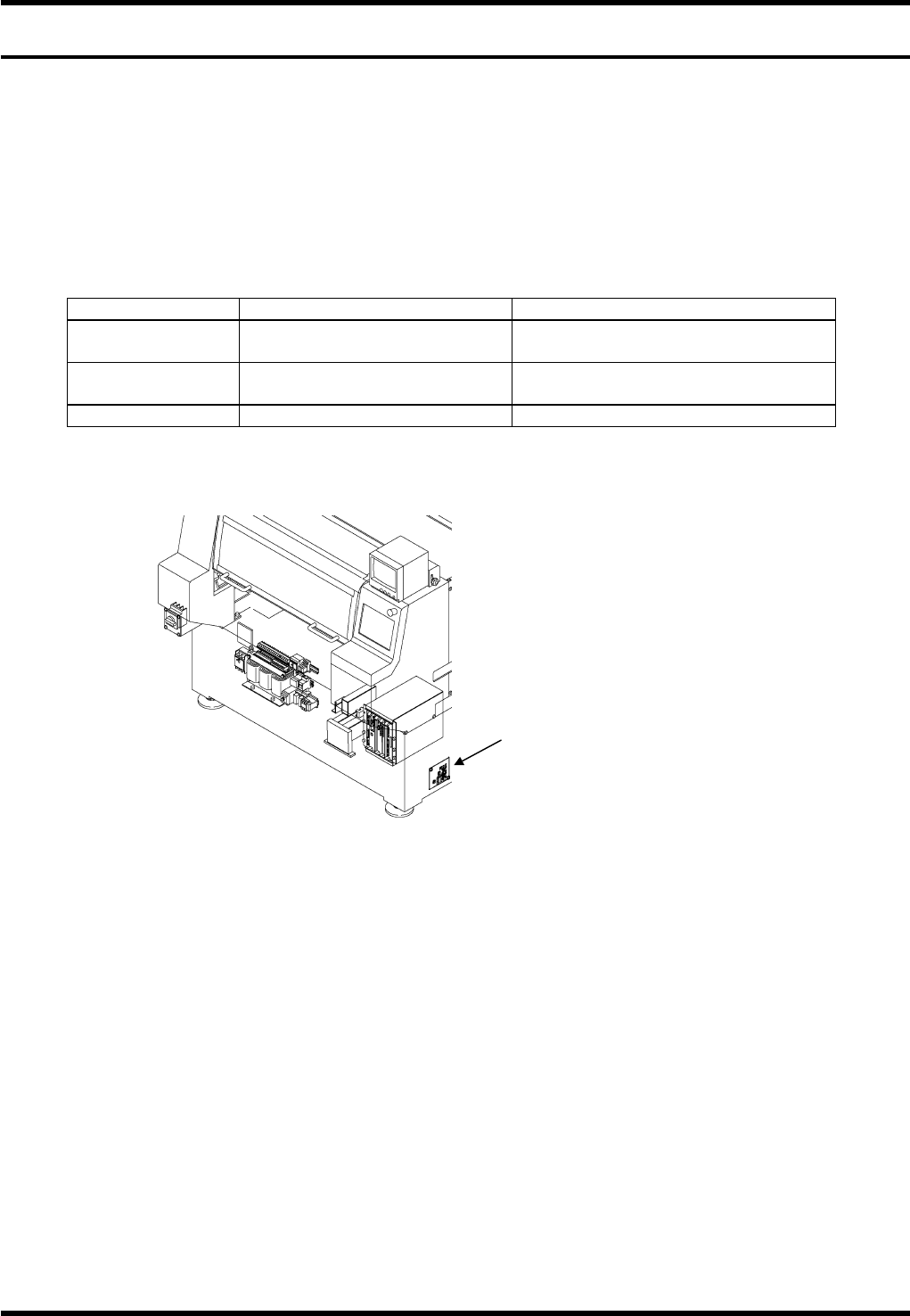
LAN connector position:
Connect the LAN connector to the port located on the side of the machine.
=REMARKS=
Before connecting the network cable, be sure to complete the IP address and computer name setting.
Starting up the machine without the setting or if the setting is incorrect, proper operation may be disabled.

BM122/123/133/221/231
HOST COMPUTER SYSTEM
2.1 LAN Interface Specifications
E35HEC-4A-131-A0
2.1-2
2.1.2 Software Specifications
Connecting the machine and our host control software such as LMV2 on a LAN enables the following
controls:
Item Description Category
Downloading data (C0) Used to transfer placement data from host computer to the
machine.
Partly optional
Uploading data (C1) Used to send placement data and production
management information from the machine to host
computer.
Standard
Monitoring (C2) Used when host computer inquires status of the machine Partly optional
Inquiring program name
(C3)
Used when host computer inquires the names of the
programs currently selected on the machine.
Standard
Control (C5) Used to accomplish machine control (start, stop and
program selection, etc.).
Option
Real-time command (R) Used to send messages whenever the machine status
changes or if errors occur during production.
Option
=REMARKS=
When using our host control software, be sure to install the package option for the machine according to
the host control software.
Unless an appropriate package option is used, communications with host computer may not be
performed properly or all functions of the host computer may be disabled.
Available commands are classified into standard and option (Panasonic package).
Refer to the command table for details
BM122/123/133/221/231
HOST COMPUTER SYSTEM
2.2 Network Setting
E35HEC-4A-141-A0
2.2-1
2.2. Network Setting
E35HEC-4A-141-A0
2.2.1 Network Setting
To effectively use the LAN function, first it is necessary to establish network setting.
Consult with the network manager to determine the parameters used for setting.
The PanaProtocol LAN function uses TCP/IP protocol only.
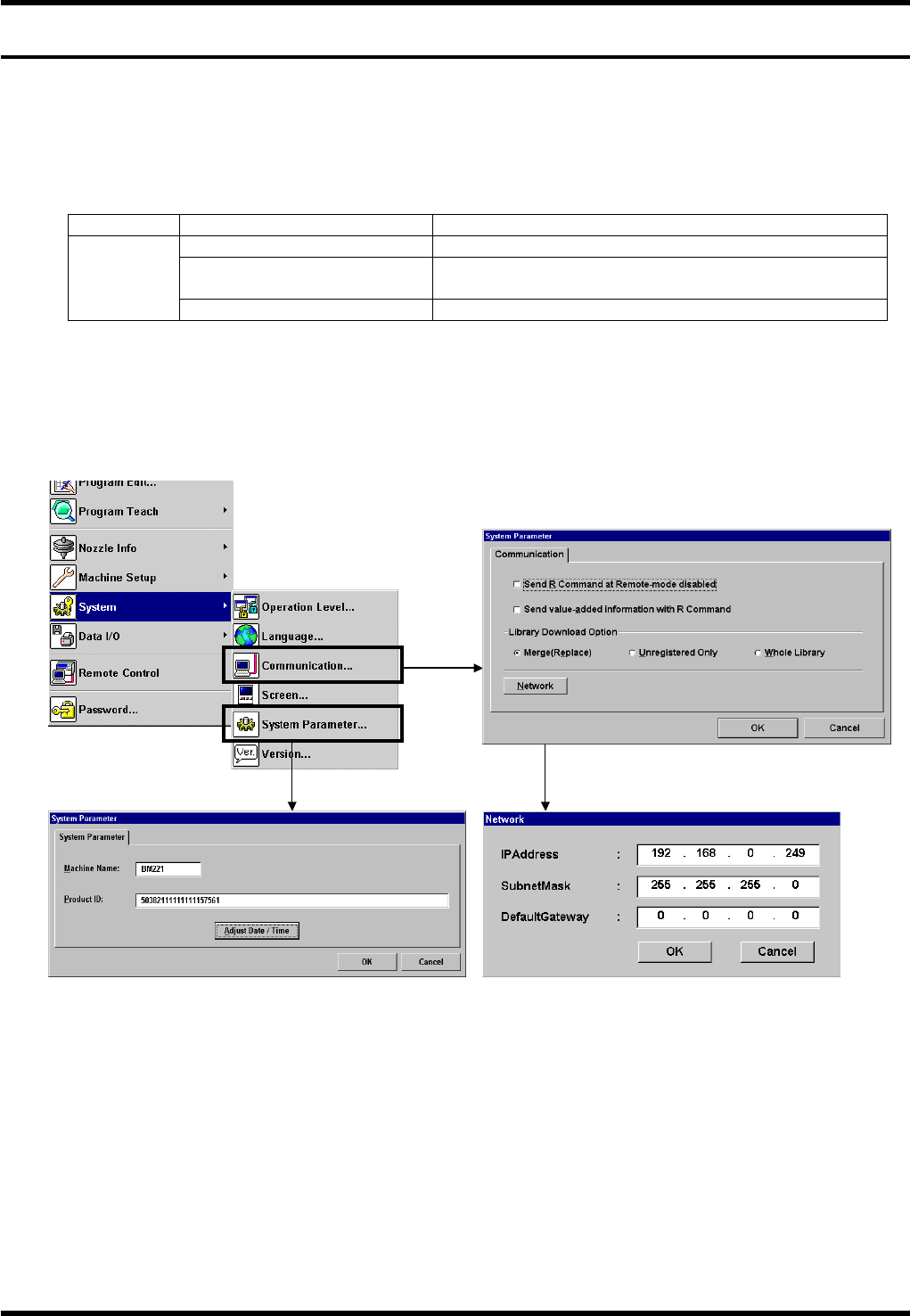
Choose ‘System’ – ‘Communication’ to access to the following setting:
Protocol Item Description
TCP/IP IP address Set the address assigned by the network manager.
Subnet Mask Set the sub-net value assigned by the network
manager.
Default Gateway Set the address assigned by the network manager.
=REMARKS=
Before connecting the network cable, be sure to complete the IP address and machine name setting.
Starting up the machine without the setting or if the setting is incorrect, proper operation may be disabled.
== Refer to ‘Communication’ and ‘System parameter’ in ‘Ref / SYSTEM SETTING’ for details.