00196932-02 SM S-Feeder Repair DE+EN multilang.pdf - 第102页
4 S-Feeder Test Software 4.2 Checking of 3x8mm S-Feeder 102 SIPLACE S-Feeder Repair SIPLACE S-Förderer Reparatur 1. Press the key F3 "tape data". 2. The sto red module data are shown. -> Check the data. Go b…
4 S-Feeder Test Software
4.2 Checking of 3x8mm S-Feeder
SIPLACE S-Feeder Repair SIPLACE S-Förderer Reparatur 101
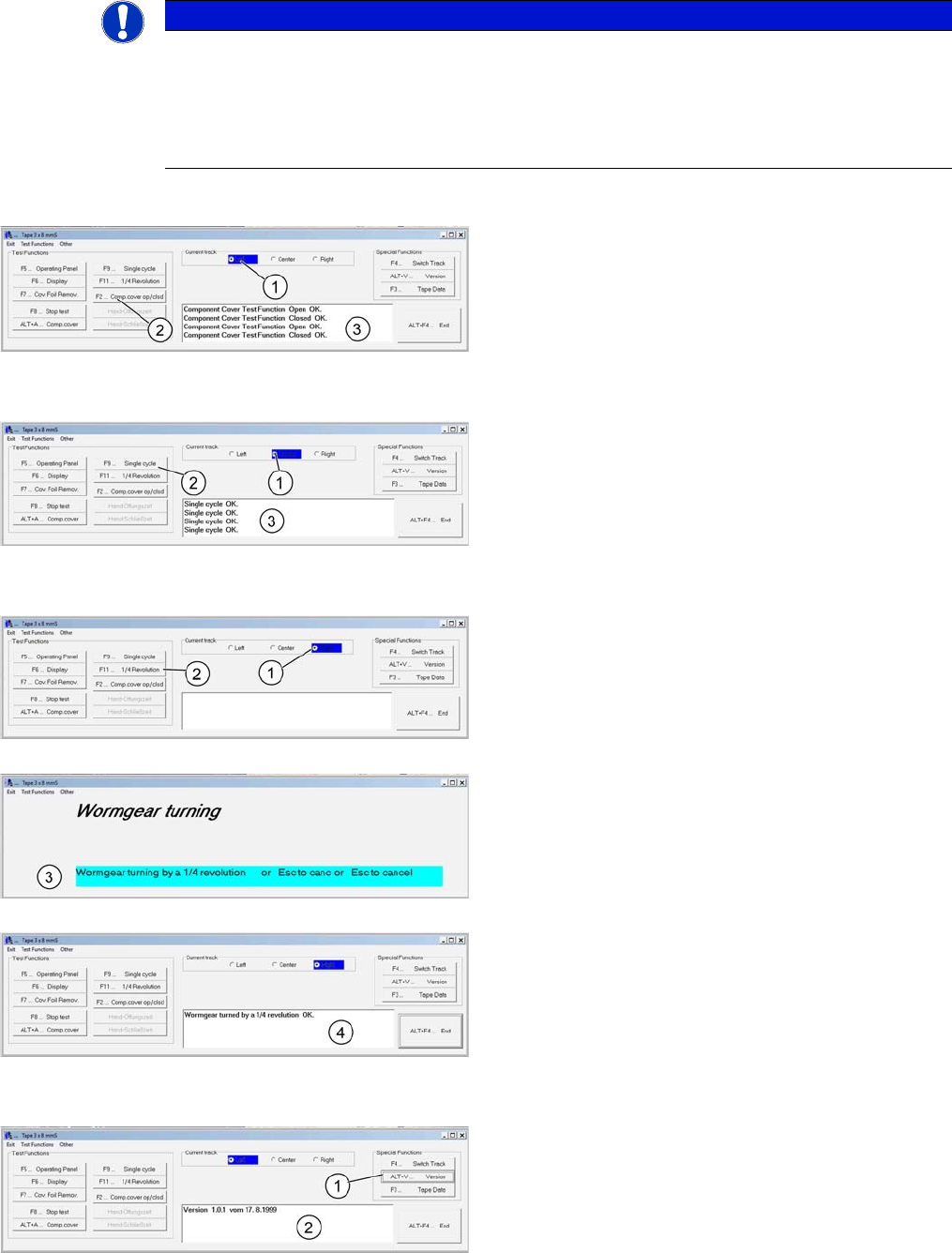
F2 Hand (Component cover)
F9 Single step
F11 ¼ revolution
ALT+V Version
F3 tape data
NOTICE
The functions F2 and ALT+A (BE-cover) are not avaible for 3x8 S 0201 Gold Feeder!
Switch off first the corresponding track for the execution of .F2, F9 and F11 . These test func
-
tions are used in case of repair for quick check of the respective drives.
Watch for these tests, the mechanical function of the feeder. The software only checks the com
-
munication with the feeder.
1. Select a track by pressing the key F4
2. Start the test "component cover" by pressing the key
F2
3. The result is shown at the comment field.
1. Select a track by pressing the key F4
2. Start the test "single step" by pressing the key F9. The
pin wheel is indexed individually
3. The result is shown at the comment field.
1. Select a track by pressing the key F4
2. Start the test "revolution" by pressing the key F11
3. The selected index wheel rotates ¼ to turn.
4. The result is shown in comment field
1. Press the keys ALT+ V "Version"
2. The software version is shown at the comment field.
4 S-Feeder Test Software
4.2 Checking of 3x8mm S-Feeder
102 SIPLACE S-Feeder Repair SIPLACE S-Förderer Reparatur
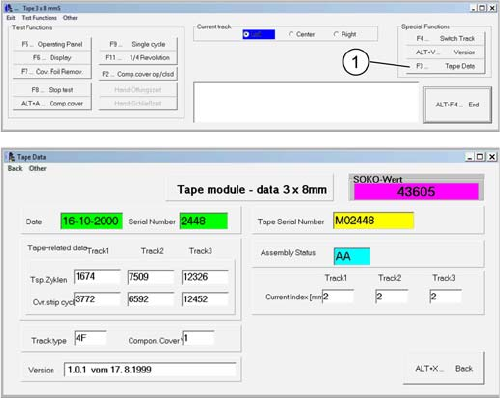
1. Press the key F3 "tape data".
2. The stored module data are shown.
-> Check the data.
Go back with ALT + X -> The test for the 3x8mm S feeder
finished. -> Close the program by pressing ALT + F4.
5 Checking and adjusting 2x8mm S-Feeder
5.1 Test set for foil and tape transport motor
SIPLACE S-Feeder Repair SIPLACE S-Förderer Reparatur 103
5
5 Checking and adjusting 2x8mm S-Feeder
Checking and adjusting 2x8mm S-Feeder
5.1
5.1 Test set for foil and tape transport motor
Test set for foil and tape transport motor
5.2
5.2 Current input and worm clearance of the tape transport
Current input and worm clearance of the tape transport
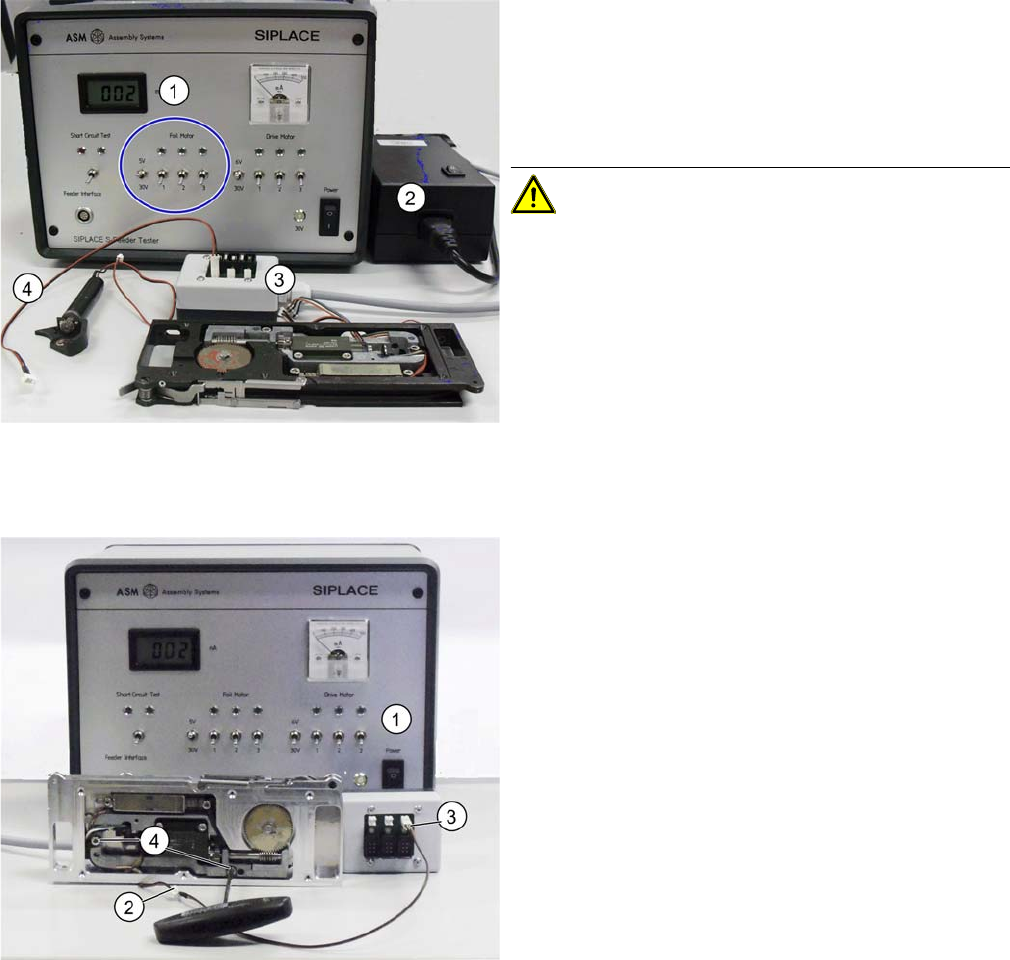
1. Testbox with check and adjustment location for the
2x8mm foils and tape motors
2. Power supply
3. Extension box with cable
4. Adapter cable
CAUTION! Motor may only be connected either
on the left OR on the right side!
Switch the S-feeder tester ON (Power ON). All other
switches 1-3 are off (down)
2. Plug the one end of the adapter cable to the motor (red
/ black).
3. Plug the other end of the adapter cable into slot 1 of the
extension box (only 1 slot is available for this function!.
4. Slightly loosen the two Allan screws (size 2,5).