00196932-02 SM S-Feeder Repair DE+EN multilang.pdf - 第92页
4 S-Feeder Test Software 4.1 Checking of 2x8mm S-Feeder 92 SIPLACE S-Feeder Repair SIPLACE S-Förderer Reparatur F9 Conveyor 1. Start the Test "transport" w ith the F9 key. The Transport wheel i s indexed 90 tim…
4 S-Feeder Test Software
4.1 Checking of 2x8mm S-Feeder
SIPLACE S-Feeder Repair SIPLACE S-Förderer Reparatur 91
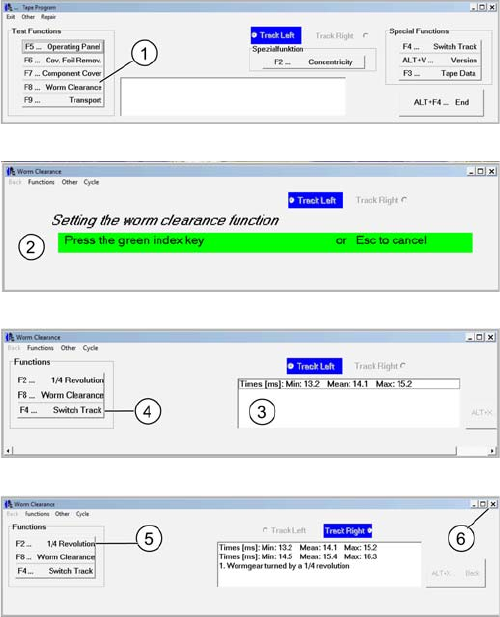
F8 Worm gear clearance
1. Start the test "worm clearance" with the F8 key. The pin
wheel in the left track starts
2. Press the green key to start the measuring process.
3. In the comment field times appear. If an error occurs,
the worm clearance set.
4. Switch of the track with F4 and repeat steps 1 to 3 for
the right track.
5. With the F2 key you can overclock the pin wheel a
quarter turn.
6. Close the menu worm clearance
4 S-Feeder Test Software
4.1 Checking of 2x8mm S-Feeder
92 SIPLACE S-Feeder Repair SIPLACE S-Förderer Reparatur
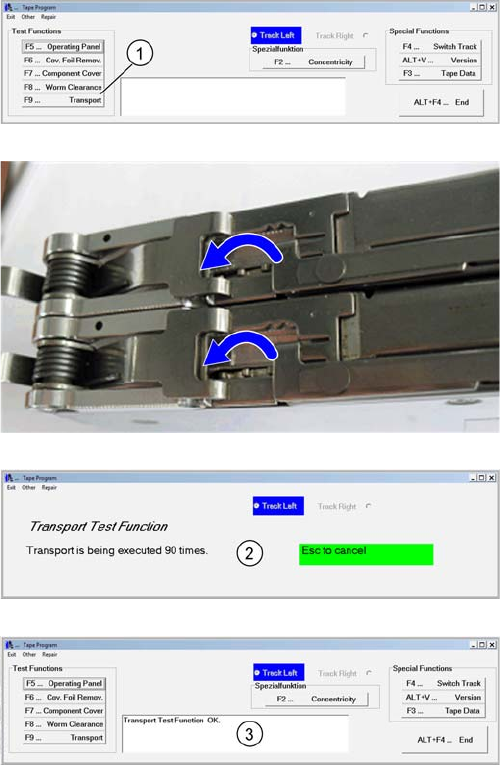
F9 Conveyor
1. Start the Test "transport" with the F9 key.
The Transport wheel is indexed 90 times..
2. Wait for the application flow of the test function for the
left track.
3. The result is shown at the comment field.
Turn F4 to the right lane and repeat steps 1 through 3
4 S-Feeder Test Software
4.1 Checking of 2x8mm S-Feeder
SIPLACE S-Feeder Repair SIPLACE S-Förderer Reparatur 93
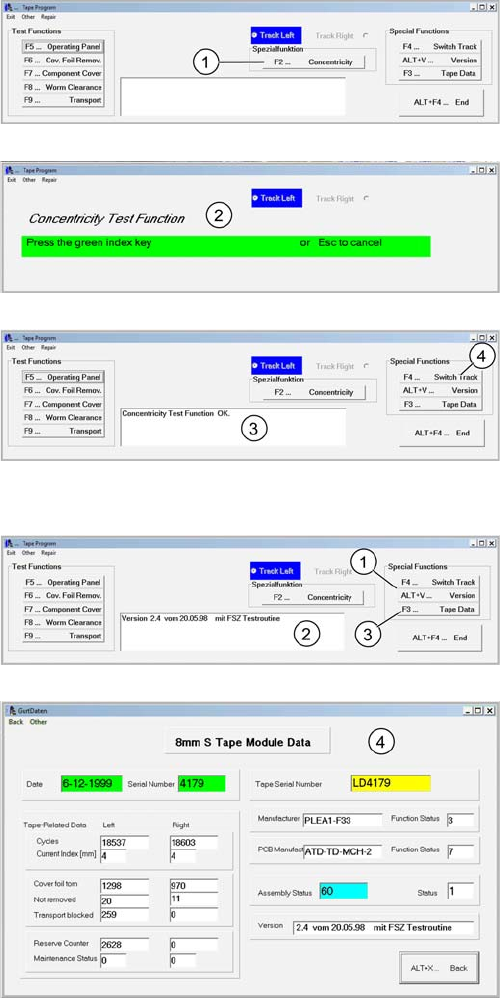
F2 runout
ALT + V version and F3 data
1. Start the test "run" with the F2 key
The Index wheel is clocked fast
2. Press the green key of the active track. The Index
wheel stops immediately.
3. The result is shown at the comment field.
4. Turn off the track by pressing the key F4. Proceed with
the steps 1 through 3 on the right track.
1. Start by pressing ALT + V to query the software version
2. The comment field shows the version
3. Press F3 "tape data" further data from the feeder will
be displayed.
4. Tape data will read and displayed.