00196932-02 SM S-Feeder Repair DE+EN multilang.pdf - 第87页
4 S-Feeder Test Software 4.1 Checking of 2x8mm S-Feeder SIPLACE S-Feeder Repair SIPLACE S-Förderer Reparatur 87 4 4 S - F e e d e r T e s t S o f t w a r e S-Feeder Test Software 4.1 4 . 1 C h e c k in g o f 2 x 8 m m S …
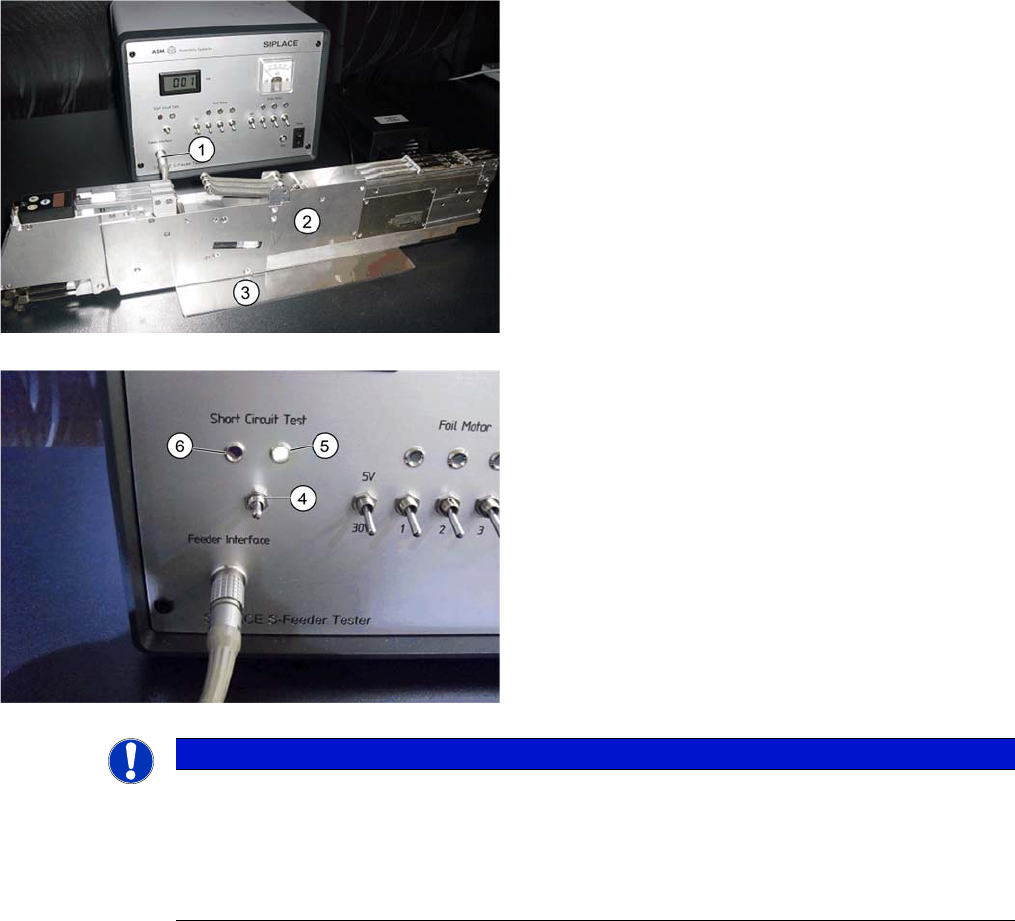
3 S-Feeder Short Circuit Box
3.2 Testing the feeder
86 SIPLACE S-Feeder Repair SIPLACE S-Förderer Reparatur
3.2
3.2 Testing the feeder
Testing the feeder
1. Connect the feeder module (2) to the Siplace S-Feeder
short circuit test box (1) .
2. Make sure that the feeder is stable on the base plate
with earth connection (3).
3. Base plate with earth connection -> the terminal clip
can also be used as alternative with the terminal clip.
4. Turn the switch "Short Circuit Test" (4) upwards.
5. The green LED (5) lights up if there are no short cir
-
cuits.
The red LED indicates a short circuit and the feeder
needs to be checked and repaired before it is used again.
NOTICE
One or more feeders with short circuit can lead to overload the control and thus cause damage
to placement system.
➢ Therefore, do not set a feeder, where the red LED lights up.
► When switching the switch "Short Circuit Test" you will see a short red LED flash. If it im
-
mediately goes out, there is not a malfunction.
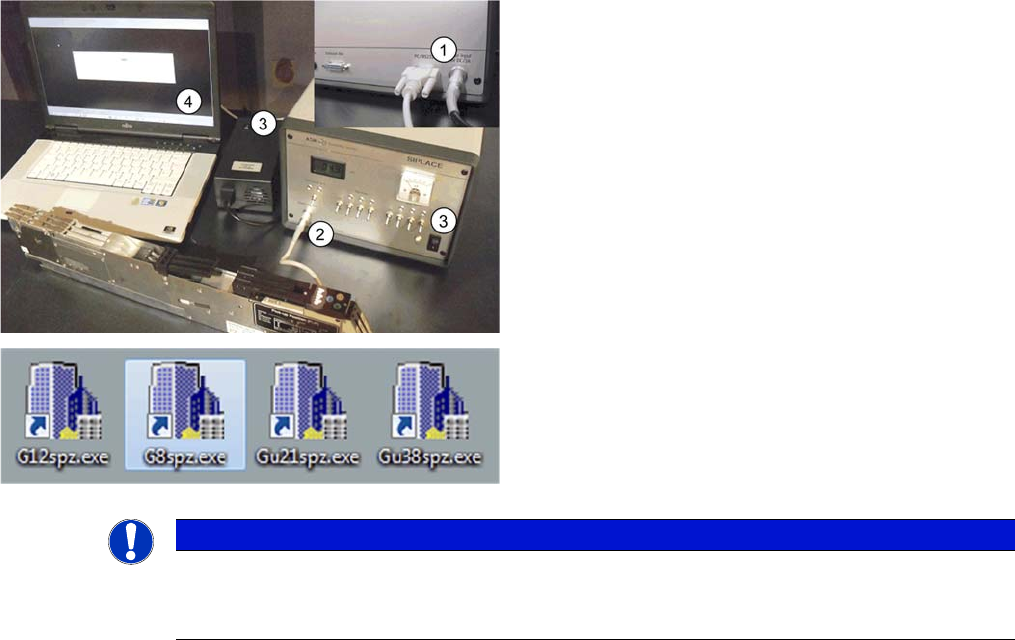
4 S-Feeder Test Software
4.1 Checking of 2x8mm S-Feeder
SIPLACE S-Feeder Repair SIPLACE S-Förderer Reparatur 87
4
4 S-Feeder Test Software
S-Feeder Test Software
4.1
4.1 Checking of 2x8mm S-Feeder
Checking of 2x8mm S-Feeder
1. Connect the power supply. and RS232 Cable with Mo
-
tortestbox (rear) ..
2. Connect the feeder with the Motortestbox (the picture
shows a 3x8mm S-Feeder).
3. Switch off the power supply and the motor testbox .
4. Connect the RS 232 cable to the PC through the
COM1 and start the test software
NOTICE
The subsequent procedure is described by the testing software for the 2x8mm S-Feeder
For operation can be used both of the function keys on the PC keyboard, as well as the corre
-
sponding buttons of the user interface!
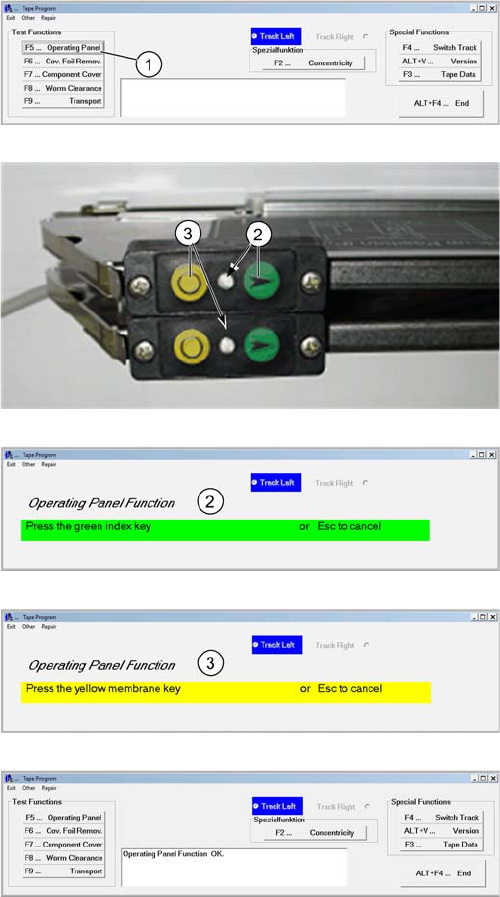
4 S-Feeder Test Software
4.1 Checking of 2x8mm S-Feeder
88 SIPLACE S-Feeder Repair SIPLACE S-Förderer Reparatur
software workflow (2x8mm S feeder)
F5 Control panel
1. The left track is in the main menu after starting allways
enabled. Start the test "control panel" via the button F5
After step 1, both LED´s are off.
After step 2 flash the LED by the active track.
After step 3 flash both LED´s.
2. Press on the feeder the green touch key for the left
track . (Tape Index Feed)
3. Press on the feeder the yellow touch key for the left
track. (Foil Feed)
4. The results is shown in the comment field..
5. Switch over by pressing the key F4 on the right Track
and repeat steps 1 to 4 with the control panel on the right
Track