00197082-03_AI_MTC2_at-Loc2_X-Series-S_DE_EN.pdf - 第59页
3 Installation 3.1 Preparatory Steps Assembly Instructions / Montageanleitung SIPLACE X-Series S MTC2 at Location 2 MTC2 an Stellplatz 2 05/2019 59 3 Installation WARNING High weight The MTC2 is very heavy. If the surfac…

2 Brief Description
2.6 Required Working Time
58 Assembly Instructions / Montageanleitung SIPLACE X-Series S MTC2 at Location 2 MTC2 an Stellplatz 2 05/2019
2.6 Required Working Time
The complete installation will take approx. 5 hours.
3 Installation
3.1 Preparatory Steps
Assembly Instructions / Montageanleitung SIPLACE X-Series S MTC2 at Location 2 MTC2 an Stellplatz 2 05/2019 59
3 Installation
WARNING
High weight
The MTC2 is very heavy. If the surface on which it stands is slightly slanted, the MTC could
roll away and damage other machines or injure persons. Bear the high inertia in mind when
pushing or pulling the MTC2.
► Check every movement so that no damage or injury is caused.
3.1 Preparatory Steps
► Move the component trolleys out of the machine.
► Switch off the machine, disconnect it from the power supply and secure it to prevent
unauthorized reactivation.
1.2 "Preparatory work..." [}46]
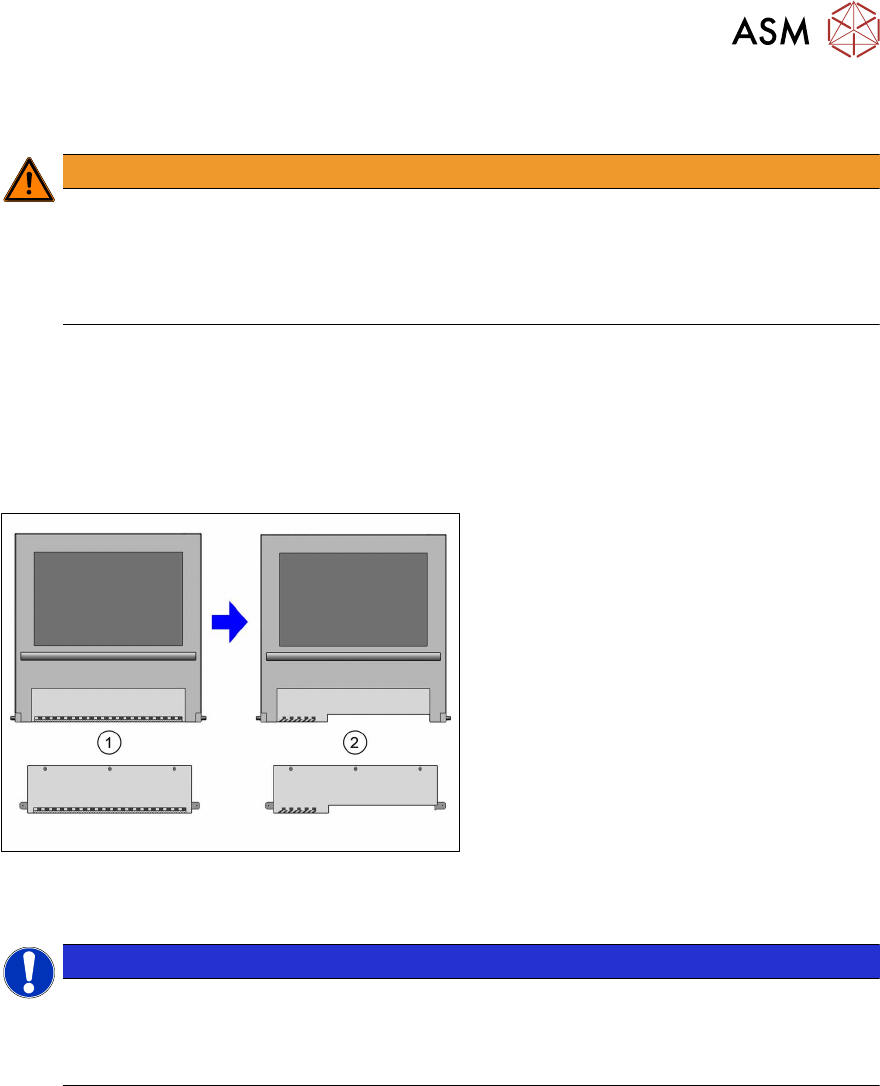
Fig.12: Replacing the bottom sheet of plexiglass
► Dismantle the bottom sheet of plexi-
glass(1) at location2.
► Fit the "Window assy shortened for use
with MTC" [03048626‑xx](2).
► Remove the cover on the distributor and store this outside the working area.
NOTICE
Heavy machine part!
► Enlist the help of a second person.
One person holds the MTC2 slide-in framework tightly by its handles and the other
person loosens the four screws fixing the slide-in framework to the MTC2.
► In addition to the MTC2, an output extension or conveyor are fitted as a default. Read the cor-
responding assembly instructions for this.
– Assembly instructions "SIPLACE X‑SeriesS Input/output conveyor extension and hand
guard" [DE+EN: 00197089‑xx]
► To operate the MTC, you also need to install a service flap. Read the corresponding assembly
instructions for this.
– Assembly instructions "SIPLACE X‑SeriesS service flap" [DE+EN: 00197396‑xx]
► To operate the MTC, you need to install a nozzle changer. Read the corresponding assembly
instructions for this.
– Assembly instructions "SIPLACE X‑SeriesS NC series 2 – NC before MTC2/WPC" [DE
+EN: 00197369‑xx]
3 Installation
3.2 Assembling the MTC2 Frame
60 Assembly Instructions / Montageanleitung SIPLACE X-Series S MTC2 at Location 2 MTC2 an Stellplatz 2 05/2019
► Check and, if necessary, correct the height of the MTC2. It needs to have the same height as
the placement machine. The height of the MTC2 can be read in the small window under the
cover, under the door for tower 1 (830 / 900 / 930 / 950 ± 15 mm). The MTC2 may not be
higher than the clamping edges of the PCB conveyor.
For details, see the user manual for the MTC2.
► If there is a COT insert at location 2, remove this. Read section 4.1.2 "Replacing the COT In-
sert Assembly" [}68] or the service manual for your machine.
3.2 Assembling the MTC2 Frame
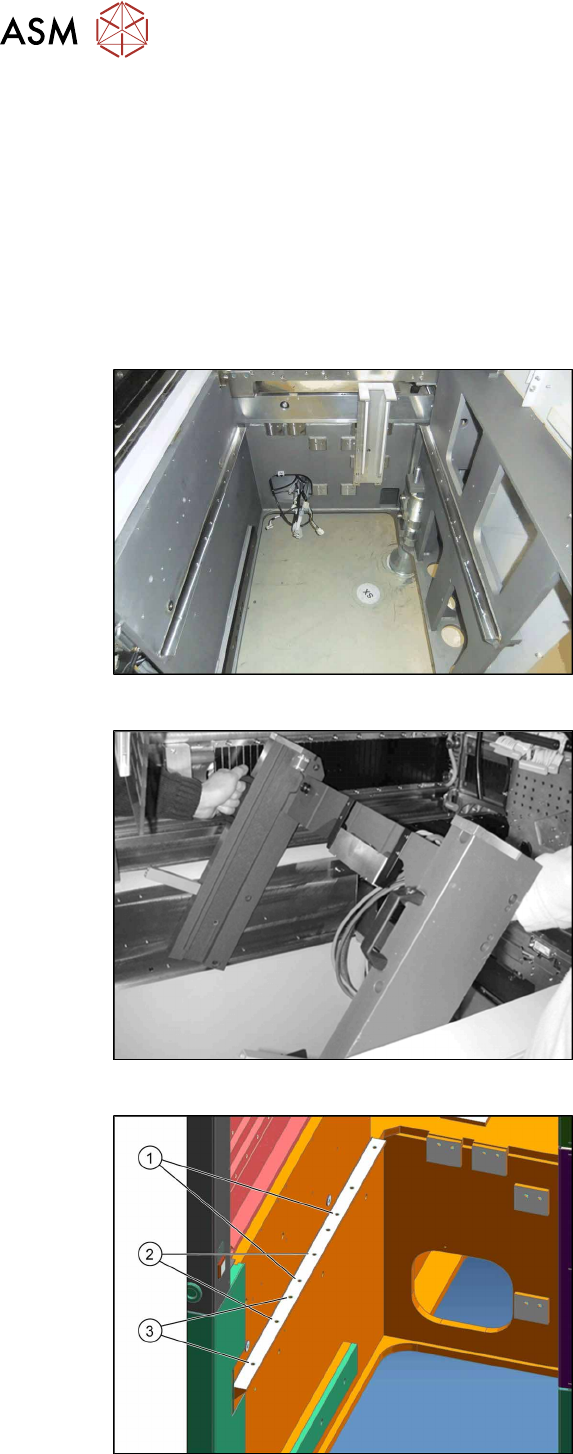
► Install the MTC2 slide-in framework into the placement machine as follows:
Fig.13: Location without COT insert
State of machine before starting assembly
without COT insert etc.
Fig.14: Slide-in framework
► Enlist the help of a second person to lift
the slide-in framework into the
machine.
Fig.15: Installation positions
The following installation positions apply to
the X-Series S:
1. Installation position 1
2. Installation position 2
3. Installation position 3
The MTC2 slide-in framework is fitted at
position 3.