00197082-03_AI_MTC2_at-Loc2_X-Series-S_DE_EN.pdf - 第61页
3 Installation 3.2 Assembling the MTC2 Frame Assembly Instructions / Montageanleitung SIPLACE X-Series S MTC2 at Location 2 MTC2 an Stellplatz 2 05/2019 61 Fig.16: Fastening the slide-in framework ► Slide in the MTC2 sl…
3 Installation
3.2 Assembling the MTC2 Frame
60 Assembly Instructions / Montageanleitung SIPLACE X-Series S MTC2 at Location 2 MTC2 an Stellplatz 2 05/2019
► Check and, if necessary, correct the height of the MTC2. It needs to have the same height as
the placement machine. The height of the MTC2 can be read in the small window under the
cover, under the door for tower 1 (830 / 900 / 930 / 950 ± 15 mm). The MTC2 may not be
higher than the clamping edges of the PCB conveyor.
For details, see the user manual for the MTC2.
► If there is a COT insert at location 2, remove this. Read section 4.1.2 "Replacing the COT In-
sert Assembly" [}68] or the service manual for your machine.
3.2 Assembling the MTC2 Frame
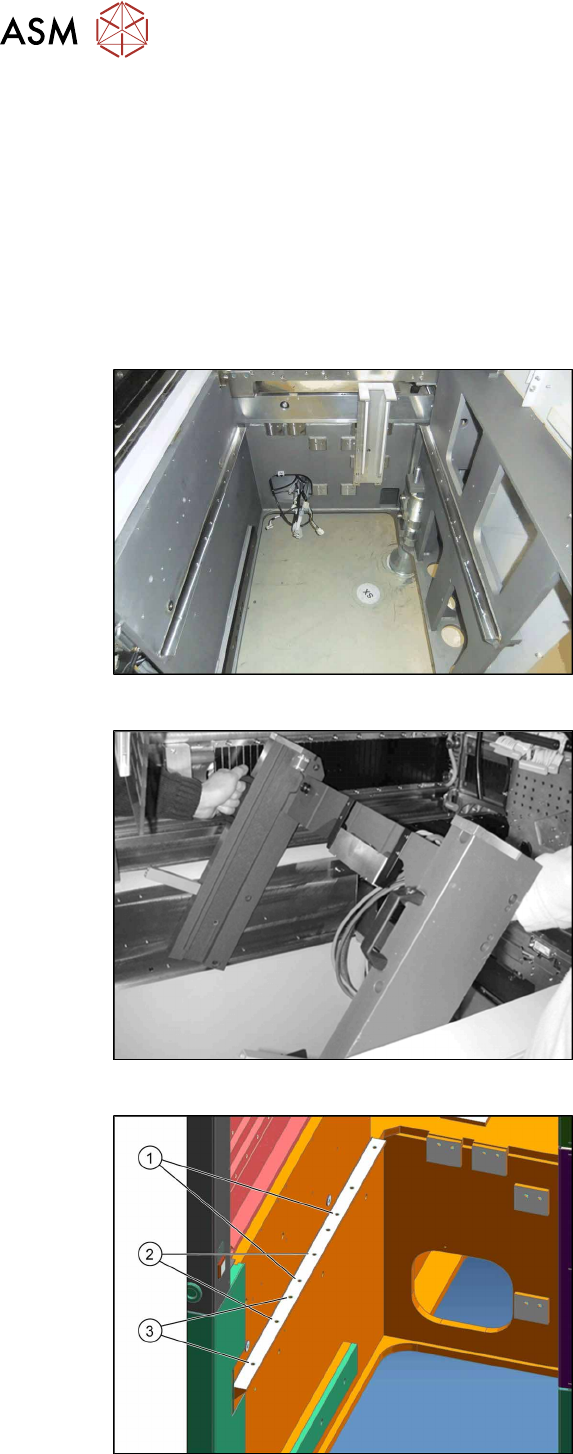
► Install the MTC2 slide-in framework into the placement machine as follows:
Fig.13: Location without COT insert
State of machine before starting assembly
without COT insert etc.
Fig.14: Slide-in framework
► Enlist the help of a second person to lift
the slide-in framework into the
machine.
Fig.15: Installation positions
The following installation positions apply to
the X-Series S:
1. Installation position 1
2. Installation position 2
3. Installation position 3
The MTC2 slide-in framework is fitted at
position 3.
3 Installation
3.2 Assembling the MTC2 Frame
Assembly Instructions / Montageanleitung SIPLACE X-Series S MTC2 at Location 2 MTC2 an Stellplatz 2 05/2019 61
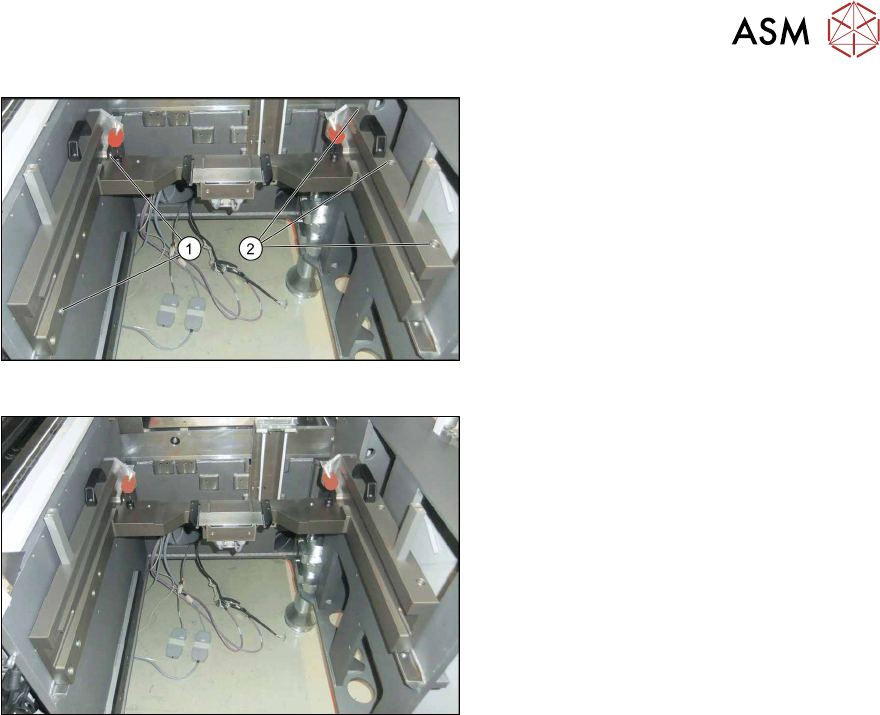
Fig.16: Fastening the slide-in framework
► Slide in the MTC2 slide-in framework at
installation position 3.
► Loosely tighten the screws (1).
► Tighten the screws (2) on the outer
side of the machine.
► Now tighten the screws at (1).
Fig.17: Slide-in framework when fitted
Installed MTC slide-in framework
3 Installation
3.3 Converting the Cover Guide
62 Assembly Instructions / Montageanleitung SIPLACE X-Series S MTC2 at Location 2 MTC2 an Stellplatz 2 05/2019
3.3 Converting the Cover Guide
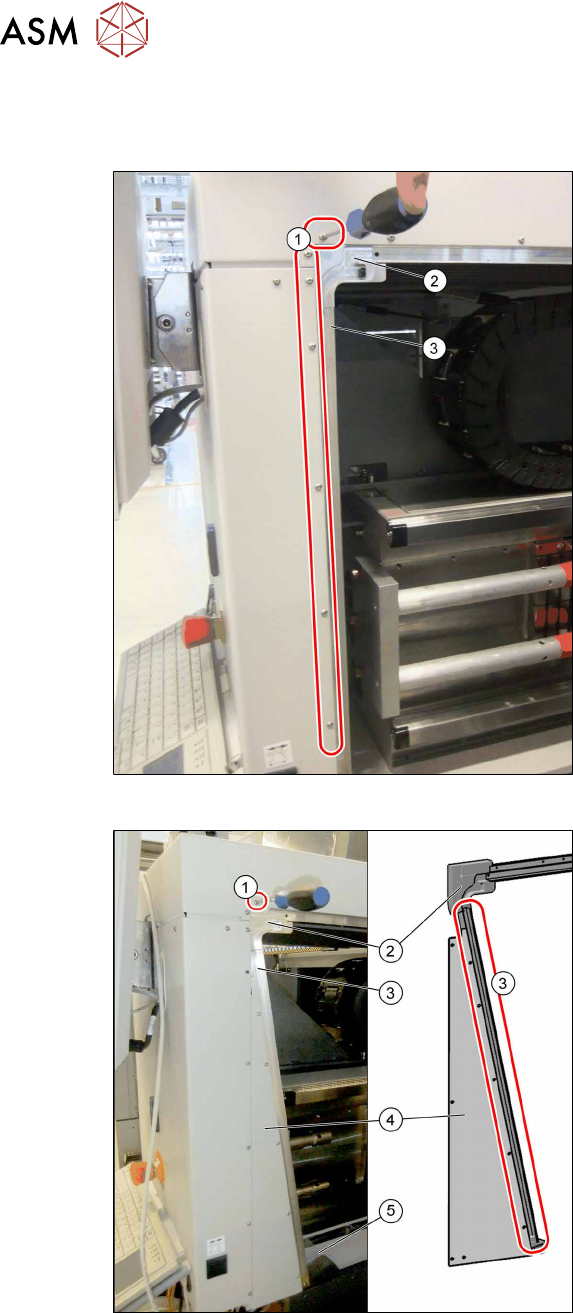
In addition to the MTC frame, you also need to convert the rail on the cover.
Fig.18: Removing the left-hand rail
► Remove the fastening screws(1).
► Remove the corner guide(2) and the
rail(3).
Fig.19: Fitting the new left-hand rail
► Install the following parts:
– The triangular distance sheet (4)
– The new rail (3)
– The guide "left corner SX4as/av
MTC" (2)
– The fastening "Stiffener rail bumper
2/4 SX4av MTC" (5)
► Fix the distance sheet and the rail with
the screws (3) (M3x6), from position (1).
Secure the screws with Loctite 241.
Make sure that any transitions in the rail
are aligned without impact edges.