FLX500-maintenance.pdf - 第17页
2 … Periodic Maintenance Weekly Maintenance —13— clean so the PNP Head optic sensor can accu- rately detect the position of the modules. NOTE: A fiducial scan is run automatically when starting a job if any modules hav…

Data I/O
FLX500 Chptr 2
—12—
2. Clear all devices or cards from the sockets
and from the work surface.
3. Close the FLX500 Application with the Exit
button.
4. Turn off the power by pressing the power
switch (right side) once and releasing. Then
push it and release once more to turn it on
again.
The Self-test will begin automatically. Check
that no system errors display on the monitor.
Checking Probe Tips
Tools Required:
• water and lint-free cloth or swab
1. Clean the rubber PNP probe tips with water
on a clean, lint-free cloth or swab.
2. Check for wear or cracking; replace the tips
if necessary.
CAUTION: Probe tips could get damaged by
isopropyl alcohol. Do not use isopropyl alco-
hol on the rubber probe tips. It will dry them
excessively, making them prone to cracking
and leaking air.
Cleaning the Fiducials and Sensors
Tools Required:
• shop air, clean and dry, .48-.55 MPa
(70-80 PSI)
Tray Modules have two fiducial locations and a
sensor, and Programmer Modules have one fidu-
cial location. These fiducials and sensors must be
Data I/O Part Numbers
Probe Tip 4.57 mm OD 288-0019-001
Probe Tip 3.05 mm OD 288-0020-001
2 … Periodic Maintenance Weekly Maintenance
—13—
clean so the PNP Head optic sensor can accu-
rately detect the position of the modules.
NOTE: A fiducial scan is run automatically
when starting a job if any modules have been
changed and for the first job after startup.
The scan can also be run any time via the
Diagnostic Windows.
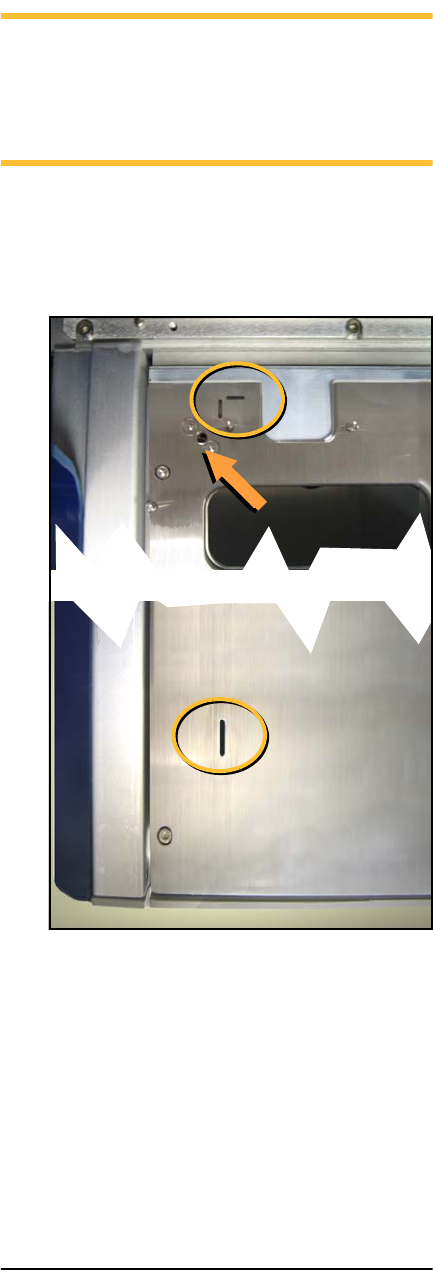
To clean fiducials and sensors:
Remove dust and debris from the fiducials and
sensors with clean, dry, compressed air. See Fig-
ure 4 and Figure 5.
Figure 4—A Tray Module fiducials (circled) and a
Tray Module sensor (arrow).