FLX500-maintenance.pdf - 第34页
Data I/O FLX500 Chptr 3 —30— Insuf ficient V acuum If you notice insufficient v acuum on the probe tips (e.g., devices are dropped), perfor m the V ac- uum Check: see Check V acuum on page 19. If some of the checks…
3 … Troubleshooting Fiducial Scan Errors
—29—
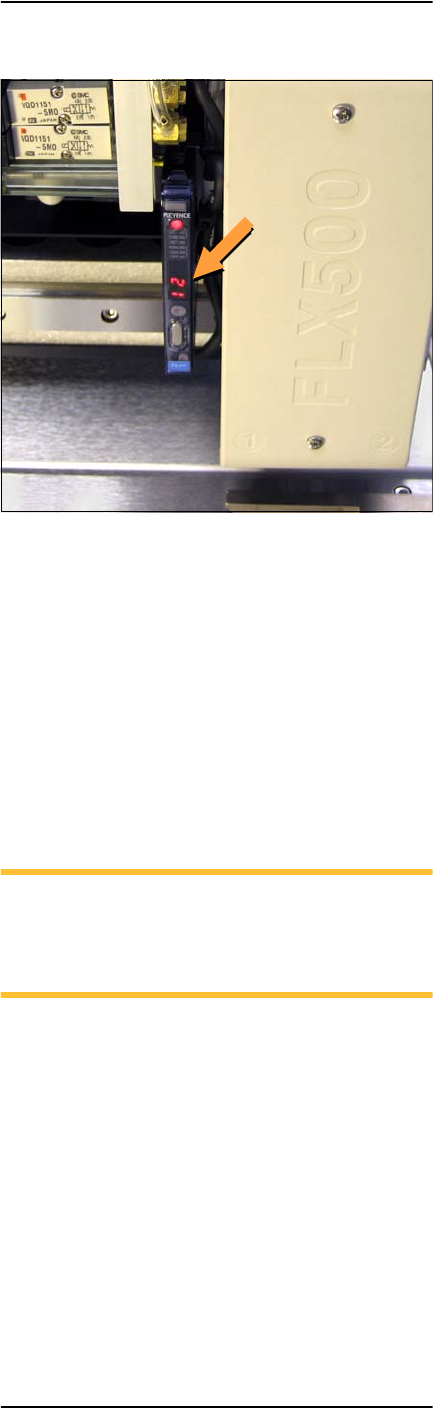
Figure 16—PNP Head optic sensor digital display
showing a reading of 12.
The reading on the top surface of the module
should be approximately in the range
1000--2500. If it is too high (>2500), then roughen
the top surface with 400 grit sandpaper. If the
reading is too low ( <1000), then polish the top
surface with fine emery cloth.
If the reading on the fiducial slot is not within
the allowed range (0– 500), gently blow out the
fiducial slot with clean, dry, compressed air.
NOTE: When running the Fiducial Scan
from the Diagnostic Window, repeatability
on subsequent scans should be ±10 counts.
(One count is 1/100 mm.)
If problems with the fiducial scan continue, see
the on-screen Diagnostics Help, which includes
further diagnostics. You need a PIN to enter the
Diagnostics Windows (Tools button) prior to tap-
ping the Help button.

Data I/O
FLX500 Chptr 3
—30—
Insufficient Vacuum
If you notice insufficient vacuum on the probe
tips (e.g., devices are dropped), perform the Vac-
uum Check: see Check Vacuum on page 19. If
some of the checks fail (red Xs on report when
the details check box is checked) then check that:
• all hose fittings are tight and hoses are not
pinched or clogged.
Perform the probe blowout procedure; see
Maintaining Air Flow on page 16.
• the air filters are not dirty. Replace air filters
if necessary. See Checking Air Filters on page
20.
• the input air to the FLX is at .48-.55 MPa
(70-80 PSI).
If you can’t find the source of the problem, save
the detailed Check Vacuum report and send it to
support@dataio.com.
Failures Picking and Placing
If probes drop devices or fail to pick and place
devices accurately, check the following:
• check for insufficient vacuum; see previous
heading.
• check the Z-Offset; see Calibrating Probe-
Offset on page 15.
• check the module alignment; see Gantry
Movement and Alignment on page 10.

3 … Troubleshooting PIN
—31—
PIN
The FLX500 uses a PIN (Personal Identification
Number) to access tools that offer fine adjust-
ments, diagnostics, or other special functions.
PIN is used synonymously with password.
When the FLX500 left the factory, the default PIN
was 2468. If you have reset and forgotten your
PIN, contact Data I/O or your local representa-
tive for assistance. For contact information see
Customer Support on page 35.
Electrical Fuse
The FLX500 uses one fuse that is located at the
back of the machine below the power connec-
tion. If you suspect the fuse has failed, replace it
with another 5 Amp, 250 Volt fuse—5 x 20 mm.
To replace the fuse:
1. Exit the FLX500 Application.
2. Turn off the power by pressing the power
switch once and releasing, and tapping OK
to close the FLX Application if it was open.
3. Unplug the power cord from the FLX.
4. With a small, flat screwdriver, placed at the
small tab, pry the fuse block straight out like
a drawer. See Figure 17.