FLX500-maintenance.pdf - 第28页
Data I/O FLX500 Chptr 2 —24— blank page
2 … Periodic Maintenance Annual Maintenance
—23—
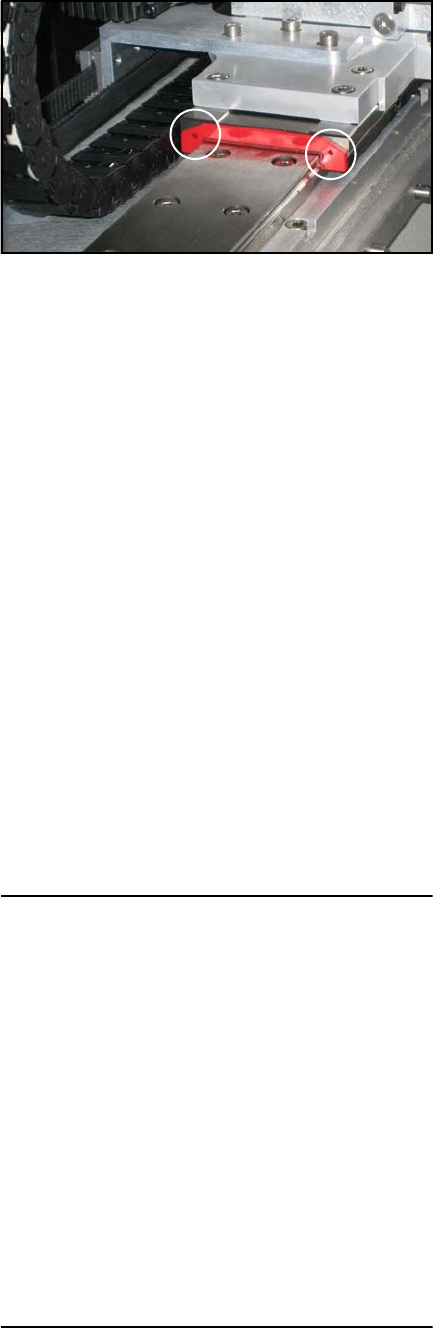
Figure 13—Two lubrication holes on plate.
5. Slide the arm to the other side of the rail for
access to the plate on the other end of the
carriage.
6. Repeat Step 4 for the plate on the other end
of the carriage.
7. Slide the arm to the left and right and wipe
excess oil from the rail.
8. Release the Emergency-stop button.
Annual Performance Verification
Performance verification uses the Diagnostic
Adapter Board (DAB) to provide a thorough
hardware test of the programmer electronics as
well as check that precision references are within
operating ranges.
Tools Required:
• 4 mm Hex Key (Allen wrench)
• DAB (Use PN below to purchase)
Once a year, perform the Performance Verifica-
tion using the DAB, or send the FLX500 Program-
mer Modules to Data I/O for performance
verification. Include the PPH results from the
PV-Kit when sending the FLX500 unit to Data I/O.
Data I/O Part Number
Diagnostic Adapter Board 910-2200-003

Data I/O
FLX500 Chptr 2
—24—
blank page
—25—
For troubleshooting items not found here, see the
FLX on-screen Diagnostics Help for a thorough
troubleshooting tree. This Help is only available
when in the diagnostics area of the software
interface (opened with the Tools button). The
Diagnostics Windows require a PIN (Personal
Identification Number) for access.
3 …
Troubleshooting