FLX500-maintenance.pdf - 第38页
Data I/O FLX500 Chptr 4 —34— Information W e Need Please remember to include the following: •T h e FLX Serial Number . It is printed on the communication w all that is visible when the modules are removed. Figure 1…
—33—
If you wish to contact Data I/O Technical Sup-
port or a service center, see the following pages
for information we need from you as well as how
to contact us.
4 … Correspondence
Data I/O
FLX500 Chptr 4
—34—
Information We Need
Please remember to include the following:
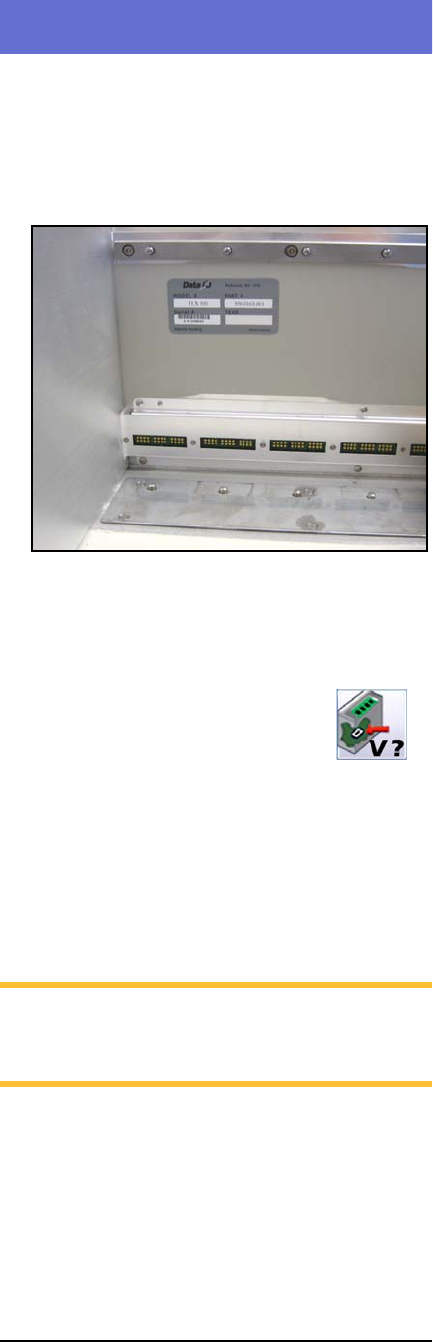
•The FLX Serial Number. It is printed on the
communication wall that is visible when the
modules are removed.
Figure 18—The Serial Number Label is visible after
removing the modules.
•The FLX software and firmware version num-
bers. These are displayed by tapping the Ver-
sion button on the Run Window.
• The log file. See Log File on page 3.
• Results from running the PV-Kit job. See
Rerunning the PV-Kit on page 26.
• Error message, if there is one.
• Device manufacturer and part number, if
device-related.
NOTE: For the latest version of this manual,
see
Support > Technical Library > Manuals
on our Web site.

4 … Correspondence Customer Support
—35—
Customer Support
Worldwide
Data I/O Corporation
6464 185th Ave NE, Suite 101
Redmond, WA USA 98052
Telephone: 425-881-6444
USA: 800-3-DATAIO (1-800-332-8246)
Fax: 425-867-6972
E-mail: support@dataio.com
Web Address: www.dataio.com
Germany
www.dataio.de
China
www.dataio.cn
Other Countries
Contact your local Data I/O representative.
To find your local representative, visit
http://www.dataio.com/contact/repsearch.asp