FLX500-maintenance.pdf - 第36页
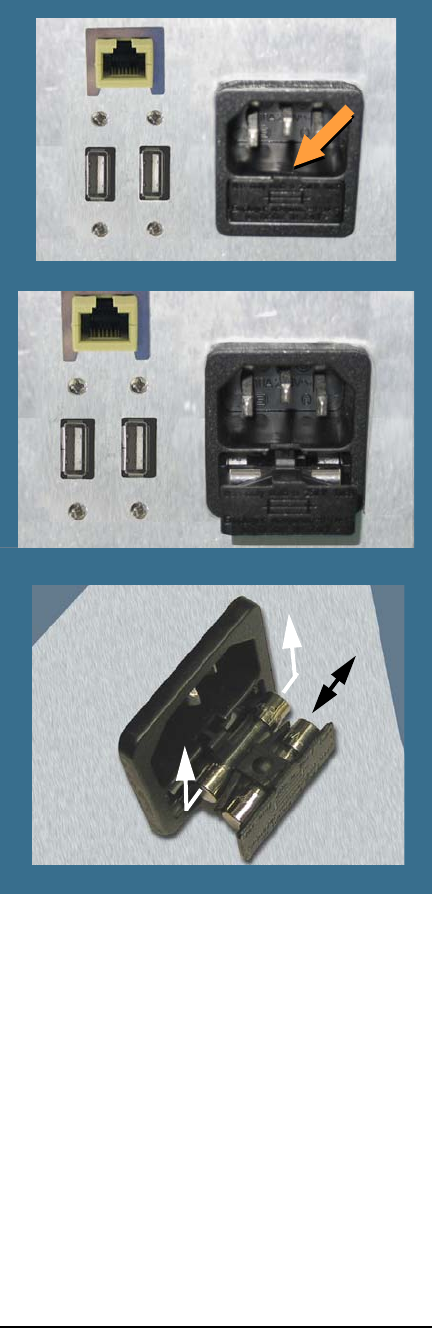
Data I/O FLX500 Chptr 3 —32— Figure 17—Fuse Ac cess is in the Back. Closed (top) and open. The nearest fuse is a spar e. The spare fuse slides out left/right unlike the main fuse. 5. T o remove the active fuse (far…

3 … Troubleshooting PIN
—31—
PIN
The FLX500 uses a PIN (Personal Identification
Number) to access tools that offer fine adjust-
ments, diagnostics, or other special functions.
PIN is used synonymously with password.
When the FLX500 left the factory, the default PIN
was 2468. If you have reset and forgotten your
PIN, contact Data I/O or your local representa-
tive for assistance. For contact information see
Customer Support on page 35.
Electrical Fuse
The FLX500 uses one fuse that is located at the
back of the machine below the power connec-
tion. If you suspect the fuse has failed, replace it
with another 5 Amp, 250 Volt fuse—5 x 20 mm.
To replace the fuse:
1. Exit the FLX500 Application.
2. Turn off the power by pressing the power
switch once and releasing, and tapping OK
to close the FLX Application if it was open.
3. Unplug the power cord from the FLX.
4. With a small, flat screwdriver, placed at the
small tab, pry the fuse block straight out like
a drawer. See Figure 17.
Data I/O
FLX500 Chptr 3
—32—
Figure 17—Fuse Access is in the Back. Closed (top)
and open. The nearest fuse is a spare. The spare fuse
slides out left/right unlike the main fuse.
5. To remove the active fuse (farthest in), press
down lightly on the drawer while pushing
up on the fuse.
6. If the fuse is burnt, replace it with the spare,
which slides out left or right.
7. Close the drawer.
8. Plug the power cord back into the FLX.
—33—
If you wish to contact Data I/O Technical Sup-
port or a service center, see the following pages
for information we need from you as well as how
to contact us.
4 … Correspondence