FLX500-maintenance.pdf - 第9页
1 … Tools and Materials Run PV-Kit —5— Run PV -Kit Running the P erformance V erification Kit estab- lishes a reference speed (PPH) to compare to if you experience troubl e in the future. All hardw are required to ru…

Data I/O
FLX500 Chptr 1
—4—
Two good ways to view the log files are:
• In the diagnostics—Tap Tools > Enter PIN
(Personal Identification Number) > Tap OK >
and View Log at bottom.
• Connecting a keyboard and mouse— see
previous headings. Then navigate to the Log
folder listed above.
Adding Antivirus Software
The FLX contains a CPU that runs Windows® XP
operating system.
Tools Required:
• Keyboard and Mouse
CAUTION: Possible virus hazard. The FLX
has no antivirus software installed from the
factory.
It is highly recommend that customers install
their own antivirus software. The software
should be set to run virus scans manually rather
than at a scheduled time unless you are sure that
the FLX will not be running jobs at that time. A
mouse and keyboard may be required for instal-
lation; see Installing a Keyboard and Mouse on
page 1.
NOTE: An antivirus program may affect
performance.
1 … Tools and Materials Run PV-Kit
—5—
Run PV-Kit
Running the Performance Verification Kit estab-
lishes a reference speed (PPH) to compare to if
you experience trouble in the future.
All hardware required to run the PV-Kit job,
including 16 devices, came with the FLX500. Con-
tact Data I/O for information about ordering
replacement parts for the PV-Kit.
NOTE: Be sure the Socket Adapters are
clean before running the PV-Kit job.
1. Set up for the PV-Kit job (Trays, Socket
Adapters, Actuator Plates). For instructions
see the on-screen Help.
2. Tap the Job File button.
3. Select the PV-Kit job from the Job Window
and tap OK.
4. Tap Run.
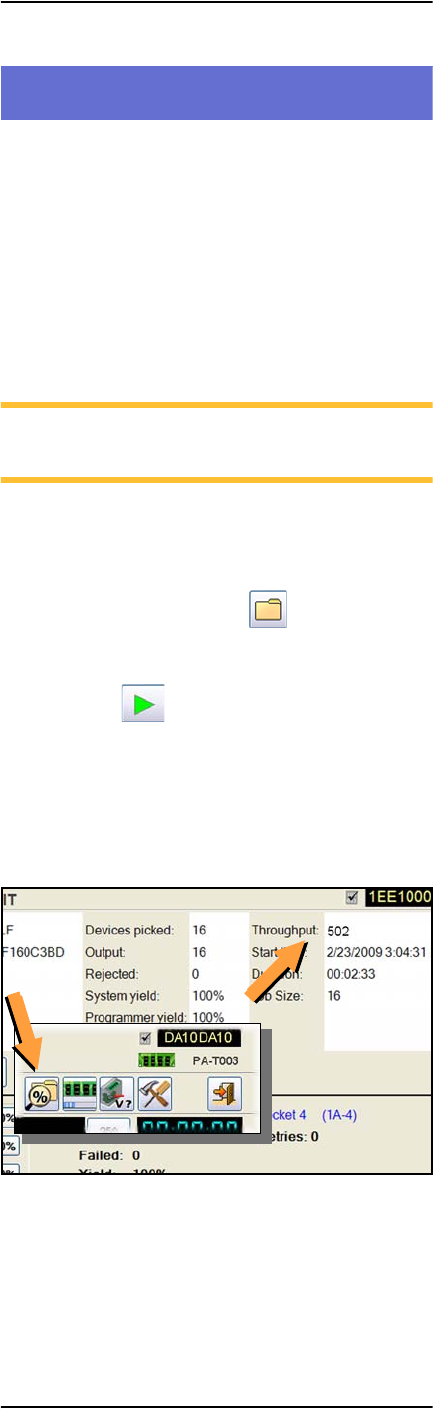
5. When it finishes, tap the Statistics button on
the Run Window and read the Throughput
displayed on the statistics window.
Record the PPH in the PV-Kit Performance
chart on page 47.
Figure 3—The Statistics Window displays
Throughput
, often abbreviated as PPH.

Data I/O
FLX500 Chptr 1
—6—
Spares Kits
A Basic Spares Kit is available for the FLX500.
Hazardous Substance
Restrictions
Disposal of FLX500
Dispose in a separately managed collection for
electronic equipment (per Directive 2002/96/EC)
or return to Data I/O (no charge).
RoHS for China
Restriction of the use of certain hazardous sub-
stances in electrical and electronic equipment in
China:
Data I/O Part Number
Basic Spares Kit 952-0377