FLX500-maintenance.pdf - 第5页
—1— Installing a Keyboard and Mouse The FLX500 incorporates a touch screen; how ever , some maintenance procedures require the use of a keyboard and mouse. The keyboard and mouse …

Data I/O
FLX500
—ii—
—1—
Installing a Keyboard and
Mouse
The FLX500 incorporates a touch screen; however,
some maintenance procedures require the use of
a keyboard and mouse. The keyboard and
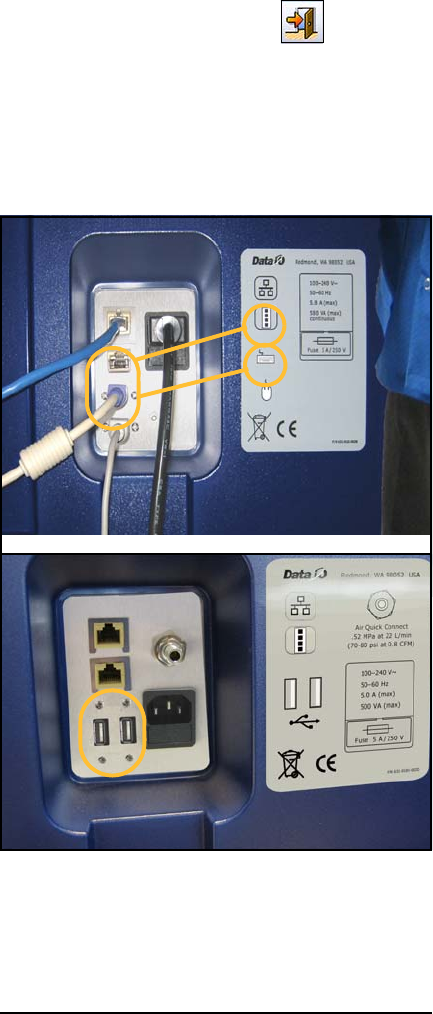
mouse plug into the back of the FLX500. See Fig-
ure 1 on the next page.
1 … Tools and
Materials
Data I/O
FLX500 Chptr 1
—2—
On early models using PS/2 ports, the system
power must be recycled after connecting a key-
board and mouse.
Connecting a keyboard and mouse depends on
your model. See the configuration in Figure 1
that matches your model.
Connecting a PS/2 Keyboard and
Mouse:
1. End a job if one is running.
2. Exit the FLX500 application–
3. Plug in the keyboard and mouse according
to the label. See Figure 1.
4. Switch off the power by pressing the power
switch (right side) once and releasing. Then
push it and release once more to turn the
power back on again.
Figure 1—Keyboard and Mouse Connections on the
back of the
FLX500
. Early models require PS/2 con-
nections (A). Later models require USB
connections (B).
PS/2
USB
A.
B.