00198001-02_IM_709.1_DE_EN.pdf - 第43页
Station Software 709.1 / Installation Manual Ausgabe 05/2016 E dition 43 7 First B ooting afte r I nstallation When a machine is boot ed for the first t ime after instal lation, the st ation software detect s for the mos…
Station Software 709.1 / Installation Manual Ausgabe 05/2016 Edition
42
CAUTION
The Vision computer must not be simply switched off!
► Wait a few seconds after you have clicked the Finish button, before you shut down
the Vision computer!
As some installation steps are not performed until the end of the installation by the
InstallShield, the installation might otherwise be incomplete what may cause
problems during further installations.
► Open the Command Prompt window under Start – All programs – Accessories.
► Run the shutdown/s command.
The shutdown starts and the Remote Desktop is terminated.
NOTICE
To establish the connection between the SIPLACE Coplan computer software or feeder
computer software and the SIPLACE station software after the installation has been
completed, the Vision computer and the station computer must first be shut down and
the machine then switched off completely.
► To do this, open the Start menu on the station computer and select All Programs – SIPLACE
– Shutdown Vision_SR (all).
► Switch the machine off when the computer systems have shut down.
► Then, switch the machine on again. This reboots the Vision computer and the station computer.
Station Software 709.1 / Installation Manual Ausgabe 05/2016 Edition
43
7 First Booting after Installation
When a machine is booted for the first time after installation, the station software detects for the
most part independently which hardware components are used via the Auto-configuration feature.
Certain settings, such as CAN card type, table type, lamp indicators and pin magazines cannot be
detected automatically and will have to be selected manually.
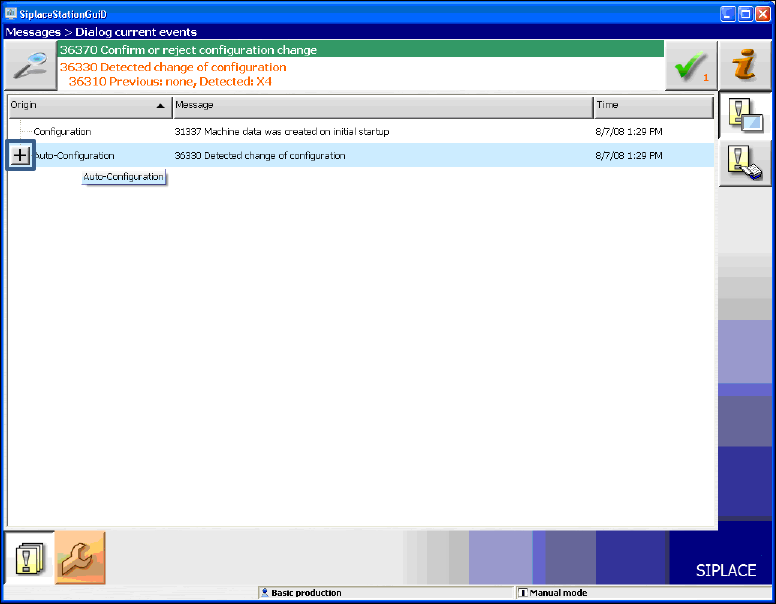
Generally, the operator will be prompted to confirm or reject any configuration changes.
Figure 7-1: Auto-configuration
► Click the + sign in front of the Auto-configuration text to open the message list of the
Auto-configuration function.
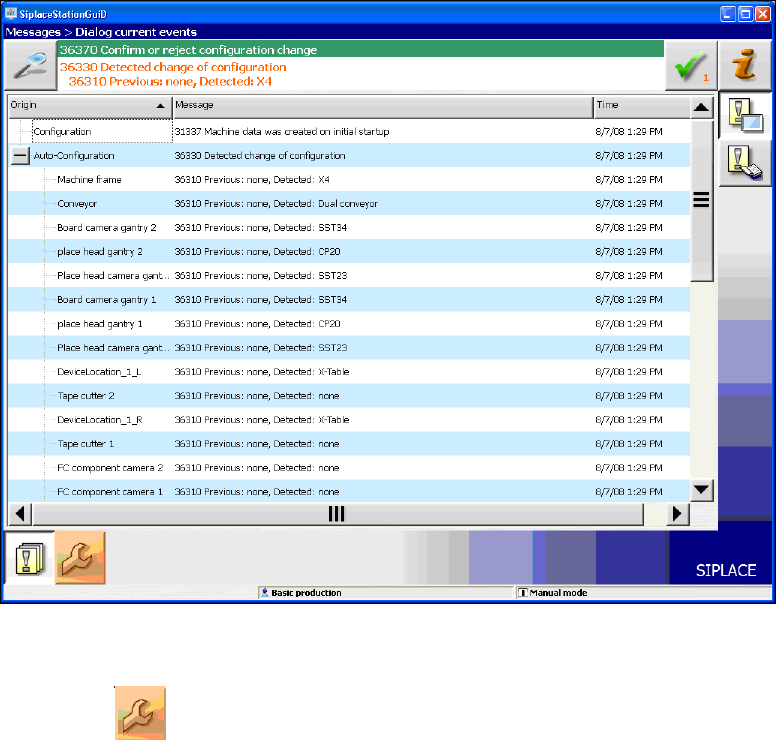
The used hardware components are displayed.
Station Software 709.1 / Installation Manual Ausgabe 05/2016 Edition
44
Figure 7-2: Used hardware components
The Machine service activity level is required to execute the Auto-configuration.
► Click the icon to call the user settings.