00198001-02_IM_709.1_DE_EN.pdf - 第9页
Station Software 709.1 / Installation Manual Ausgabe 05/2016 E dition 9 – The 70 9 .x station software versio n runs with Windo ws Embedded Standar d 7 (WES7) only . The station comput er has to be equi pped with at leas…
Station Software 709.1 / Installation Manual Ausgabe 05/2016 Edition
8
3 Upgrading to the 709.x Software Version
This chapter describes which steps you generally have to attend when upgrading to the current
station software version and which steps are additionally required when upgrading from different
software versions.
– When upgrading the station software, always check the eSW versions and download the
current versions if necessary.
– With the installation of the 709.x station software, statistic data (maintenance intervals) is
registered for the CPP and C&P20A placement heads and the SX main axis. In order to
achieve a defined initial state for the maintenance due, the correspondent maintenance
operations have to be performed on the subsystems after the software installation.
– An upgrade of the embedded software is necessary for the LDU-X. Generally, it is not possible
to perform a download of the embedded software via the station software for the LDU-X. The
LDU-X has to be upgraded to the 2.02 software version with the aid of an external PC.
– There is new embedded software for the feeders. As soon as a feeder with an elder eSW is set
up an update of the eSW is proposed. This can be cancelled but it is not possible to take out
the table as long as the update is pending. To get the table out without a download you have to
take out the feeders or disable the feeder download within the SW options.
– There is new embedded software for CPP and C&P20 placement heads. After an update from
a lower version they are recognized as modified heads and the head data has to be saved
manually once after the installation.
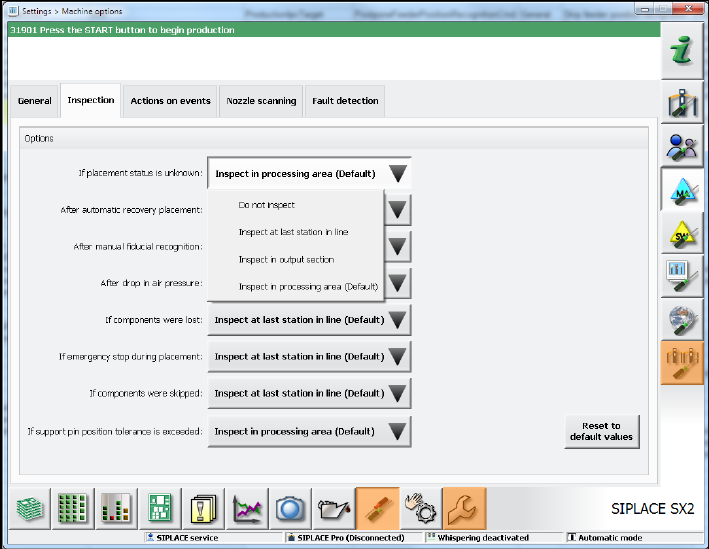
– When upgrading to the 709.x station software the inspection options will be reset to the
respective default values. If necessary, the inspection options have to be adjusted under
Settings – Machine options – Inspection.
Figure 3-1: Adjust inspection options
Station Software 709.1 / Installation Manual Ausgabe 05/2016 Edition
9
– The 709.x station software version runs with Windows Embedded Standard 7 (WES7) only.
The station computer has to be equipped with at least 2 GB memory with WES7, 32-bit and 4
GB memory with WES7, 64-bit respectively. If necessary, station computers in the field have to
be exchanged or upgraded with a memory extension. Please refer to the Technical Information
TI2014-09E04.
– When upgrading from a previous station software version to the 709.x version, C&P head
segments with the Deactivated or Not used state will be reset to the Activated state
automatically! If required, the status for such segments has to be changed manually again.
– Predictive Maintenance:
By installing station software version 709.1, the calculation of the maintenance display for
placement heads, cutters and X/Y axes has been changed for the SX placement machines.
The calculation is now based on time.
For this, the following conditions must be met:
► Ensure that the system time of the station computer is set correctly.
► Perform a complete maintenance of the machine and placement heads before installing the
station software. This is required as a date stamp is stored in the corresponding EEPROMs
with the new station software version and this stamp is used for the maintenance display.
3.1 Upgrading from the 708.x Software Version
No further steps required.
3.2 Upgrading from the 707.x Software Version
► If necessary, perform an upgrade to the Microsoft Windows Embedded Standard 7 (WES7,
32-bit or 64-bit) operating system. See sections 4.1.1 and 5.3.1.
3.3 Upgrading from the 706.xx Software Version
► If necessary, perform an upgrade to the Microsoft Windows Embedded Standard 7 (WES7,
32-bit or 64-bit) operating system. See sections 4.1.1 and 5.3.1.
3.4 Upgrading from the 705.xx Software Version
► If necessary, perform an upgrade to the Microsoft Windows Embedded Standard 7 (WES7,
32-bit or 64-bit) operating system. See sections 4.1.1 and 5.3.1.
► SX1/SX2 and DX1/DX2 placement machines in the field with an FC camera at Location 1:
Due to an error correction in the configuration, the FC camera position has been moved and
thus the calibration values for the camera and the segment offset are invalid.
Recalibrate the camera and the segment offset.
Station Software 709.1 / Installation Manual Ausgabe 05/2016 Edition
10
3.5 Upgrading from the 704.xx Software Version
► If necessary, perform an upgrade to the Microsoft Windows Embedded Standard 7 (WES7,
32-bit or 64-bit) operating system. See sections 4.1.1 and 5.3.1.
► SX1/SX2 placement machines in the field with an FC camera at Location 1:
Due to an error correction in the configuration, the FC camera position has been moved and
thus the calibration values for the camera and the segment offset are invalid.
Recalibrate the camera and the segment offset.
► Recalibrate the travel ranges.
► Recalibrate the external cameras.
This is required, as the z height has been adapted for the dp calibration.
► Save the calibration data for the placement heads (except Twin Head) in the EEPROM
(see section 7.11).
► Perform a component sensor calibration if a CPP placement head is used for 0201/01005
placement.
► Perform the closed vacuum calibration if Twin Heads are used.
3.6 Upgrading from the 703.02 or 703.02 SP1 Software Version
► If necessary, perform an upgrade to the Microsoft Windows Embedded Standard 7 (WES7,
32-bit or 64-bit) operating system. See sections 4.1.1 and 5.3.1.
► SX1/SX2 placement machines in the field with an FC camera at Location 1:
Due to an error correction in the configuration, the FC camera position has been moved and
thus the calibration values for the camera and the segment offset are invalid.
Recalibrate the camera and the segment offset.
► Please pay attention to the Technical Information TI2010-10V02 and TI2010-10C02 when you
download the embedded software.
► Recalibrate the travel ranges.
► Recalibrate the external cameras.
This is required, as the z height has been adapted for the dp calibration.
► SX-series placement machines in the field:
Due to the SW component counter, the HCU/GCU and the sensor modules have to be
programmed. For this, perform the work steps that are described in the Technical Information
TI2010-02V01 and TI2010-02C01 about programming HCU/GCU for the 704 upgrade. These
work steps can only be performed by the SIPLACE Service.
► SX 1/2 placement machine:
In order to use the "Long Board" option and the "Gantry Modularity" functionality, PCB mapping
and head mapping have to be performed.
► Placement machines with FC camera:
The entire placement head has to be calibrated.
► X4i placement machine:
The machine zero points, tables, nozzle changers, PCB reference corners and, if stationary
cameras are present the placement heads as well, have to be recalibrated (due to a changed
handling of double zero points on the X4i placement machine). No mapping is necessary.
► Save the calibration data for the placement heads (except Twin Head) in the EEPROM
(see section 7.11).
► Perform a component sensor calibration if a CPP placement head is used for 0201/01005
placement.
► Perform the closed vacuum calibration if Twin Heads are used.