00197551-01_MM_CPP-CP-Twin_Kunde_en.pdf - 第90页
Handling the Multipette Filling and Setting the Multipette 90 Maintenance Manual SIPLACE Placement Heads CPP, C&P20, Twin 9.3 9 . 3 F illin g a n d S e t t in g t h e M u lt ip e t t e Filling and Setti ng the Multip…
Handling the Multipette
Overview of Multipette
Maintenance Manual SIPLACE Placement Heads CPP, C&P20, Twin 89
9
9 Handling the Multipette
Handling the Multipette
9.1
9.1 Overview of Multipette
Overview of Multipette
9.2
9.2 Assembling the Multipette
Assembling the Multipette
NOTICE
Description example
The multipette is described using an example [03078989-xx].
For all other multipette types, refer to the manufacturer's instructions included.
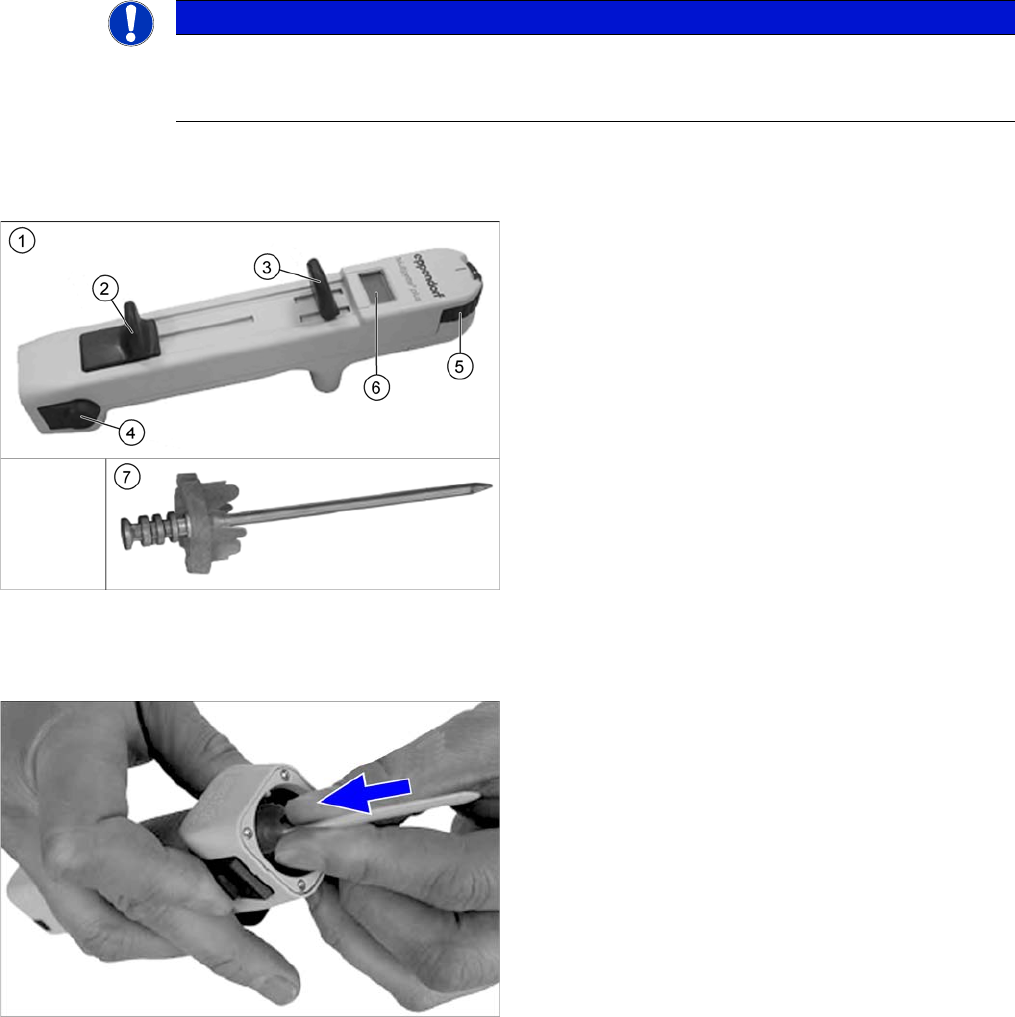
1. Multipette
2. Filling lever
3. Dosage lever
4. Reject button
5. Volume setting
6. Digital display
This shows the application amount. The amount ap-
plied depends on the combitip used and the current
position of the volume setting.
7. Combitip
► Press the filling lever on the multipette right down and
hold in position.
► Press the relevant combitip onto the multipette until it
engages.
► Check whether the combitip is fitted firmly on the Mul-
tipette.
► Set the required dosage on the volume setting.
Handling the Multipette
Filling and Setting the Multipette
90 Maintenance Manual SIPLACE Placement Heads CPP, C&P20, Twin
9.3
9.3 Filling and Setting the Multipette
Filling and Setting the Multipette
► Place a cloth or similar material on your working surface so that this is not soiled with lubricant when
you set the multipette.
► Take the tip of the combitip out of the lubricant and wipe any excess lubricant off the combitip.
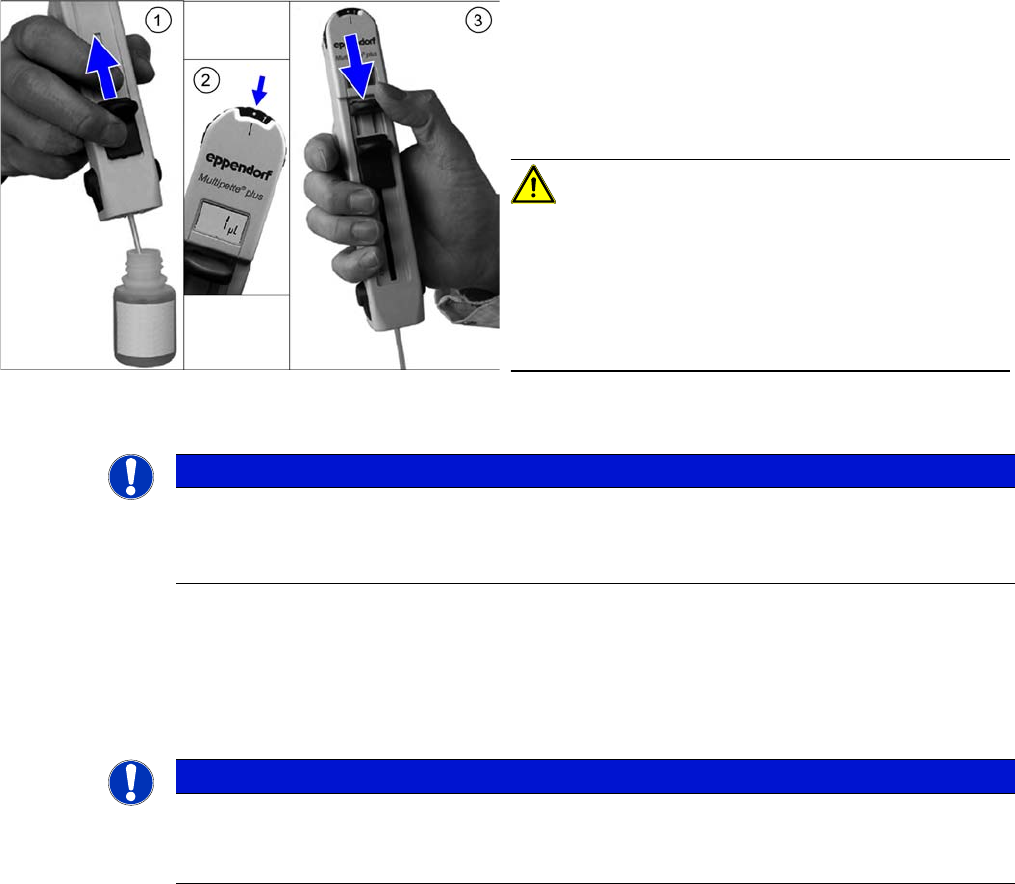
► (2) Set the multipette gauge to the dot on the left, next to the "1". The display should now show "1 µl".
► (3) Push the application lever as far as the end stop, in the direction of the combitip.
This removes any air trapped in the combitip. The volume shown is then accurate.
► Test the application volume on the cloth.
The multipette is now ready for use.
9.4
9.4 Releasing the Combitip from the Multipette
Releasing the Combitip from the Multipette
► Hold the combitip over a container with the relevant lubricant or a waste bin and push the filling lever
right down. The remaining lubricant will be pressed out.
► Pull the filling lever back up again.
► Press the two reject buttons simultaneously. The combitip will be released from the multipette.
► Push the filling lever as far as the end stop, in the di-
rection of the combitip.
► Dip the tip of the combitip into the relevant lubricant.
► (1) Slowly push the filling lever in the direction of the
display, to pull the lubricant into the multipette.
CAUTION!
Do not apply the filling lever too quickly, otherwise a
strong vacuum will be created. The fluid will then be en-
riched with air bubbles, which can lead to inaccurate ap-
plication volumes.
However, the small air bubble in the upper section of the
cylinder does not affect the application volume.
NOTICE
Fill the combitip completely
If you do not completely fill the combitip, the display will not flash.
► In this case, you need to return the initial volume to the bottle and then refill the combitip.
NOTICE
Changing the volume
► You can change the volume between applications by simply turning the volume setting
wheel.
acpage