JAKA Zu 3及JAKA Zu 3 pro-电控柜V2.1-硬件手册( 英文版).pdf - 第24页
JAKA Zu 3 v 1. 1 19 4 Electrical Interface 4.1 Introduc tion This chapt er descr ibes all t he electrica l interfaces of the r obot and e lectrica l cabinet. These inter faces ar e divide d into thr ee categor ies, eac h…
18
JAKA Zu 3 v1.1
recommended to tighten these bolts with a torque of 40 Nm. If you need to adjust the robot installation
position very accurately, you can also drill two φ8 pin holes and fix them with pins. It is also possible to
purchase an accurate base counterpart as an accessory. Mount the robot on a sturdy surface that is
strong enough to withstand at least ten times the full torque of the base joint and at least five times the
weight of the robot arm. Furthermore the surface shall be vibration free. If the robot is mounted on a linear
axis or a moving platform then the acceleration of the moving mounting base shall be very low. A high
acceleration might cause the robot to stop, thinking it bumped into something. Fig. 3-7 shows the robot
mounting holes. All measurements are in mm.
Fig
3-6
3.2.4 End effector Installation
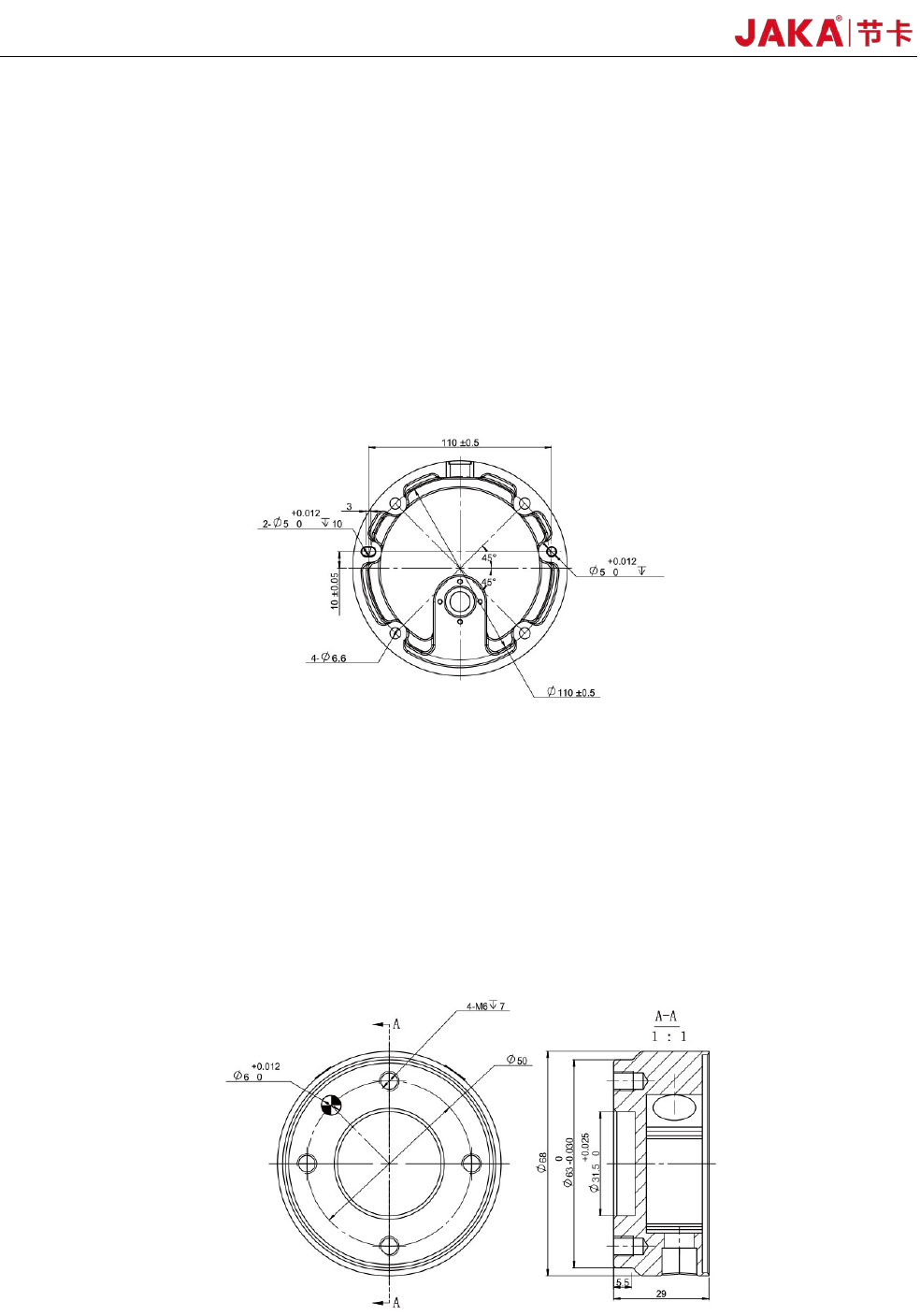
The robot end flange has four M6 tapped holes to mount the end effector. When screws are installed
in these threaded holes, the screws need to be tightened with a torque of 15 Nm. If you need to adjust the
tool position very accurately, you can also drill a φ6 pin hole and fix it with a pin. Fig. 3-7 shows the
drilling position and the screw mounting position. All measurements are in mm.
Fig
3-7
JAKA Zu
3 v1.1 19
4 Electrical Interface
4.1 Introduction
This chapter describes all the electrical interfaces of the robot and electrical cabinet.
These interfaces are divided into three categories, each of which has different purposes and properties:
• Front panel interface of the electrical cabinet
• Bottom interface of the electrical cabinet
• Tool input and output interface(TIO)
These three types of interfaces are described below, and most types of I/O are provided with examples.
4.2 Warnings and Cautions
Be sure to observe the following warnings and cautions when designing and installing robotic
applications. These warnings and cautions are also apply for service work.
Warning:
1.Never connect a safety signal to a non-safety PLC with an
unsuitable safety level. Failure to follow this warning may result in
serious injury or death due to the failure of a safety stop function.
Be sure to separate the safety interface signal from the normal
I/O interface signal.
2.All safety signals are redundant (two independent channels).
Keeping the two channels independent ensures that no safety
features are lost in the event of a single failure.
3. For an introduction to the I/O functions inside the electrical
cabinet, please refer to Section 4.3.
Warning:
1. Please ensure that all equipment that is not wet is kept dry. If
water enters the
product, cut off the power supply in a timely
manner, then contact your supplier.
2. Use only the original cable of the robot. Do not use the robot in
applications where the cable needs to be bent. If you need a longer
cable or flexible cable, you can contact your supplier.
3. For protective earthing (PE), use the screw connector marked
with a grounding mark in the electrical cabinet. The ground
connector should have at least the rated current of the current
maximum within the system.
4. When the cabinet's I / O interface cable when installed, the door
is opened to remove the metal plate outlet holes, and to ensure
that I / O cable outlet holes to avoid fraying.
20 JAKA Zu 3 v1.1
Cautions:
1. The robot has passed the electromagnetic compatibility test
specified in the CR certification. Exceeding standard interference
signals will cause abnormal behavior of the robot. Extremely high
signal levels or exceeding the maximum standards will cause
permanent damage to the robot. JAKA is not responsible for any
damage caused by out-of-range EMC problems.
2. The length of the I/O cable used to connect the electrical cabinet
to other mechanical and industrial equipment must not exceed 30
meters unless it is feasible after extended testing and shielded
cables are required if necessary.
4.3 Front panel of the electrical cabinet
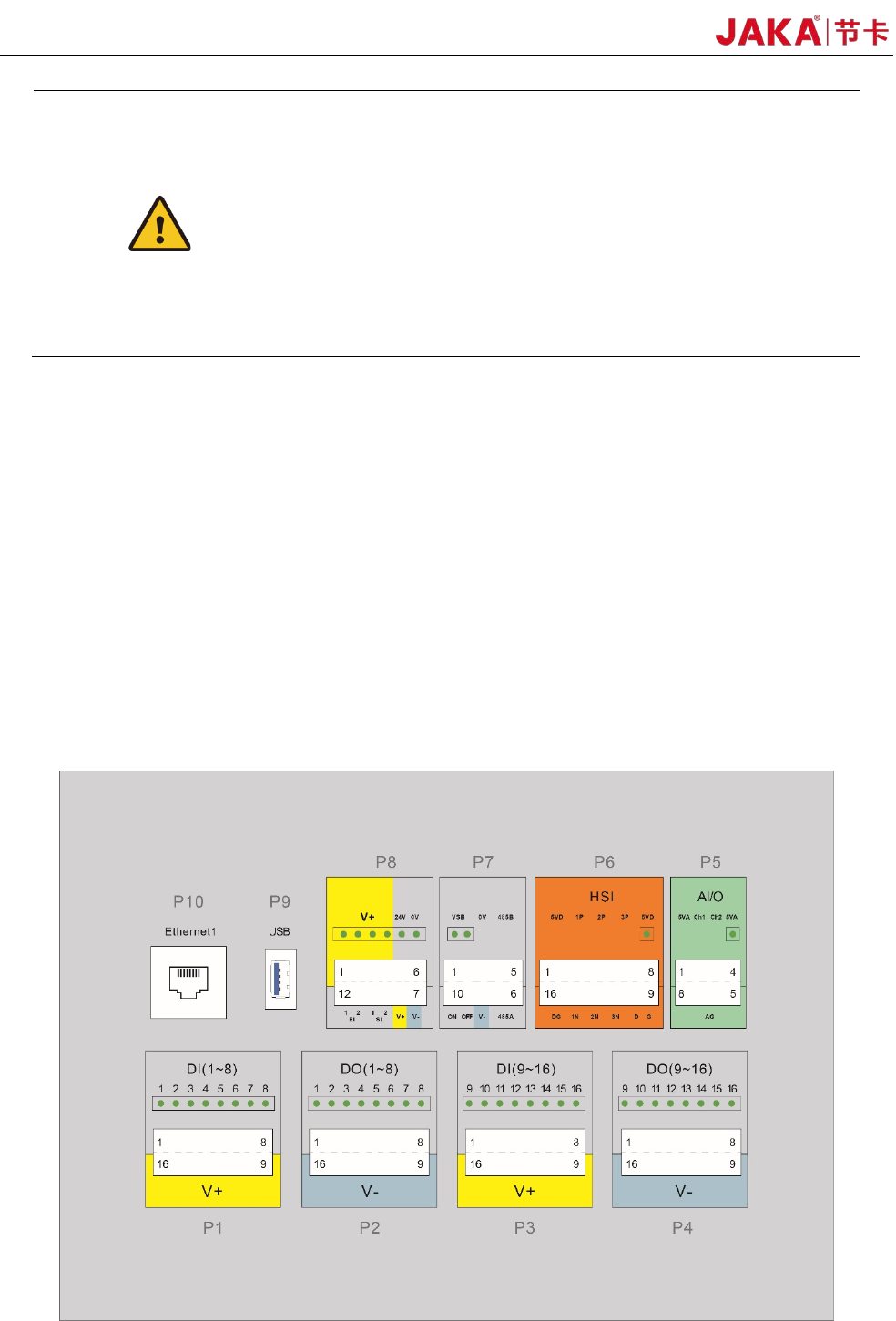
The front panel interface of the electrical cabinet is arranged on the first floor after the electrical cabinet
door is opened, including:
16 digital inputs (P1 and P3)
16 digital outputs (P2 and P4)
2 configurable analog interfaces (P5)
1 set of high speed interface (P6)
Remote ON/OFF and 485 interface (P7)
Safety function interface (P8)
USB3.0 interface (P9) and Ethernet interface (P10)
The USB interface and Ethernet interface are reserved for internal use and can be contacted by JAKA
technical support personnel if needed. The layout is shown in Figure 4-1.
Fi
gure 4-1 Front panel interface of the electrical cabinet