JAKA Zu 3及JAKA Zu 3 pro-电控柜V2.1-硬件手册( 英文版).pdf - 第33页
28 JAKA Zu 3 v1. 1 Fig 4-13 The digita l output module c an be contr olled by the DO function o f the APP . The user nee ds to control t he load pow er whe n using it. The si ngle chann el shoul d not excee d 1A cu rrent…
JAKA Zu
3 v1.1 27
.
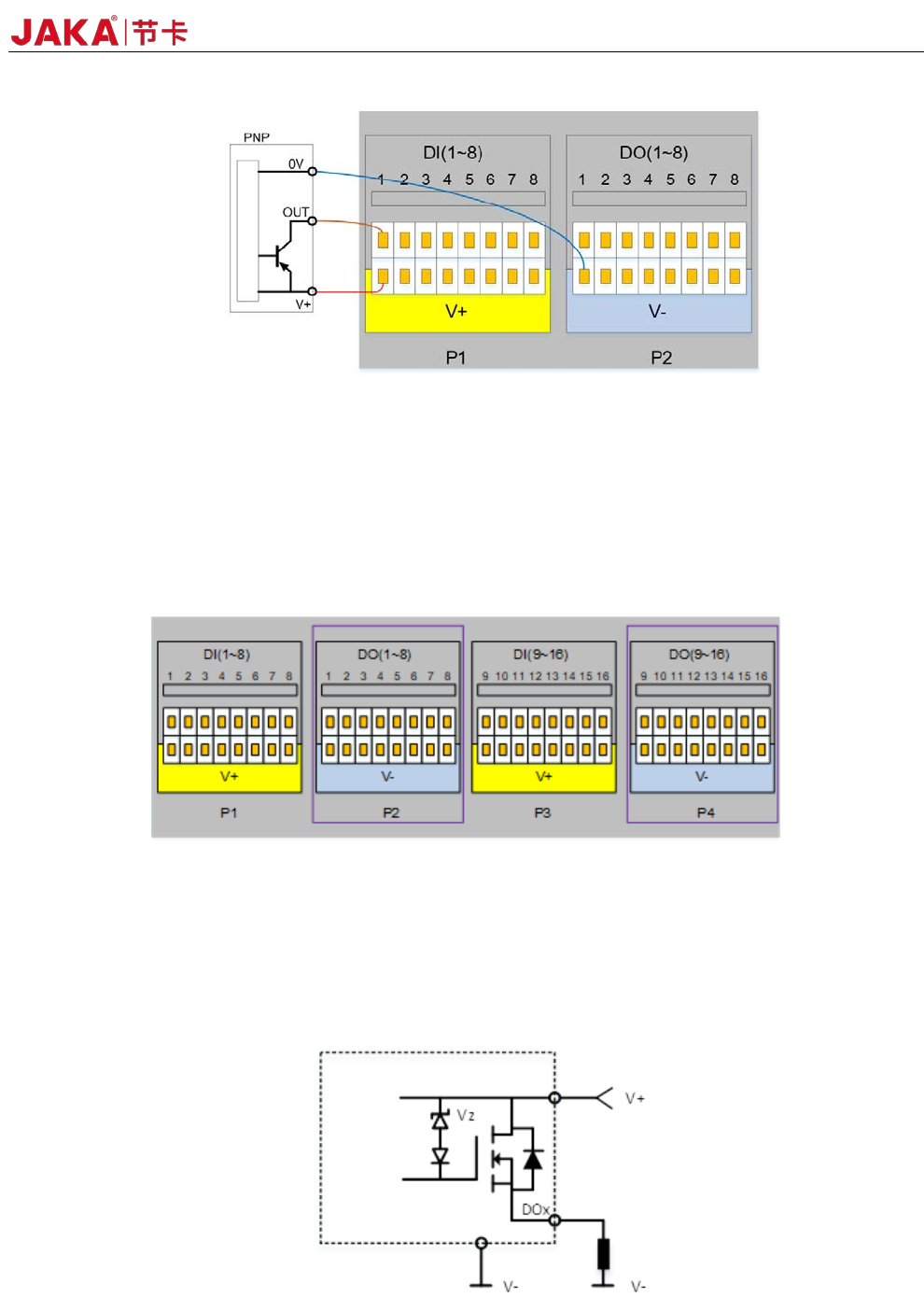
Figure 4-10
Figure 4-10 shows the input wiring diagram of the PNP interface. The V + pin is connected to V +, the
OUT pin is connected to DIx, and the 0V pin is connected to V-. When the signal is triggered, the LED on the
panel turns on, and the DIx status on the APP interface is changed.
4.3.3 Digital Output(DO)
Figure 4-11
The electric control cabinet has 16 channels PNP type output interface (DO1 ~ DO16) to support isolated
signal output.
The digital output uses a high-side output with a single continuous maximum current of 1A. However,
when V+ defaults to internal 24V power supply, the 24V power supply is limited to 1.5A. The typical internal
circuit diagram is as follows:
Figure 4-12
The typical block diagram is as follows:
28 JAKA Zu 3 v1.1
Fig 4-13
The digital output module can be controlled by the DO function of the APP. The user needs to
control the load power when using it. The single channel should not exceed 1A current, and the DO
output current should not exceed the maximum output current of the power supply.
* Note: It is strongly recommended to use protection DIODES for the inductive loads (such as
relays, electromagnets, DC motors, etc.).
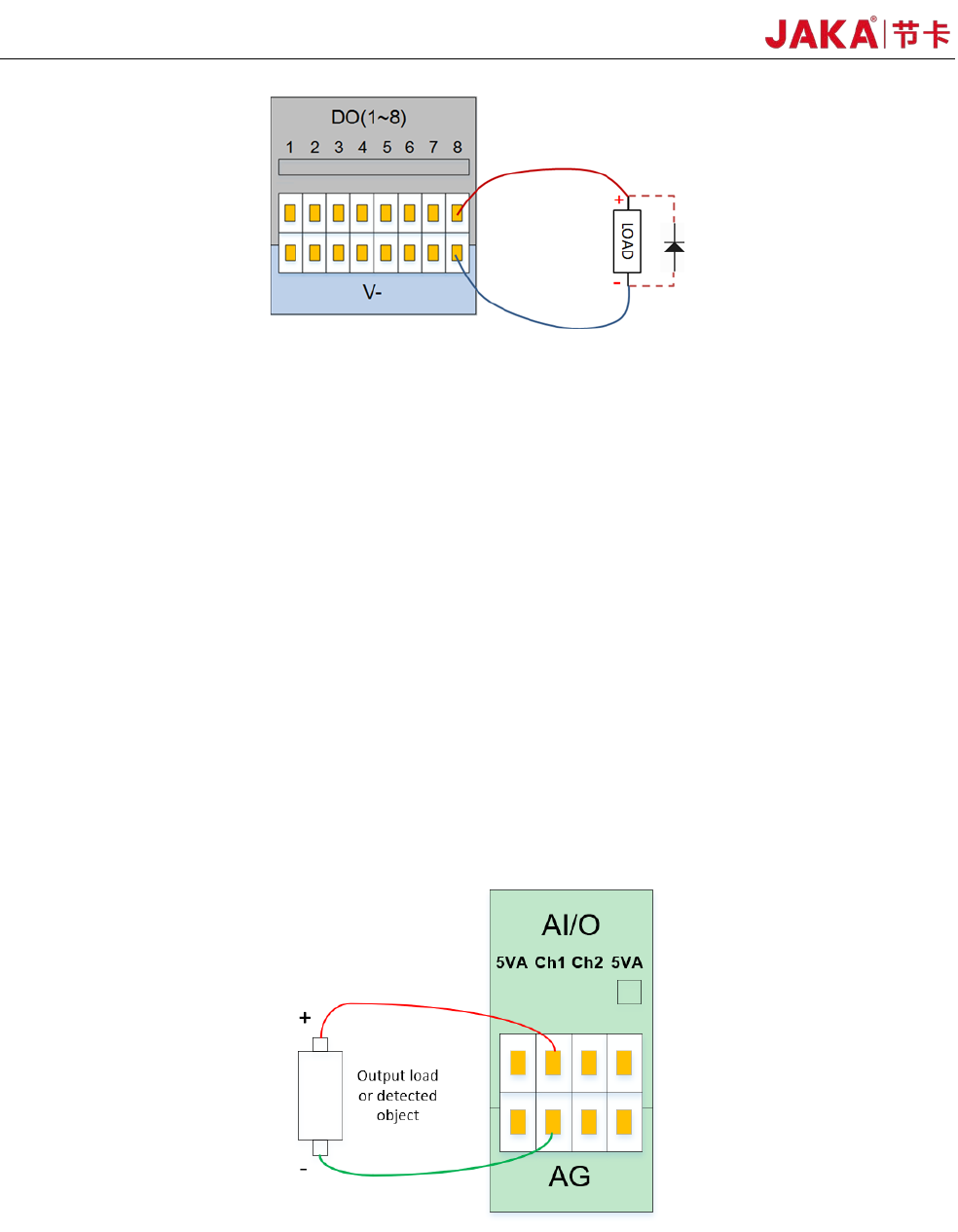
4.3.4 Analog Input&Output(AI&AO)
The electrical cabinet has 2 analog input and output interfaces (Ch1, Ch2), the input mode can be
configured, and the AI mode is as follows:
1) Current signal input: 4 to 20 mA.
2) Voltage signal input: 0~5V, 0~10V, -10V~+10V.
3) Current signal output: 0~20mA
4) Voltage signal output: 0~5V, 0~10V, -10V~+10V.
The wiring method for analog input and output is shown in Figure 4-13.
Fi
gure 4-14
The JAKA CAB V2 AI/O interface can be configured to work in different modes (factory default is
0~10V analog input). The user can set the AI/O working mode through the APP.
For high accuracy, the following instructions are recommended:
• Use the AG terminal closest to the AI/O.

JAKA Zu
3 v1.1 29
• Use the same GND for equipment and electrical cabinet. The analog AI/O is not isolated from the
electrical control cabinet.
• Use shielded cables or twisted pairs. Connect the shield to the "AG" on the "Power".
• The sensitivity of the current signal is lower for the device operating in current mode than the
interface.
4.3.5 High Speed Interface
The P6 HSI (High Speed Interface) can be connected to an external encoder. Can be used for conveyor
tracking and other occasions. For detailed usage, please contact our technical staff for support.
4.3.6 Remote ON/OFF
The remote ON/OFF control is used to enable the user to leave the APP and the handle to turn the
cabinet on and off. It can usually remotely control the on/off switch of the robotic control cabinet when the user
connects to the PLC system.
When ON/OFF receives a 5~24V voltage signal (reference ground is V-), and the “ON/OFF” connector
functions the same as the handle switch button
The user can short-circuit Remote ON/OFF to 12V power supply or VSB interface through the switch.
4.3.7 Safety I/O
In order to ensure the safety function configuration of the robot, the electrical cabinet provides two fixed
safety function input interfaces. EI is an emergency stop and SI is the user stop. Both EI and SI have a redundant
design that can be enabled when any channel signal is active. The emergency stop function is similar to the
handle emergency stop button function, and the user stop function belongs to the program pause. The difference
between the two functions is as follows:
EI SI
Robot stops moving Yes Yes
Joint motor status Stop Enable
Robot power supply OFF ON
Program execution
status
Terminated Pause
Brake status OFF ON
Users can access security doors, security light curtains, sensors and other devices according to actual
security requirements.
4.4 Bottom panel of the electrical cabinet
The bottom panel of the electrical cabinet includes the outlet hole, the binding hole, the handle outlet, the
Ethernet interface, the robot heavy-duty connector, the standard plug and the switch.
The outlet holes and the tie holes can be used to arrange and fix the wire harness leading to the front