20121120111955_KY8030_2_Maintenance_Manual_Eng_ver1.pdf - 第68页
68 | KY -8030 2 3D Solder Paste Inspec tion System V ersion 1.0 K OH Y OUNG T ECHNOLOGY I NC . 3.4.3. P ACKAGE W EIGHT AND S IZE Model Package weight Package size (W x D x H) KY -8030 2 700Kg 1800mm x 1500mm x …
Maintenance Manual | 67
3.4. Package and Storage
3.4.1. PACKAGING ITEMS
3DSolderInspectionSystem(KY‐80302)
LCDMonitor
Computer
TowerLamp
StandardPartBox(UserManual,CDincluded)
3.4.2. PACKAGING
1. Fixthebottomofthefoot,locatedonthelowerpartofthemachine,withwoodenPlator
StopperBracket.
2. FixtheBufferConveyor,locatedontheoutsideofthemachine,withspecialfixingJigor
Bracket.
3. Pack the Monitor, Computer and Tower Lamp, located on the outside
of the machine,
separatelyafterdetachingthemfromthemachine.
4. Fix the Monitor support, keyboard, keyboard support, mouse and mouse pad to the
machinesothattheycannotmove.
5. Fix the probe, Conveyor, internal operating part X, Y and Z axis with fixing Jig or
Bracket.
6. Put
soft cloth or polyester sheet on the acrylic door to prevent damages, wrap the
machinewithadhesivevinylwrapandfoams.
7. Make the whole wooden box (crate) with the machine inside, and then attach the
Shippingmark.
8. Attach the sticker with information including sender, receiver, Case No. and Gross
Weightwrittenon.
※ Caution:Avoidimpactorpressureontheacrylicdoororsystempackage.
Forkliftthesystemfromtheside.Ifliftedfromthefrontorback,thesystemcanlosebalanceandfall.
Observethepackagingruletopreventdamageorscratch.
Useair‐ridetrucktopreventdamagefortheshortdistancetransportation.
Whenexporting,vacuumpackagethesystembythepackagingexpert.

68 | KY-8030 2
3DSolderPasteInspectionSystem
Version 1.0
KOH YOUNG TECHNOLOGY INC.
3.4.3. PACKAGE WEIGHT AND SIZE
Model Package weight Package size (W x D x H)
KY-8030 2 700Kg 1800mm x 1500mm x 1700mm
3.4.4. STORAGE
Thefollowingistheenvironmentforthemachinestorage.
※Caution: Save the machine in the environment specified below. Otherwise the machine may be
damagedormaycarryoutafaultyoperation.
Temperatureforoperation:0°C~30°C(32°F~86°F)
Temperatureforstorage:0°C~30°C(32°F~86°F)
Acceptablehumidity:50%
Maintenance Manual | 69
3.5. Remote control/Monitoring Setting (Server)
3.5.1. NETWORK SETTING
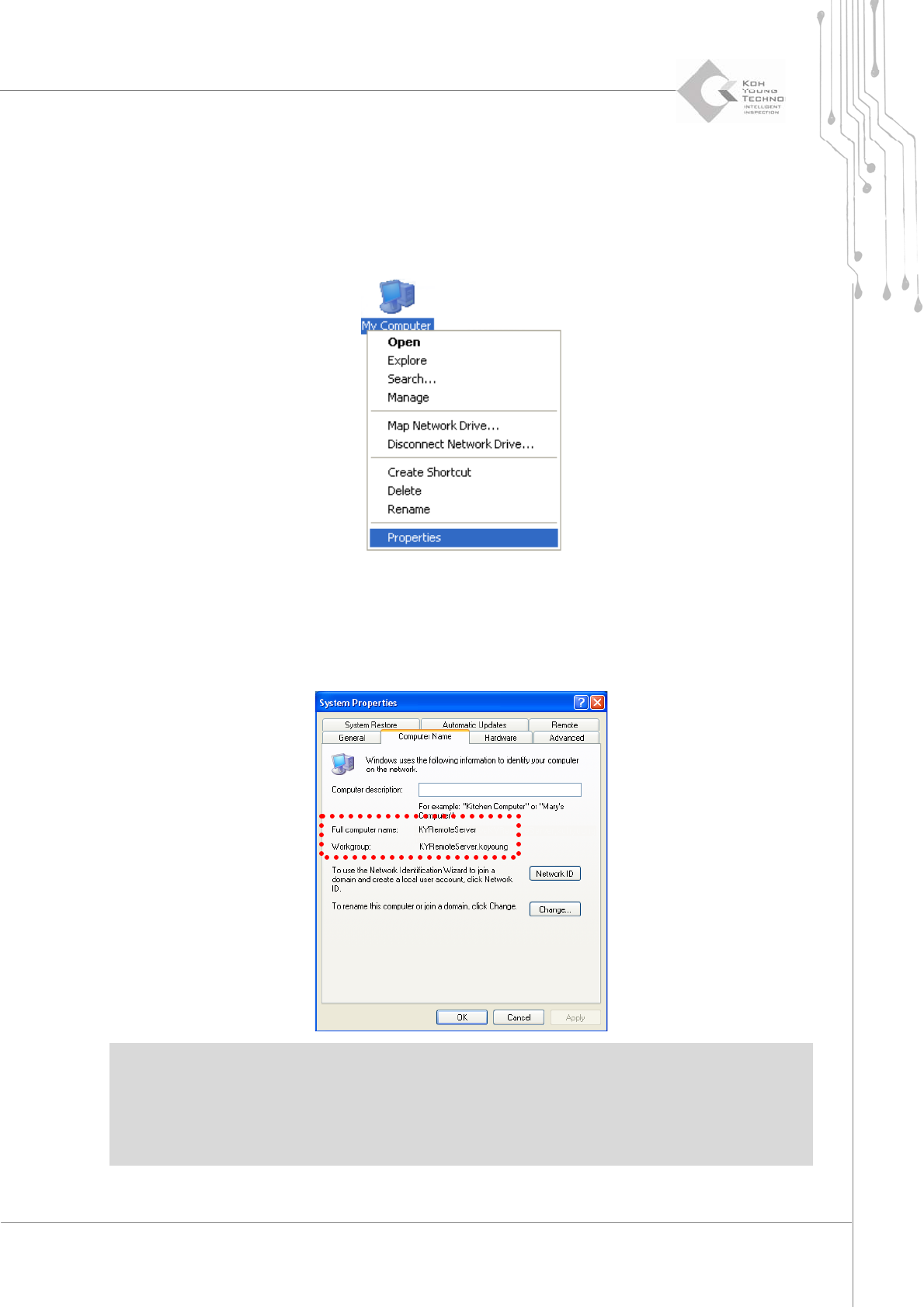
1. Clicktherightbuttonofthemouseat[MyComputer]andselect[Properties].
2. Clickthe[ComputerName]Tab.
3. Confirm the computer name (KYRemoteServer), small group (kohyoung) name and
userʹsname.
※Caution:
Ifcomputernames aresamewhen remote controllingmorethanone machine, the machines cannot
beusedatthesametime.
Thedomainsofallmachinesandcontrolsevermustbesameinordertoremotecontrolthemachine.