BA-UI-EN-D33363.pdf - 第29页
D33363 | Date 01/2020 29 Operation and control 5.4.4 Manual mode In this operating mode, the appliance runs in permanent operation at the values set on the ControlCOCKPIT . Adjustment options As described in chapter 5.4.…
28 D33363 | Date 01/2020
Operation and control
5.4.2 Basic operation
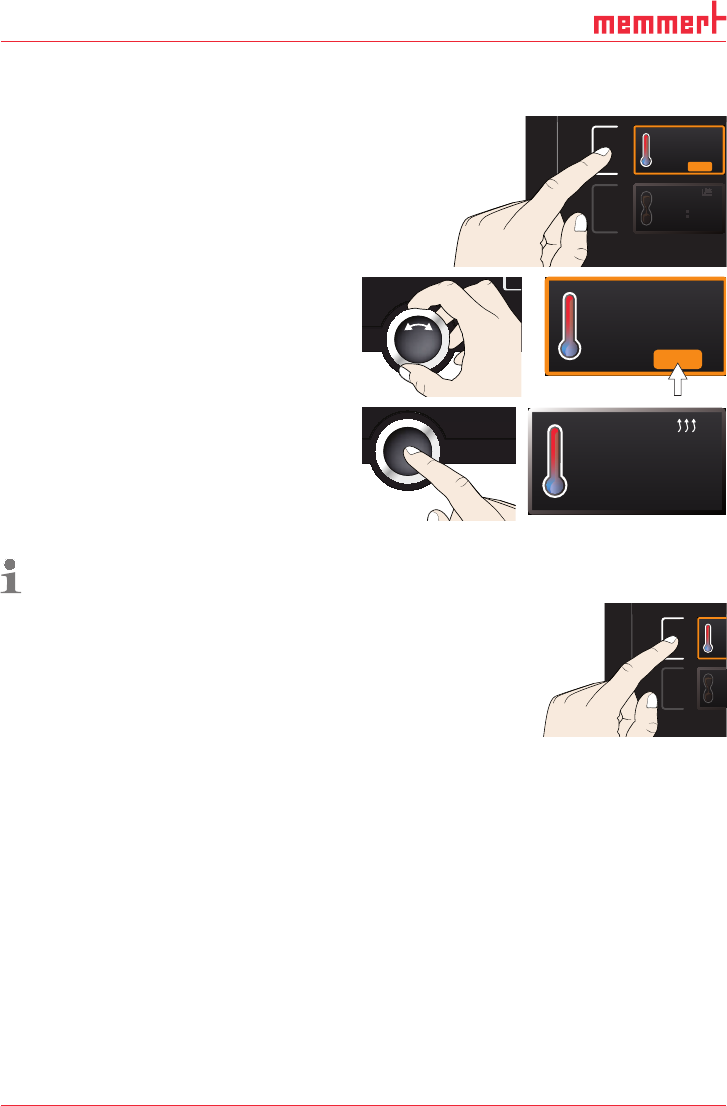
In general, all settings are made according to the following pattern:
1. Activate the desired parameter (e.g. tem-
perature). To do so, press the correspond-
ing activation key on the left or right of
the respective display. The activated dis-
play is lined in colour, the other displays
are dimmed. The set value is highlighted
in colour.
. 5°C100
TEMP
TIMER
TIMER
-
-
-
-
m
h
22.4 °C
TEMP
37.0 °CSet
2. By turning the turn control to the left
or right, adjust the set value (e.g. to
180.0 ºC).
3. Save the set value by pressing the confir-
mation key.
The display returns to normal and the
appliance begins adjusting to the defined
set value.
23.2 °C
TEMP
Set 180
.0 °C
Additional parameters (air flap position etc.) can be set accordingly.
If no new values are entered or confirmed for approx. 30 seconds, the appliance automati-
cally returns to the main menu and restores the former values.
If you want to cancel the setting procedure, press the
activation key on the left or right of the display that you
want to exit. The appliance restores the former values.
Only the settings that you have confirmed by pressing
the confirmation key before cancelling the setting
procedure are accepted.
5.4.3 Operating modes
The appliance can be operated in different modes:
► Manual mode: The appliance runs in permanent operation at the values set on the
ControlCOCKPIT. Operation in this mode is described in chapter 5.4.4.
► Operation with digital backwards counter with target time setting, adjustable from 1 min-
ute to 99 days (Timer): The appliance runs at the values set until the timer has elapsed.
Operation in this mode is described in chapter 5.4.5 .
► via remote control (see page 41)
22.4 °C
TEMP
180.0 °CSet
T
T
T
-
T
D33363 | Date 01/2020 29
Operation and control
5.4.4 Manual mode
In this operating mode, the appliance runs in permanent operation at the values set on the
ControlCOCKPIT.
Adjustment options
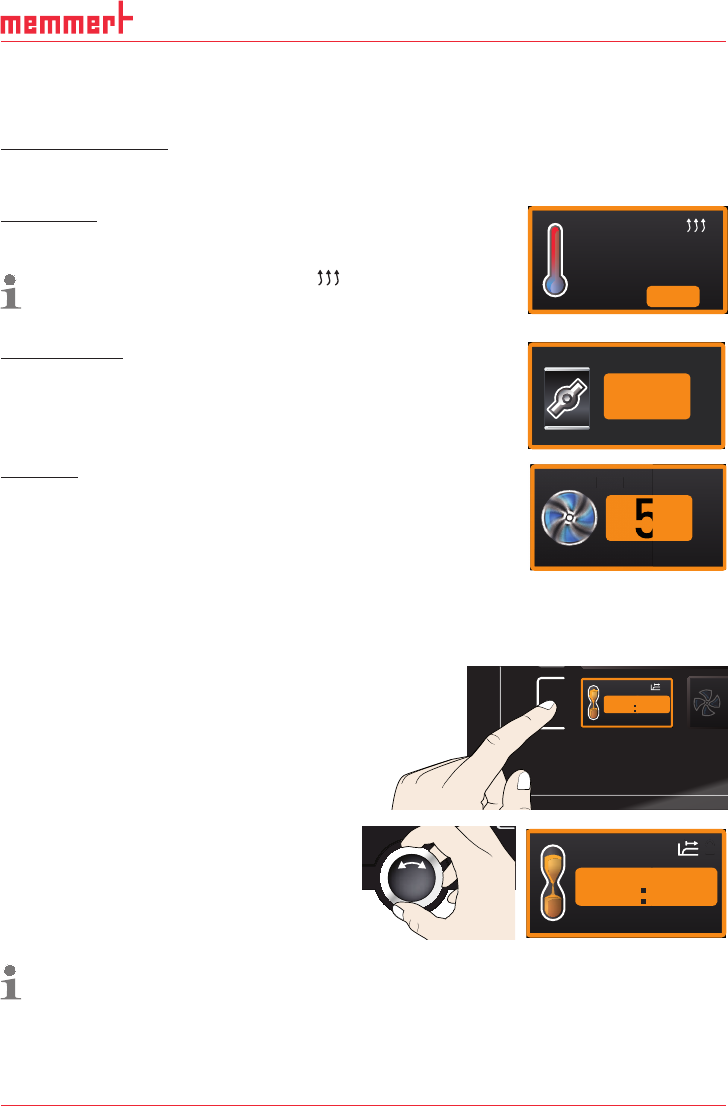
As described in chapter 5.4.2, you can set the following parameters after pressing the cor-
responding activation key (in any sequence):
Temperature
Adjustment range: model dependent (see nameplate and technical
date on page 14)
Heating operation is indicated by the
symbol.
You can select °C or °F as the temperature unit displayed (see
page 39).
24.4 °C
TEMP
180.4 °CSet
Air flap position
Adjustment range: 0 % (closed, recirculating operation) to 100 %
(completely opened, fresh air operation) in steps of 10%
FLAP
%40
Fan speed
(only for UF
.../IF... appliances)
Adjustment range: 0 to 100 % in steps of 10%
FAN
%
50
FAN
A
5.4.5 Operation with digital backwards counter with target time setting,
adjustable from 1 minute to 99 days (Timer)
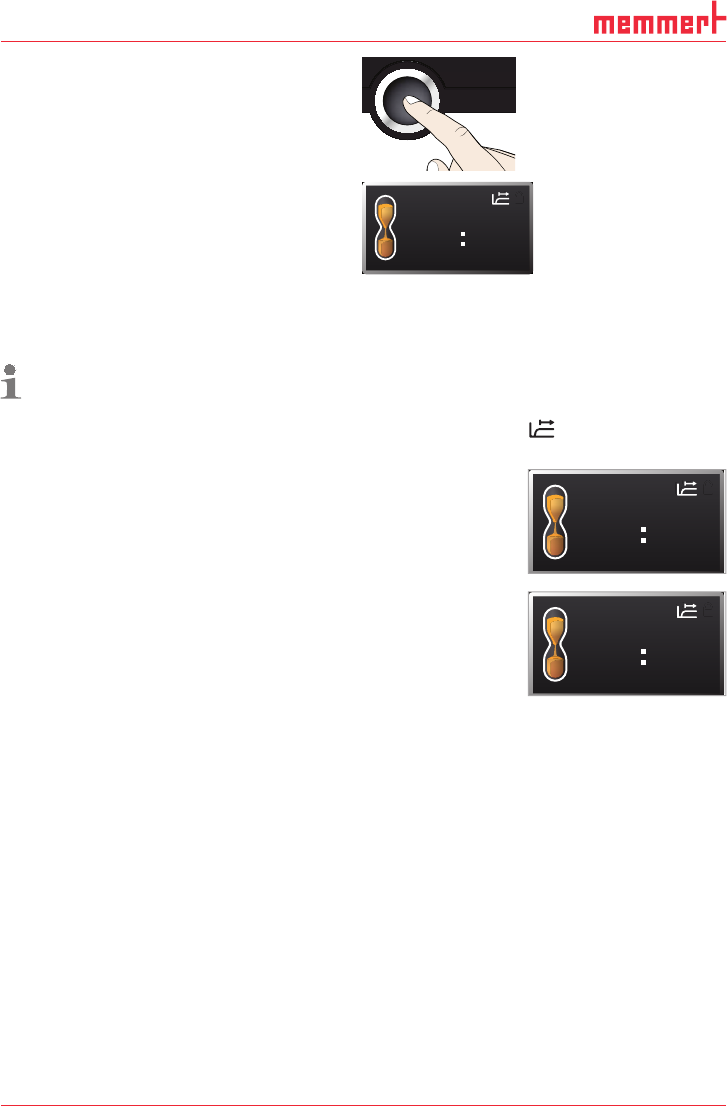
In timer operation, you can adjust the time the appliance runs at the set value.
1. Press the activation key to the left of
the timer display. The timer display is
activated.
FA
FA
TIMER
-
Ende
9:00 23.11.
--h- m
2. Turn the turn control until the desired
duration is displayed – in this example 4
hours 30 minutes. The approximate end
time is shown beneath, in a smaller font.
TIMER
End
0
13:30 23.11.
04 mh 3
Up to a duration of 23 hours 59 minutes, the time is displayed in hh:mm (hours:minutes)
format. For 24 hours and more, the format dd:hh (days:hours) is used. The maximum
duration adjustable is 99 days 00 hours.
30 D33363 | Date 01/2020
Operation and control
3. Press the confirmation key.
The display now shows the remaining time in
a large font and the approximate end time in
a smaller font beneath.
TIMER
30m04h
End
13:30 23.11.
4. Now, as described under 5.4.2, set the individual values for temperature, air flap position
etc. which you want the appliance to operate at. The set values can be changed at any
time while the timer elapses. The changes are effective immediately.
In Setup, you can choose if the timer should run setpoint-dependent or not. This deter-
mines whether the timer should not start until a tolerance band around the set
temperature is reached or whether it should start right after activation (see page
41). If the timer runs setpoint-dependent, this is indicated by the
symbol in the
timer display.
When the timer has elapsed, the display shows 00h:00m. All func-
tions (heating etc.) are switched off. If a fan had been active, it will
keep on running for a short safety period. In addition, an acoustic
alarm sounds, which can be turned off by pressing the confirma-
tion key.
To deactivate the timer, open the timer display by pressing the
activation key again and then turning the turn control to reduce
the timer setting until --:-- is displayed. Confirm with the confirma-
tion key.
5.5 Temperature monitoring
The appliance is equipped with a double overtemperature protection (mechanical/electronic)
in accordance with DIN 12 880. This serves to avoid damage to the chamber load and/or ap-
pliance in case of a malfunction:
► Electronic temperature monitoring (TWW/TWB) (TWB only if equipped with a second tem-
perature sensor, option A6)
► mechanical temperature limiter (TB)
TIMER
00m00h
End
13:30 23.11.
TIMER
--m--h
End
9:00 23.11.