BA-UI-EN-D33363.pdf - 第32页
32 D33363 | Date 01/2020 Operation and control 5.5.2 Mechanical temperature monitoring: T emperatur e limiter (TB) The appliance is equipped with a mechanical temperature limiter (TB) of protection class 1 in accordance …
D33363 | Date 01/2020 31
Operation and control
5.5.1 Electronic temperature monitoring
The monitoring temperature of the electronic temperature monitoring is measured via the
Pt100 temperature sensor in the interior of the chamber. The type of temperature monitoring
(TWW/TWB) and the monitoring temperature are set in menu mode in the Setup display (see
page 40). The setting made applies to all operating modes.
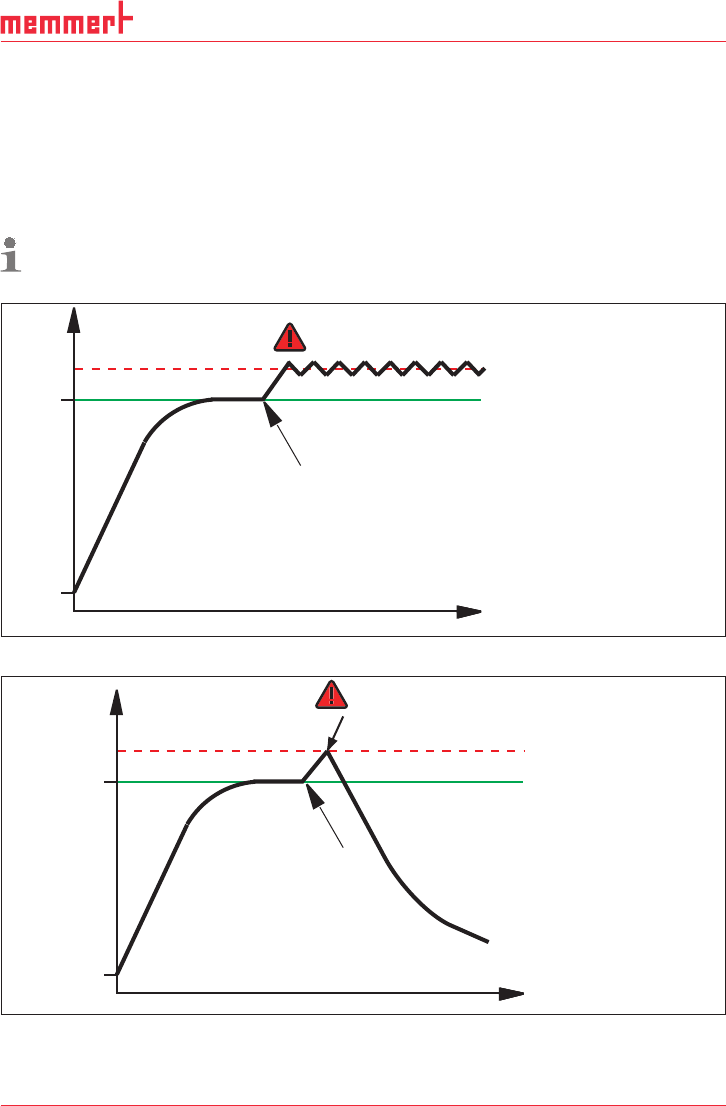
If the manually set monitoring temperature is exceeded, temperature monitoring takes over
temperature control and begins to regulate the monitoring temperature (TWW, Fig. 17) or
switches off the heating (TWB, Fig. 18).
The two types of temperature monitoring are only available for appliances equipped with
a second temperature sensor (option A6). For appliances with only one temperature
sensor, only TWW is available.
t
°C
Setting Max Alarm
Set temperature
Controller error
Emergency operation
Fig. 17 Schematic diagram of how the TWW temperature monitoring system works
t
°C
heating switched off by TWB
Setting Max Alarm
Set temperature
Controller error
Fig. 18 Schematic diagram of how the TWB temperature monitoring works (only if equipped
with a second temperature sensor, option A6)
32 D33363 | Date 01/2020
Operation and control
5.5.2 Mechanical temperature monitoring: Temperature limiter (TB)
The appliance is equipped with a mechanical temperature limiter (TB) of protection class 1 in
accordance with DIN 12 880.
If the electronic monitoring unit should fail during operation and the factory-set maximum
temperature is exceeded by approx. 20 °C, the temperature limiter, as the final protective
measure, switches off the heating permanently.
5.5.3 Function
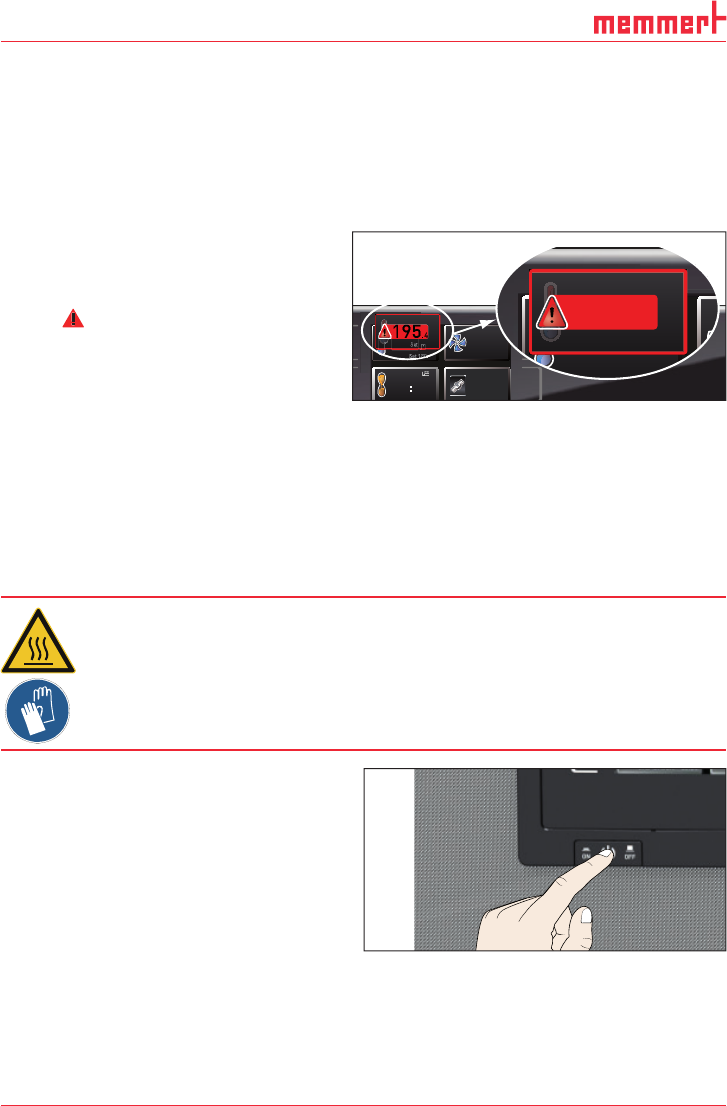
If temperature monitoring has been
triggered, this is indicated by the
temperature display: the actual tempera-
ture is highlighted in red and a warning
symbol
is shown (Fig. 19 ). The type
of temperature monitoring triggered is
shown beneath the temperature: TB for
mechanical and TWW or TWB for
electronic temperature monitoring. The
alarm is additionally signalled by an
intermittent acoustic signal, which can
be turned off by pressing the confirma-
tion key. Information on what to do in
this case are provided in the chapter
Malfunctions, warning and error
messages from page 33.
5.6 Ending operation
Warning!
Depending on the operation performed , the surfaces in the working
chamber and the chamber load may still be very hot after the appli-
ance is switched off. Touching these surfaces can cause burns. Wear
heat-resistant protective gloves or wait until the appliance cools
down.
1. Switch off active appliance functions
(turn back the set values).
2. Remove the chamber load.
3. Switch off the appliance (Fig. 20 ).
TIMER
End 14:45
44h:44m
°C
0°C
20%
FLAP
LÜFTER
%
0
KLAPPE
40%
TIMER
30m04h
Ende
13:30 23.11.
.°C
Set 180.0°C
TEMP
TB Set 190.0
°C
195.4°C
180.4°C
TEMP
Set 185
.0°C
23.2°C
TEMP
Set 180
.0°C
TEMP
TB Set 190.0 °C
195.4°C
Fig. 19
Temperature monitoring triggered
ON
O
O
ON
N
N
N
O
O
N
O
Fig. 20 Switch off appliance
D33363 | Date 01/2020 33
Malfunctions, warning and error messages
6. Malfunctions, warning and error messages
Warning!
After removing covers, live parts may be exposed. You may receive
an electric shock if you touch these parts. Malfunctions requiring
work inside the appliance may only be rectifi ed by electricians. Ob-
serve the separate service manual for this.
Do not try to rectify appliance errors yourself but contact the MEMMERT customer service
department (see page 2) or an authorised service point.
In case of enquiries, please always specify the model and appliance number from the name-
plate (see page 13).
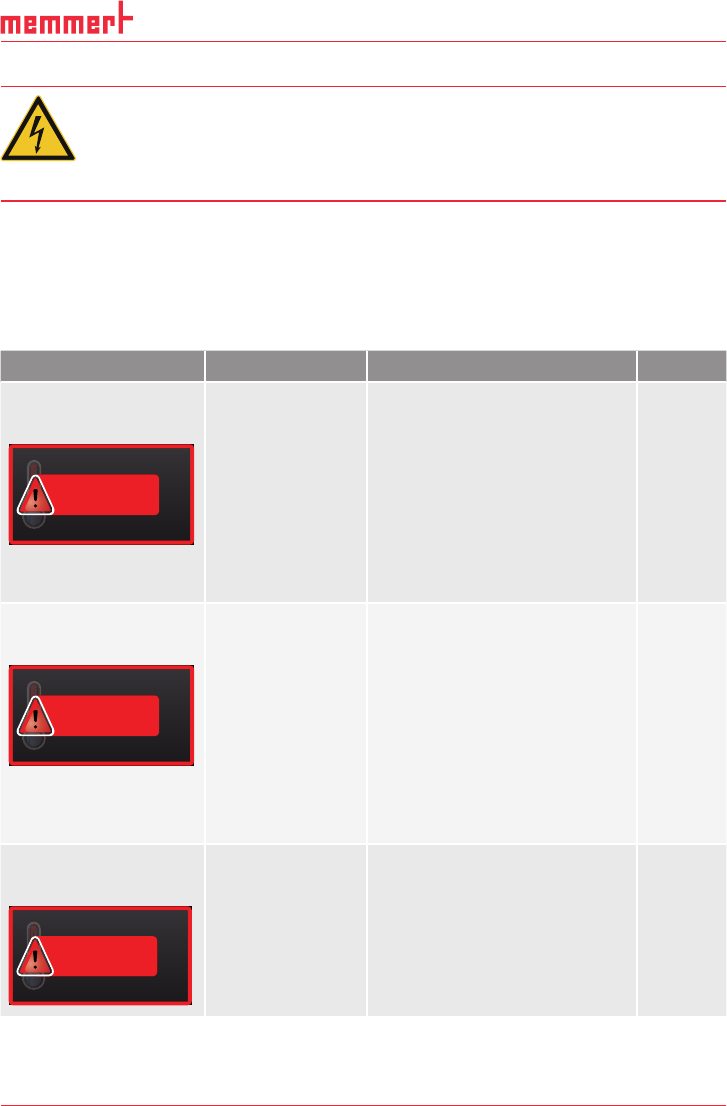
6.1 Warning messages of the temperature monitoring function
Description Cause Action See
Temperature alarm and
"TWW" are displayed
TEMP
TWW Set 190.0 °C
195.4 °C
The adjustable
undertemperature
/ overtemperature
controller (TWW)
has assumed heat-
ing control.
Increase the difference between
the monitoring and setpoint
temperature – by either in-
creasing the max value of the
temperature monitoring (
MAX
temp) or decreasing the setpoint
temperature.
If the alarm continues: Contact
customer service
page
40
page 2
Temperature alarm and
"TWB" are displayed
TEMP
TWB Set 190.0 °C
195.4 °C
The electronic
temperature
limiter (TWB) per-
manently switched
off heating.
Deactivate the alarm by pressing
the confirmation key.
Increase the difference between
the monitoring and setpoint
temperature – by either in-
creasing the max value of the
temperature monitoring (
MAX
temp) or decreasing the setpoint
temperature.
If the alarm continues: Contact
customer service
page
40
page 2
Temperature alarm and
TB are displayed
TEMP
TB
230.4 °C
The mechanical
temperature lim-
iter (TB) perma-
nently switched
off heating.
Switch off the appliance and
leave to cool down. Contact
customer service and have the
error rectified (e.g. by replacing
the temperature sensor).
page 2