BA-UI-EN-D33363.pdf - 第43页
D33363 | Date 01/2020 43 Menu mode 6. Accept the selection by pressing the confirmation key . The adjustment options are highlighted. Time 12 . 05 . 2012 12 : 00 GMT 00:00 Date Time zone Daylight savings 7. Set daylight …
42 D33363 | Date 01/2020
Menu mode
7.3.7 Gateway
The setup entry Gateway is used to connect two networks
with different protocols.
The gateway is set the same way as the IP address (see
page 38).
7.4 Date and Time
In the Time display, you can set date and time, time zone and daylight saving time. Changes
can only be made in manual operating mode.
Always set the time zone (and summer time yes/no) before you set the date and time.
Avoid changing the set time after that since this can lead to gaps or overlapping when
recording measured values. If you still need to change the time, you should not run a
programme immediately before or after doing so.
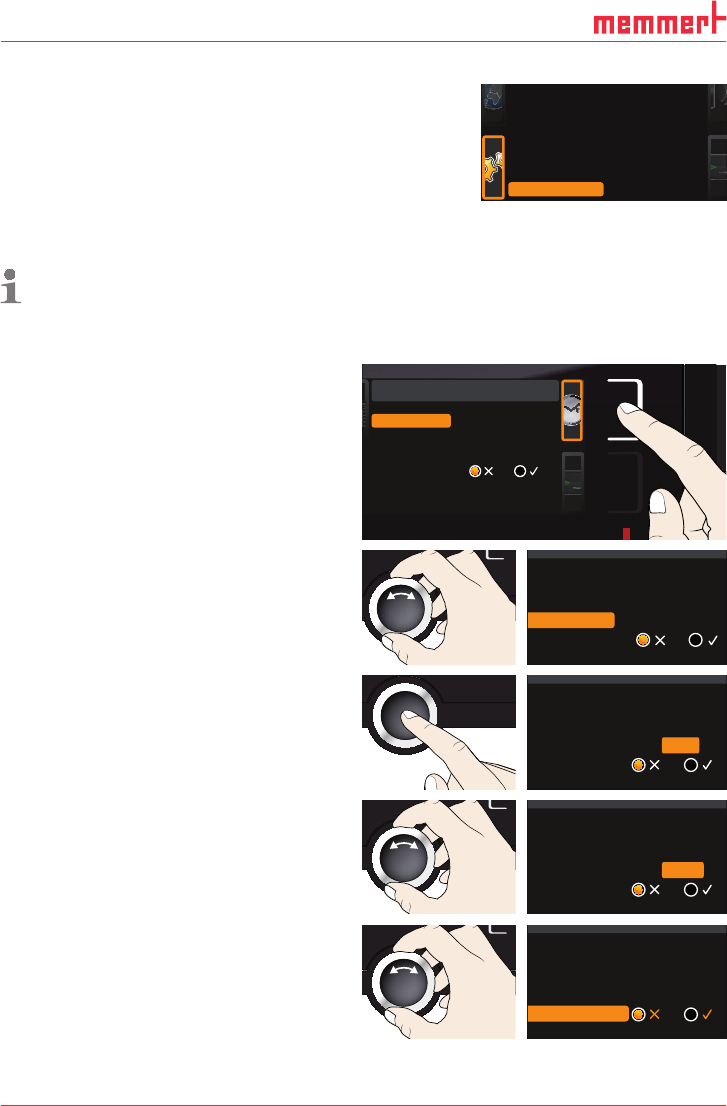
1. Activate the time setting. To do so, press
the activation key on the right side of
the
Time display. The display is enlarged
and the first adjustment option (
Date)
automatically highlighted.
Date and time
Time
Time zone
Daylight savings
12. 05 . 2012
12:00
GMT 01:00
Date
2. Turn the turn control until Time zone is
highlighted.
Time
Daylight savings
12. 05 . 2012
12: 00
GMT 01:00
Date
Time zone
3. Accept the selection by pressing the
confirmation key.
Time
Daylight savings
12. 05 . 2012
12: 00
GMT
Date
Time zone
01:00
4. Set the time zone of the installation site
with the turn control, e.g. 00:00 for Great
Britain, 01:00 for France, Spain or Ger-
many. Accept the selection by pressing
the confirmation key.
Time
Daylight savings
12. 05 . 2012
12: 00
GMT
Date
Time zone
00:00
5. With the turn control, select the Daylight
savings entry
Time
12. 05 . 2012
12: 00
GMT 00:00
Date
Time zone
Daylight savings
Balance
Remote Control Off
Gateway 192.168.5 .1
+30 %
2/2
D33363 | Date 01/2020 43
Menu mode
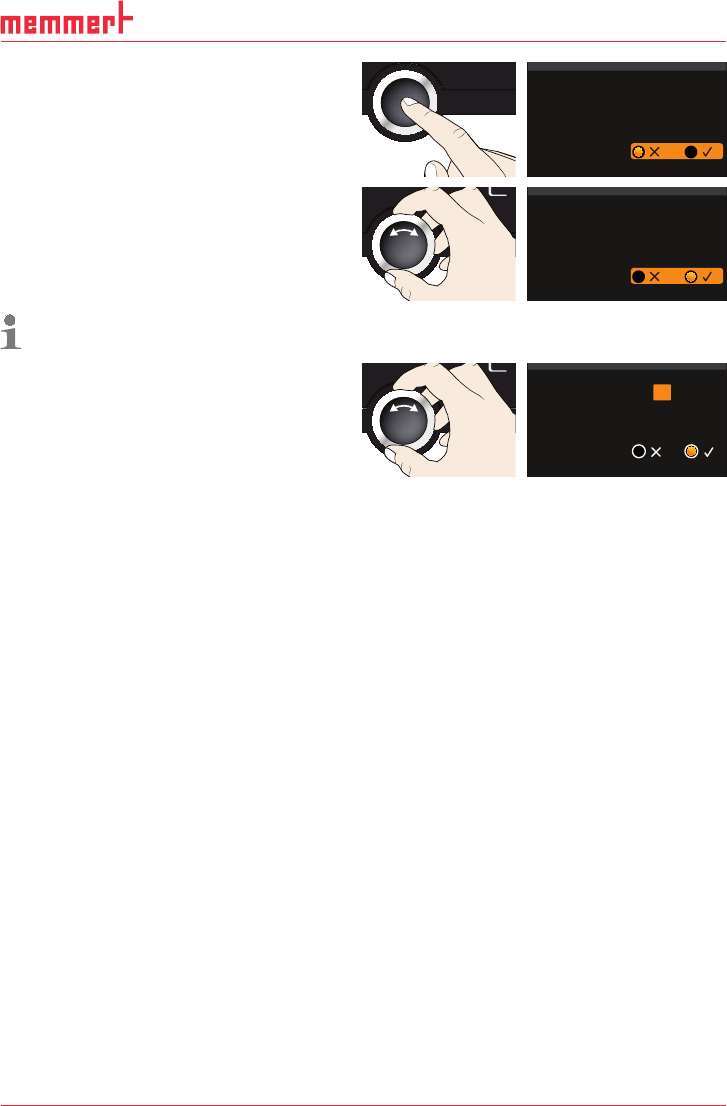
6. Accept the selection by pressing the
confirmation key. The adjustment options
are highlighted.
Time
12. 05 . 2012
12: 00
GMT 00:00
Date
Time zone
Daylight savings
7. Set daylight savings to off () or on
(
) with the turn control – in this case
on (
). Save the setting by pressing the
confirmation key.
Time
12. 05 . 2012
12: 00
GMT 00:00
Date
Time zone
Daylight savings
Daylight saving time and standard time are not changed automatically. For this reason,
please keep in mind to adjust them at the beginning of each period.
8. Now, set date (day, month year) and time
(hours, minutes) in the same way. Accept
the selection by pressing the confirma-
tion key.
Time
Time zone
Daylight savings
..2012
12: 00
GMT 00:00
Date 27 05
44 D33363 | Date 01/2020
Menu mode
7.5 Calibration
The appliances are temperature calibrated and adjusted at the factory. In case readjustment
should be necessary later on – for example due to influence of the chamber load – the ap-
pliance can be calibrated customer-specifically using three calibration temperatures of your
choice:
► Cal1 Temperature calibration at low temperature
► Cal2 Temperature calibration at medium temperature
► Cal3 Temperature calibration at high temperature
To guarantee perfect control, we recommend to calibrate the appliance once a year.
For temperature adjustment, you will need a calibrated reference measuring device.
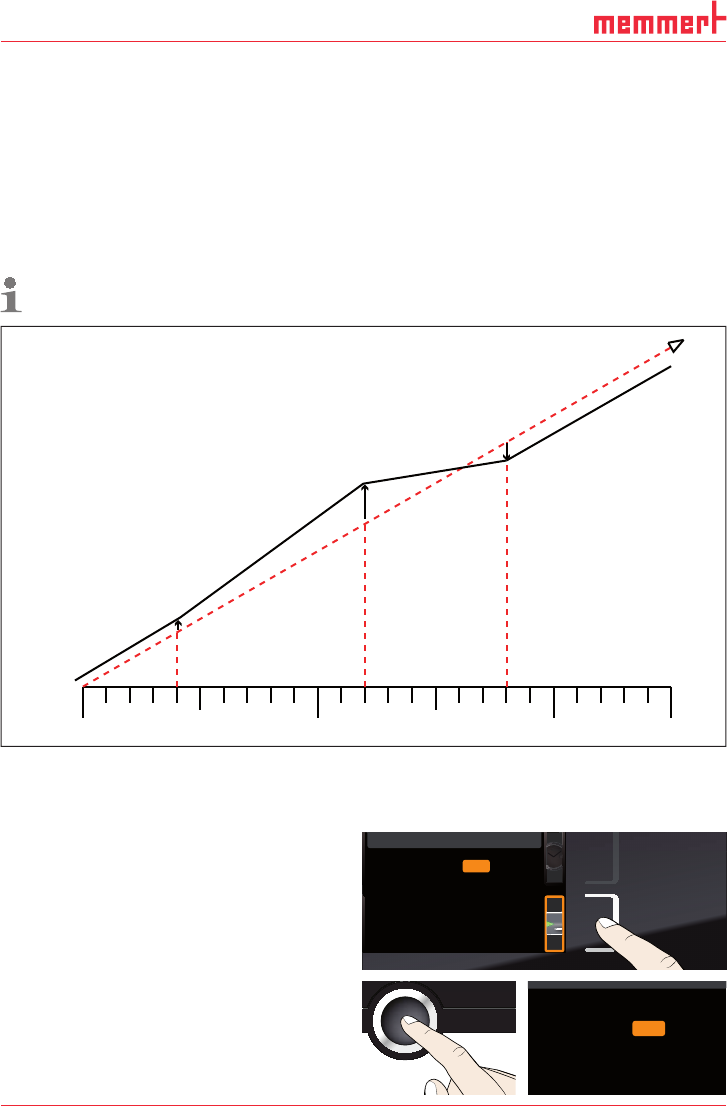
CAL 1
+0,5 K
CAL 3
-0,8 K
CAL 2
+2,6 K
180°C
40°C
120°C
0°C
factory calibration
Fig. 24 Schematic example of temperature adjustment
Example: Temperature deviation at 120 °C should be corrected.
1. Activate the adjustment setting. To do so,
press the activation key on the right side
of the
CALIB display. The display is en-
larged and the first calibration tempera-
ture – in this case 40 °C – automatically
highlighted.
Cal1 °C -0,2K
Cal2 100.0 °C +0,1 K
Cal3 180.0 °C -0,2 K
JUSTIEREN
Temperatur
letzte Justierung 12.10.2012 12:00
40.0
CK0,2-
CK0,1+
CK0,2-
Calibration
Temperature
Last updated 12.10.2012 12:00:00
Cal1
Cal2
Cal3
100.0
180.0
40.0
2. Press the confirmation key repeatedly,
until the calibration temperature Cal2 is
selected.
CK0,2-
CK0,1+
CK0,2-
Temperature Cal1
Cal2
Cal3 180.0
40.0
100.0