BA-UI-EN-D33363.pdf - 第39页
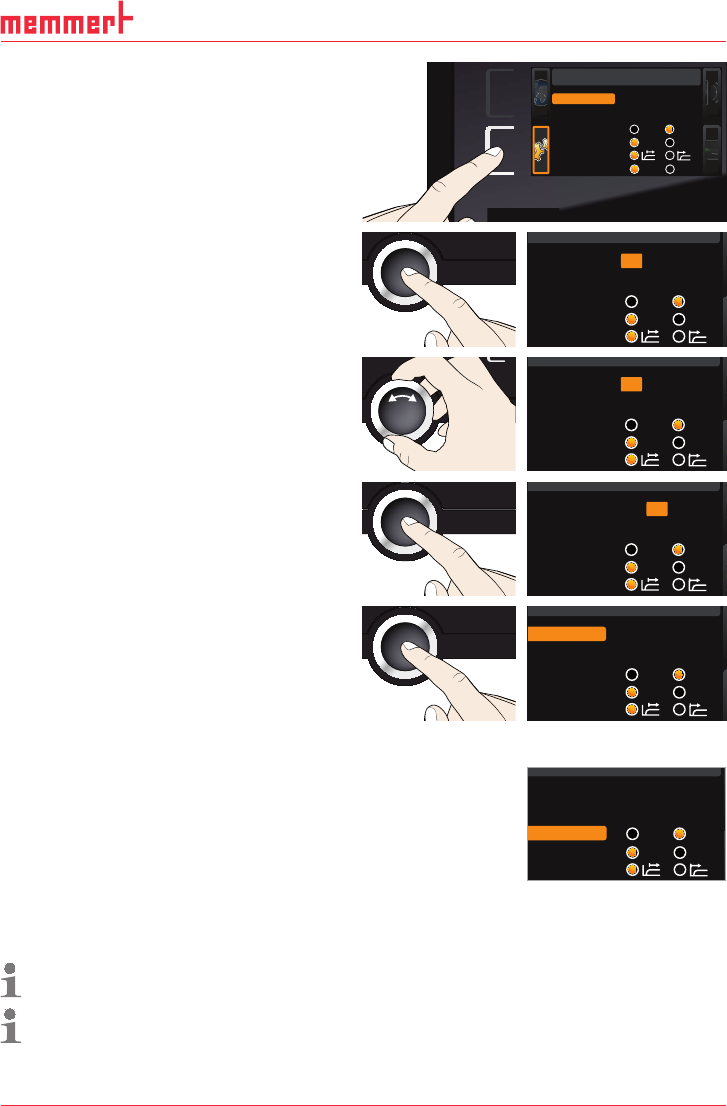
D33363 | Date 01/2020 39 Menu mode 1. Activate the SETUP display . The entry IP address is automatically highlighted. SETUP Balance Einheit IP Adresse +30 % 192. 168. 1 0 0 . 100 Alarm Temp °C F TWW TWB Timer Mode Setup …
38 D33363 | Date 01/2020
Menu mode
All other settings can be made accordingly. The settings possible are described in the follow-
ing sections.
If no new values are entered or confirmed for approx. 30 seconds, the appliance automati-
cally returns to the main menu and restores the former values.
7.3 Setup
In the SETUP display, you can set the following parameters:
► the IP address and Subnet mask of the appliance's Ethernet interface (for connection to
a network)
► the Unit of the temperature display (°C or °F, see page 39)
► the type of temperature monitoring (TWW or TWB, Alarm Temp, only if equipped with
a second temperature sensor, option A6) and the trigger temperature of the monitoring
function (
Max alarm, see page 40)
► how the digital backwards counter with target time setting works (Timer mode, see page
41)
► the type of the slide-in unit (Grid or Shelf, see page 41)
► Remote control (see page 41)
► Gateway (see page 42)
If the SETUP menu contains more entries than can be
displayed, this is indicated by the display “1/2”. This
means that there is a second „page“ of entries.
To display the hidden entries, use the turn control
to scroll beyond the lowest entry. The page display
changes to “2/2”.
7.3.1 IP address and subnet mask
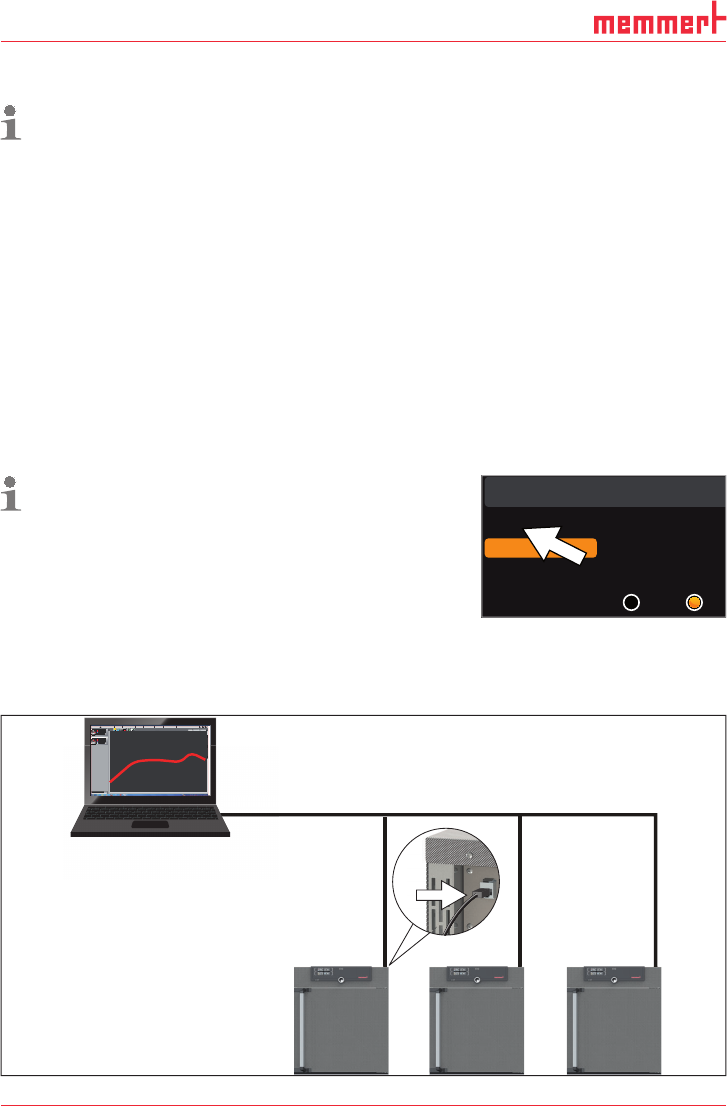
If you want to operate one ore more appliances in a network, each appliance must have its
own unique IP address for identification. By default, each appliance is delivered with the IP
address 192.168.100.100.
LAN 1: 192.168.1.233
192.168.1.216
LAN 2: 192.168.1.215
LAN 3: 192.168.1.241
1
9
2.1
68
.
1
Editor
Programmname
Simulation Protokoll
-
+
-
+
INP 250 Test 01
180
.0°C
i
HPP 250 Labor
i
37
.0°C
44
.4%rh
151
5
STAND BY
Programm negnulletsniEllokotorPtäreG efliHnekcurD
AtmoCONTROL
Fig. 22 Operation of several appliances in a network (schematic example)
Setu
p
Unit
IP adress 255.145.136.
2
Subnet mask 255.255.0. 0
°C F
1/2
D33363 | Date 01/2020 39
Menu mode
1. Activate the
SETUP display. The entry
IP address is automatically highlighted.
SETUP
Balance
Einheit
IP Adresse
+30%
192.168. 1 0 0 .100
Alarm Temp
°C F
TWW TWB
Timer Mode
Setup
Unit
IP address 192.168. 1 0 0. 100
Subnet mask 255.255. 0 . 0
Alarm temp
°C F
TWW TWB
Timer mode
Slide-in unit
Grid Shelf
2. Accept the selection by pressing the con-
firmation key. The first three digits of the
IP address are automatically selected.
SETUP
Unit
IP address 192.168.100.100
Subnet mask 255.255. 0 .0
Alarm temp
°C F
TWW TWB
Timer mode
3. With the turn control, set the new num-
ber, e.g. 255.
SETUP
Unit
IP address 255.168.100.100
Subnet mask 255.255. 0 .0
Alarm temp
°C F
TWW TWB
Timer mode
4. Accept the selection by pressing the con-
firmation key. The next three digits of the
IP address are automatically selected. Set-
ting these is done with the turn control
according to the description above.
SETUP
Unit
IP address 255.168.100.100
Subnet mask 255.255. 0 .0
Alarm temp
°C F
TWW TWB
Timer mode
5. After setting the last three digits, accept
the new IP address by pressing the con-
firmation key. The selection returns to the
overview.
The subnet mask is set accordingly.
SETUP
Unit
IP address 255.145.136.225
Subnet mask 255.255. 0 .0
Alarm temp
°C F
TWW TWB
Timer mode
7.3.2 Unit
Here, you can choose whether the temperature is displayed in °C
or °F.
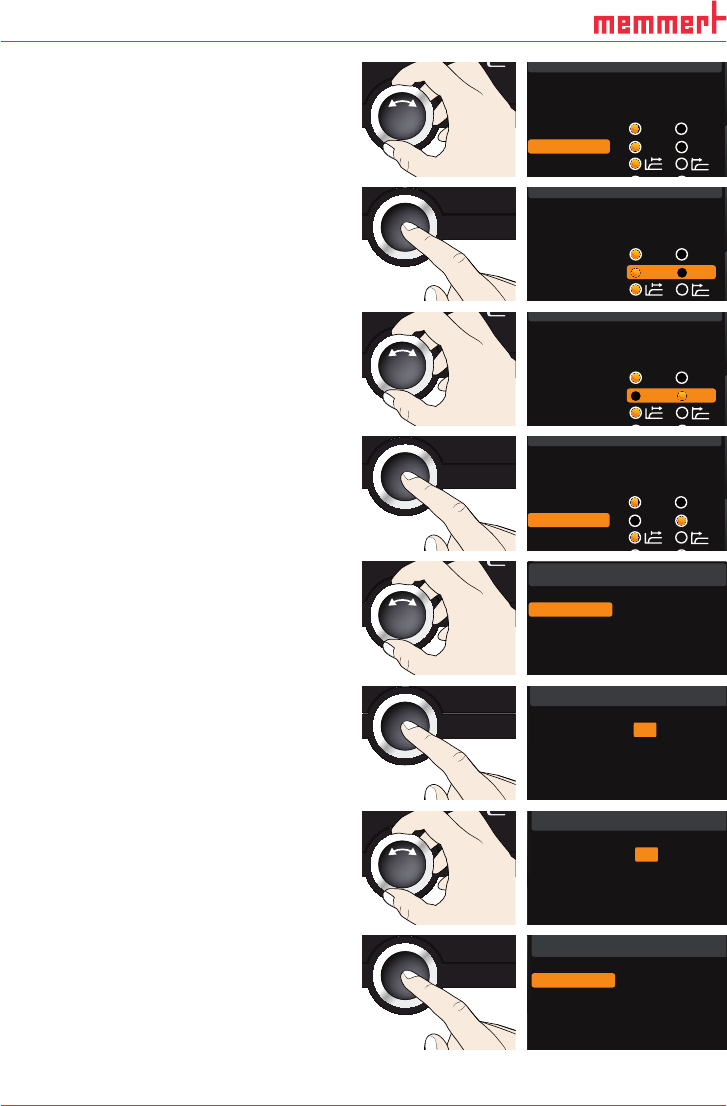
7.3.3 Temperature monitoring ( Alarm Temp and Max
Alarm)
Here, the type of monitoring function that should be activated (TWW or TWB, description
from page 30) can be set (
Alarm Temp), as well as the temperature at which the automatic
temperature monitoring should be triggered (
Max alarm).
The selection option TWW/TWB is only available for appliances with a second temperature
sensor (option A6).
The monitoring temperature must be set sufficiently high above the maximum set tem-
perature. We recommend 5 to 10 K difference for UN
.../UF... and 1 to 3 K difference for IN.../
IF
...
SETUP
Unit
IP address 255.145.136.225
Subnet mask 255.255. 0 .0
Alarm temp
°C °F
TWW TWB
Timer mode
40 D33363 | Date 01/2020
Menu mode
1. Activate the
SETUP display and select
Alarm temp with the turn control.
SETUP
Unit
IP address 255.145.136.225
Subnet mask 255.255. 0. 0
Alarm temp
°C F
TWW TWB
Timer mode
Slid i i
2. Accept the selection by pressing the con-
firmation key. The adjustment options are
automatically highlighted.
SETUP
Unit
IP address 255.145.136.225
Subnet mask 255.255. 0. 0
Alarm temp
°C F
TWW TWB
Timer mode
3. With the turn control, select the desired
setting – in this example TWB.
SETUP
Unit
IP address 255.145.136.225
Subnet mask 255.255. 0. 0
Alarm temp
°C F
TWW TWB
Timer mode
Slid i it
4. Save the setting by pressing the confir-
mation key.
SETUP
Unit
IP address 255.145.136.225
Subnet mask 255.255. 0. 0
Alarm temp
°C F
TWW TWB
Timer mode
Slid i it
5. Select Max Alarm with the turn control.
SETUP
Max Alarm
190 °C
2/2
6. Accept the selection by pressing the
confirmation key. The current settings are
automatically highlighted.
SETUP
Max Alarm
190 °C
2/2
7. With the turn control, select the desired
new trigger temperature - in this example
160 °C.
SETUP
Max Alarm
160 °C
2/2
8. Save the setting by pressing the confir-
mation key. The electronic temperature
monitoring system will now be triggered
when the actual temperature reaches 160
°C.
SETUP
Max Alarm
160 °C
2/2