BA-UI-EN-D33363.pdf - 第44页
44 D33363 | Date 01/2020 Menu mode 7.5 Calibr ation The appliances are temperature calibrated and adjusted at the factory . In case readjustment should be necessary later on – for example due to influence of the chamber …
D33363 | Date 01/2020 43
Menu mode
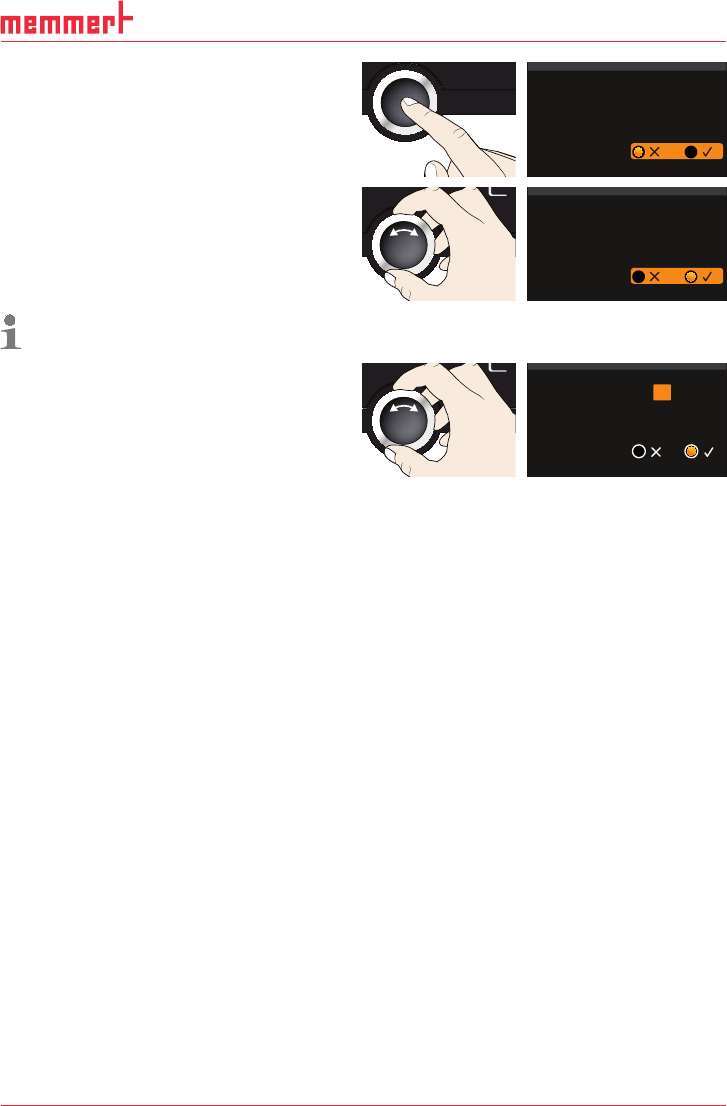
6. Accept the selection by pressing the
confirmation key. The adjustment options
are highlighted.
Time
12. 05 . 2012
12: 00
GMT 00:00
Date
Time zone
Daylight savings
7. Set daylight savings to off () or on
(
) with the turn control – in this case
on (
). Save the setting by pressing the
confirmation key.
Time
12. 05 . 2012
12: 00
GMT 00:00
Date
Time zone
Daylight savings
Daylight saving time and standard time are not changed automatically. For this reason,
please keep in mind to adjust them at the beginning of each period.
8. Now, set date (day, month year) and time
(hours, minutes) in the same way. Accept
the selection by pressing the confirma-
tion key.
Time
Time zone
Daylight savings
..2012
12: 00
GMT 00:00
Date 27 05
44 D33363 | Date 01/2020
Menu mode
7.5 Calibration
The appliances are temperature calibrated and adjusted at the factory. In case readjustment
should be necessary later on – for example due to influence of the chamber load – the ap-
pliance can be calibrated customer-specifically using three calibration temperatures of your
choice:
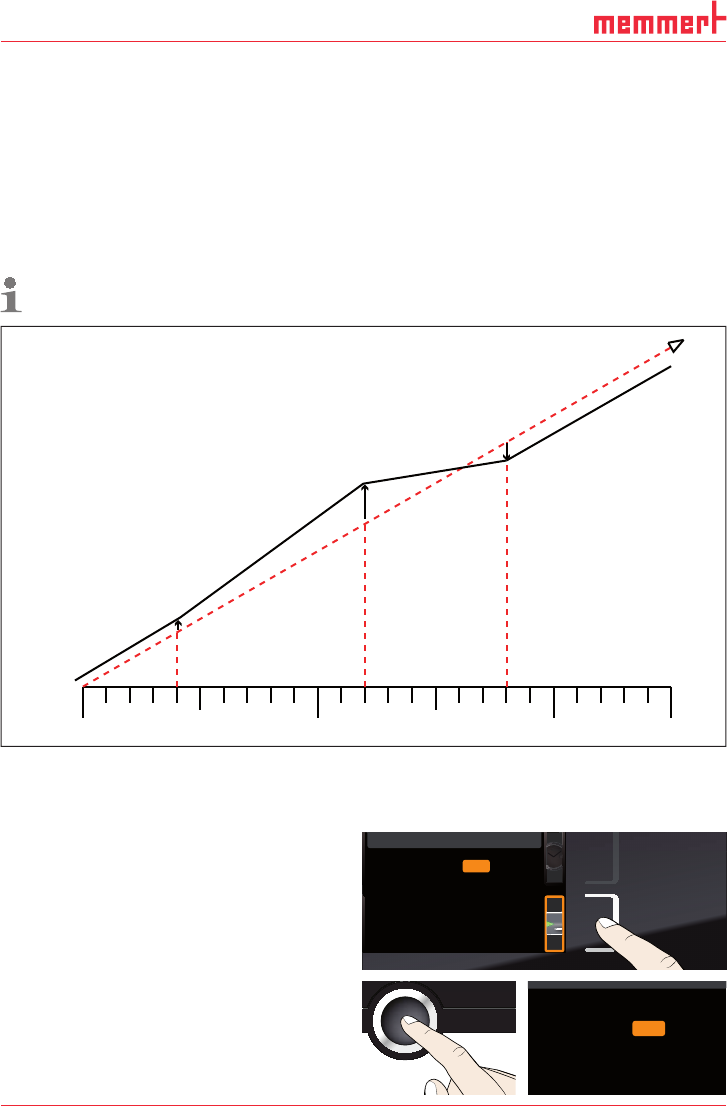
► Cal1 Temperature calibration at low temperature
► Cal2 Temperature calibration at medium temperature
► Cal3 Temperature calibration at high temperature
To guarantee perfect control, we recommend to calibrate the appliance once a year.
For temperature adjustment, you will need a calibrated reference measuring device.
CAL 1
+0,5 K
CAL 3
-0,8 K
CAL 2
+2,6 K
180°C
40°C
120°C
0°C
factory calibration
Fig. 24 Schematic example of temperature adjustment
Example: Temperature deviation at 120 °C should be corrected.
1. Activate the adjustment setting. To do so,
press the activation key on the right side
of the
CALIB display. The display is en-
larged and the first calibration tempera-
ture – in this case 40 °C – automatically
highlighted.
Cal1 °C -0,2K
Cal2 100.0 °C +0,1 K
Cal3 180.0 °C -0,2 K
JUSTIEREN
Temperatur
letzte Justierung 12.10.2012 12:00
40.0
CK0,2-
CK0,1+
CK0,2-
Calibration
Temperature
Last updated 12.10.2012 12:00:00
Cal1
Cal2
Cal3
100.0
180.0
40.0
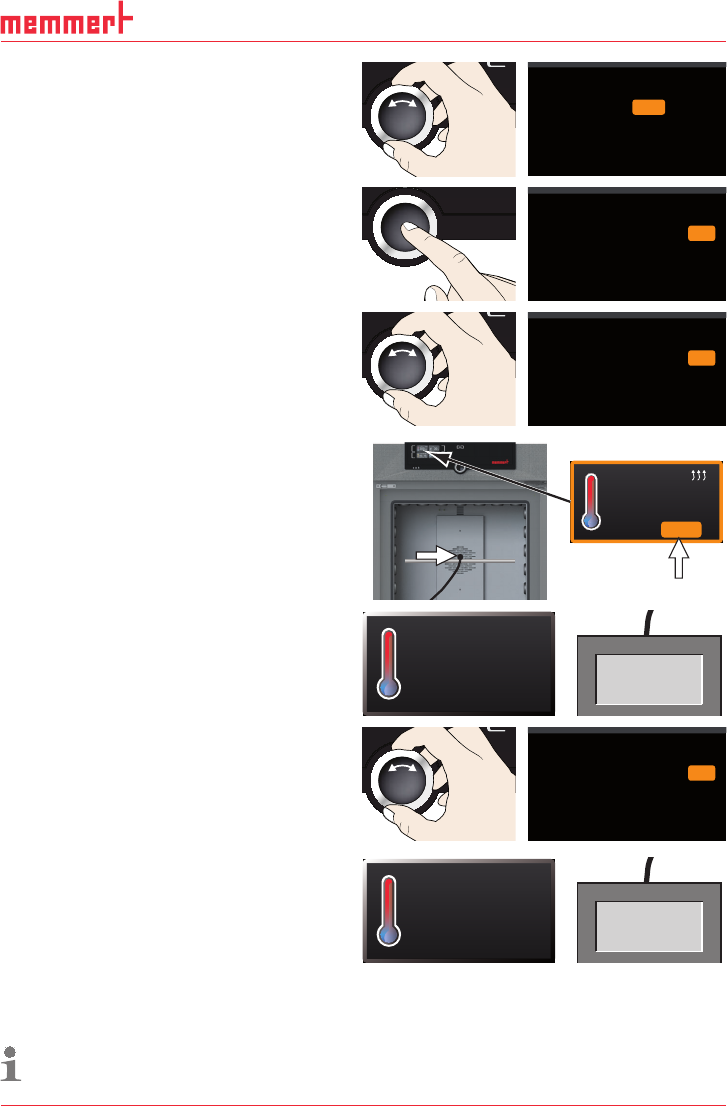
2. Press the confirmation key repeatedly,
until the calibration temperature Cal2 is
selected.
CK0,2-
CK0,1+
CK0,2-
Temperature Cal1
Cal2
Cal3 180.0
40.0
100.0
D33363 | Date 01/2020 45
Menu mode
3. With the turn control, set the calibration
temperature Cal2 to 120 °C.
CK0,2-
CK0,1+
CK0,2-
Temperature
Cal1
Cal2
Cal3 180.0
40.0
120.0
4. Save the setting by pressing the confir-
mation key. The corresponding calibra-
tion value is automatically highlighted.
CK0,2-
CK
CK
0,2-
Temperature Cal1
Cal2
Cal3 180.0
40.0
120.0 0,1+
5. Set the calibration value to 0.0 K and ac-
cept the setting by pressing the confirma-
tion key.
CK0,2-
CK
CK
0,2-
Temperature Cal1
Cal2
Cal3 180.0
40.0
120.0 0,0
6. Position the sensor of a calibrated refer-
ence instrument centrally in the appli-
ance's working chamber.
7. Close the door and, in manual mode,
adjust the set temperature to 120 °C.
21.4 °C
TEMP
120.0 °CSet
8. Wait until the appliance reaches the set
temperature and displays 120 °C. The
reference instrument for example displays
122.6 °C.
120.0°C
TEMP
Set 120
.0 °C
122.6 °C
9. In the SETUP, adjust the calibration value
Cal2 to +2.6 K (actual value measured
minus setpoint temperature) and save the
setting by pressing the confirmation key.
CK0,2-
CK
CK
0,2-
Temperature Cal1
Cal2
Cal3 180.0
40.0
120.0 2,6+
10. After the calibration procedure, the
temperature measured by the reference
instrument should now also be 120 °C.
120.0°C
TEMP
Set 120
.0 °C
120.0 °C
With Cal1, a calibration temperature below Cal2 can be programmed accordingly, and with
Cal3, a temperature above. The minimum difference between the Cal values is 20 K for univer-
sal ovens UN
.../UF... and 10 K for incubators IN.../IF...
If all calibration values are set to 0.0 K, the factory calibration settings are restored.