BA-UI-EN-D33363.pdf - 第35页
D33363 | Date 01/2020 35 Malfunctions, warning and err or messages 6.3 P ower failure Warning! Depending on the operation performed, the surfaces in the interior and the chamber load may still be very hot after power los…
34 D33363 | Date 01/2020
Malfunctions, warning and error messages
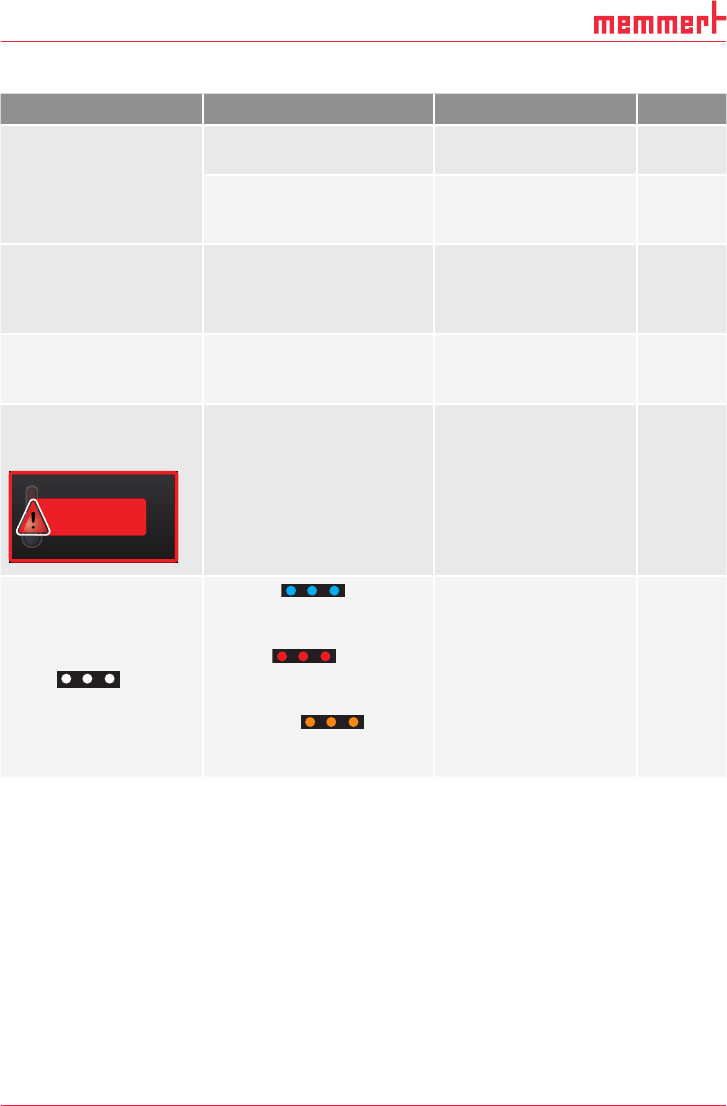
6.2 Malfunctions, operating problems and appliance errors
Error description Cause of errors Rectifying errors See
Displays are dark External power supply
was interrupted
Check the
power supply
page
23
Miniature fuse, appliance
fuse or power module
faulty
Contact customer
service
page 2
Individual or all displays
cannot be activated
The appliance is in timer
or remote control mode
(mode "Write" or "Write +
Alarm")
Wait until the end of
the timer or switch off
the remote control
Displays suddenly look
different
Appliance is in "wrong"
mode
Change to operating or
menu mode by pressing
the
MENU key
Error message E-3 in
the temperature display
TEMP
Set 45.0 °C
E-3 °C
Temperature sensor defec-
tive.
► Switch off appli-
ance.
► Remove the cham-
ber load
► Contact customer
service
page 2
When switching on
the appliance, the start
animation is displayed
in another colour than
white
► Cyan :
Not enough storage
space on the SD card
► Red :
The system files could
not be loaded
► Orange : The
fonts and images could
not be loaded
Contact customer
service
Contact customer
service
Contact customer
service
page 2
page 2
page 2
D33363 | Date 01/2020 35
Malfunctions, warning and error messages
6.3 Power failure
Warning!
Depending on the operation performed, the surfaces in the interior
and the chamber load may still be very hot after power loss. Ad-
ditionally, depending on the duration of the power loss, the appli-
ance might heat up again after power supply has been restored (see
below). Touching these surfaces can cause burns. Wear heat-resistant
protective gloves or wait until the appliance cools down fi rst.
In case of a power failure, the appliance operates as follows:
In manual mode
After power supply has been restored, operation is continued with the parameters set. The
time and the duration of the power failure is documented in the protocol log memory.
In timer mode
In case of an interruption of the power supply of less than 60 minutes, the current timer is
continued from the point at which it was interrupted. For interruptions of the power supply
longer than this, all appliance functions (heating, fan etc.) are switched off and the air flap is
opened.
In remote control mode:
The previous values are restored.
36 D33363 | Date 01/2020
Menu mode
7. Menu mode
In menu mode, you can make basic settings as well as adjust appliance parameters.
Caution:
Before changing menu settings, read the description of the respective functions on the fol-
lowing pages to avoid possible damage to the appliance and/or chamber load.
To enter menu mode, press the MENU key.
To exit the menu mode at any time, press the MENU key
again. The appliance then returns to manual mode. Only
changes accepted by pressing the confirmation key are
saved.
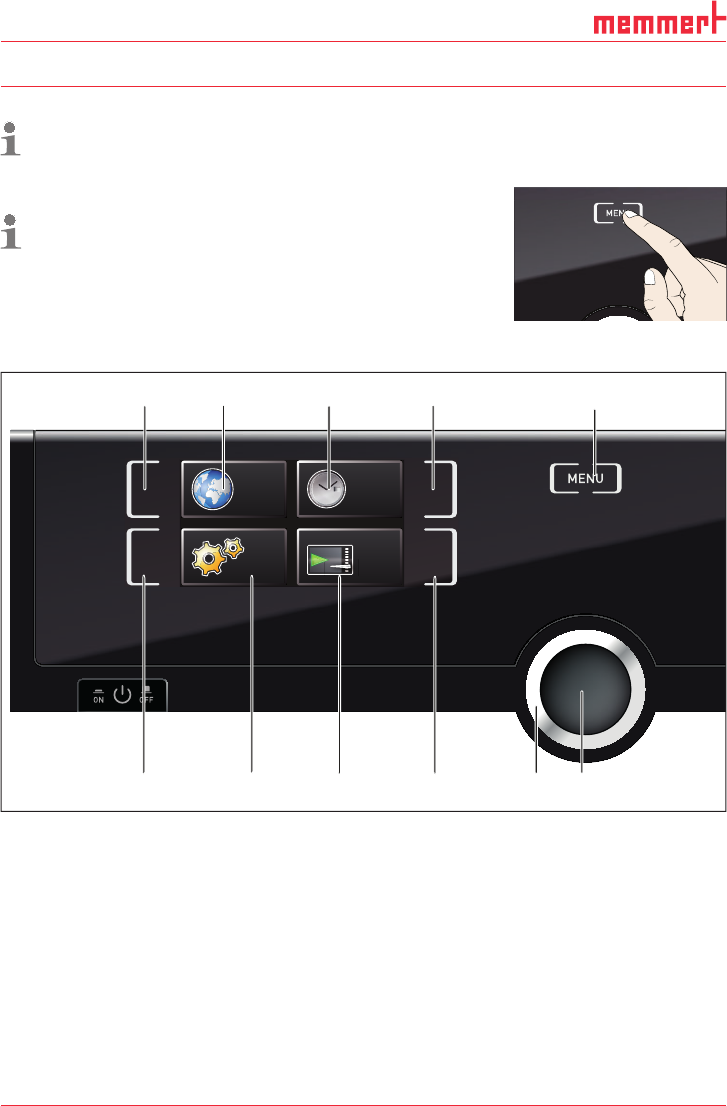
7.1 Overview
Press the MENU key to change between the displays in menu mode:
SETUP
SIGNALTÖNE
CALIB
LANGUAGE
TIME
12 34 5
6789 1011
Fig. 21 ControlCOCKPIT in menu mode
1 Language selection activation key
2 Language selection display
3 Date and time display
4 Date and time setting activation key
5 Return to manual mode
6 Setup activation key (basic appliance set-
tings)
7 Setup display (basic appliance settings)
8 Adjustment display
9 Adjustment activation key
10 Turn control for adjustment
11 Confirmation key (accepts setting made
with the turn control)