00197490-03_SM_CP20-P-M2_EN保养维护.pdf - 第88页
Item no.: 00197490-03 ASM Assembly Systems GmbH & Co. KG Rupert-Mayer-Strasse 44 81379 Munich Germany www.asm-smt.com
11 Software functions
11.3 Transferring the head specific data (from SW701)
86 Service Manual SIPLACE SpeedStar (C&P20 P / C&P20 M2) 03/2018
11.3 Transferring the head specific data (from SW701)
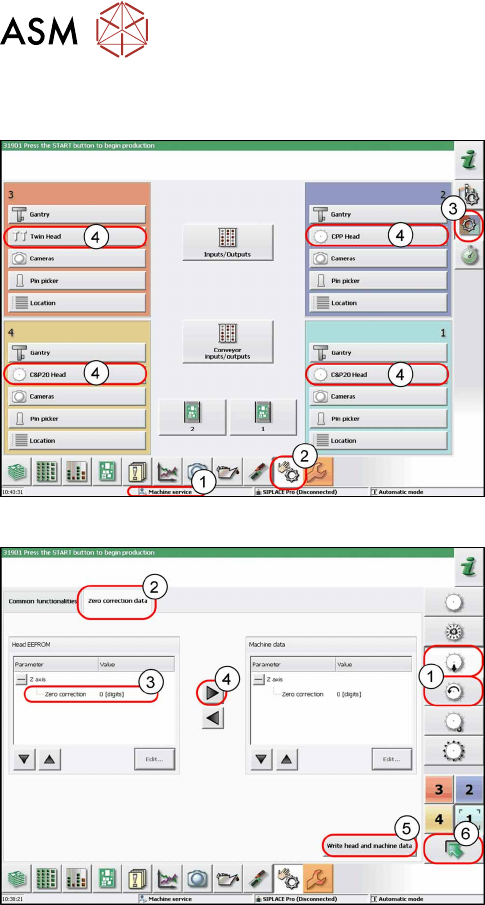
Fig.129: Overview of locations
After changing the head hardware, the new head data
needs to be made available from the head EPROM of
the software.
► Turn the machine on.
► Select the operator level Service (Cus-
tomer)(1).
► Switch over to the menu Check sensors and
functions(2).
► Select the button Check sensors and functions
of specific components(3).
► Select the button(4) for the head on the relevant
gantry.
Fig.130: Zero correction data
► Select the Z axis/star axis (1).
► Select Zero correction data(2).
This is where the axis data (Z and star axes) can be
written from the head EPROM to the machine data.
Depending on the head type, you can also write the Z
and rotary axis data from the machine data to the
head EPROM.
► Select the line Zero correction data(3).
► Move the value out of the head EPROM and into
the machine data (4).
► Select Write head and machine data(5).
► The arrow button (6) takes you back one menu
level.

Item no.: 00197490-03 ASM Assembly Systems GmbH & Co. KG
Rupert-Mayer-Strasse 44
81379 Munich
Germany
www.asm-smt.com