SOM-1802-002_w.pdf - 第39页
36 AJBES-P (3) Front ltg 1 (Ring (Dn)) When "Manual" is selected in the "Lighting pattern" text box, select one of the following options ("On" or "Off") as the lighting pattern for…
35 AJBES-P
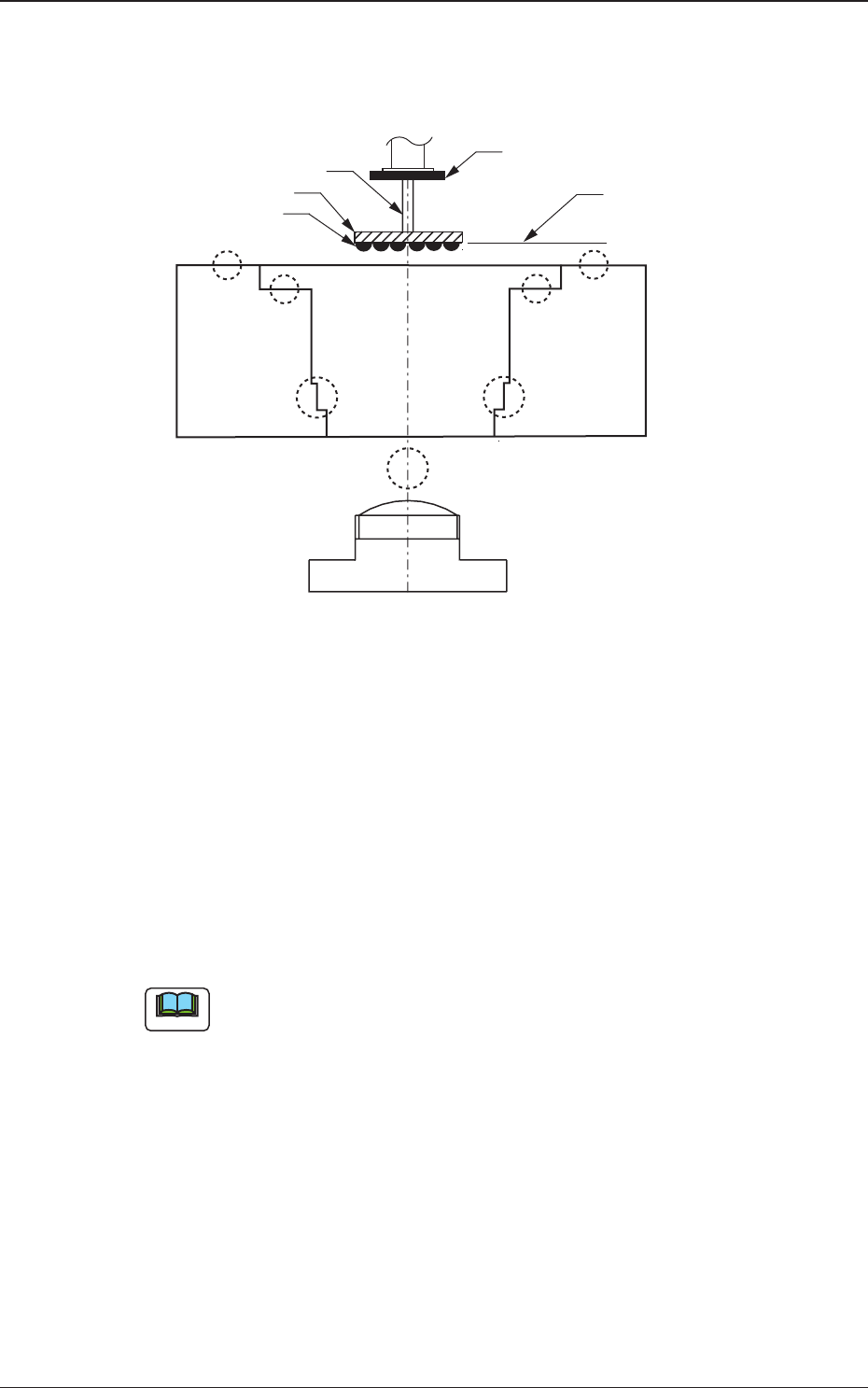
(B02_06) Lighting pattern
Set a lighting pattern to be used for component recognition.
Fig. 20
(1) Ltg pattern designation
Select one of the following options to designate a lighting pattern.
Auto : The lighting patterns are automatically set for all lighting
units.
Manual : The lighting patterns (On/Off patterns) can be set
individually for each lighting unit.
(a) When the recognition cannot be made correctly due to improper
lighting condition, set proper lighting patterns for the selected
component.
(b) To set a parameter, select "Manual" in the "Recog data set" text box.
(2) Back ltg
When "Manual" is selected in the "Lighting pattern" text box, select
one of the following options ("On" or "Off") as the lighting pattern for
back lighting recognition.
0606-002
4.2 Data Explanation (B02_06)
Nozzle
Component (BGA)
Focused Plane
Ball
Monocular
Component Recognition
Camera (CCD Camera)
Diffusion Plate
Front ltg 1
(Ring (Dn))
Front ltg 3
(Ring (Up))
Front ltg 2
(Coax)
Back ltg
Note

36 AJBES-P
(3) Front ltg 1 (Ring (Dn))
When "Manual" is selected in the "Lighting pattern" text box, select
one of the following options ("On" or "Off") as the lighting pattern for
the lower ring lamp for the front lighting system.
(4) Front ltg 2 (Coax)
When "Manual" is selected in the "Lighting pattern" text box, select
one of the following options ("On" or "Off") as the lighting pattern for
the coaxial lamp for the front lighting system.
(5) Fron ltg 3 (Ring (Up))
When "Manual" is selected in the "Lighting pattern" text box, select
one of the following options ("On" or "Off") as the lighting pattern for
the upper ring lamp for the front lighting system.
(B02_07) Image capture method
Select one of the following options as a method to capture an image of
the picked component.
Disable : A proper method is automatically selected.
Single : The image of the component is
captured at the camera center position.
When the image is captured, the height
position of the nozzle end is regarded as an
element of no importance.
Single (Descent) : When an image is captured, the height
position of the nozzle end is kept at a
position lower than the underside of the
linear measure sensor.
This method should be taken for the area
array components, etc., that might be
interfered by the lighting linear measure
sensor.
To set a parameter, select "Manual" in the "Recog data set" text box.
4.2 Data Explanation (B02_06), (B02_07)
Note
0606-002
37 AJBES-P
(B02_13) Electd pos detn/Electd pos tol [mm]
Select one of the following options to determine whether or not the electrode
position should be detected. When "Enable (Auto)" or "Enable (Mnl)" is
selected, the tolerance must be specified.
Disable : Select this when the electrode position determination
should not be made.
Enable (Auto) : Select this to make the electrode position determina-
tion.
The automatically specified default is used as an
electrode position tolerance.
Enable (Mnl) : Select this to make the electrode position determina-
tion.
The arbitrarily specified value is used as an elec-
trode position tolerance.
(a) To set a parameter, select "Manual" in the "Recog data set" text box.
(b) When "Enable (Auto)" is selected in this text box, the value
indicated in the "Electd pos tol [mm]" text box is used.
(B02_14) Electd size detn/Electd size tol [mm]
Select one of the following options to determine whether or not the electrode
size should be detected. When "Enable (Auto)" or "Enable (Mnl)" is selected,
the tolerance must be specified.
Disable : Select this when the electrode size determination
should not be made.
Enable (Auto) : Select this to make the electrode size determination.
The automatically specified default is used as an
electrode size tolerance.
Enable (Mnl) : Select this to make the electrode size determination.
The arbitrarily specified value is used as an elec-
trode size tolerance.
(a) To set a parameter, select "Manual" in the "Recog data set" text box.
(b) When "Enable (Auto)" is selected in this text box, the value
indicated in the "Electd size tol [mm]" text box is used.
0606-002
Note
Note
4.2 Data Explanation (B02_13), (B02_14)