SOM-1802-002_w.pdf - 第53页
50 AJBES-P [4 ] Description Displayed are the contents of the error and Return Method (Remedial Procedure). [5 ] Date and T ime Displayed are the date and time of error occurrence. [6 ] Number of Pages Displayed are the …
49 AJBES-P
7.1 "ERROR" Windows
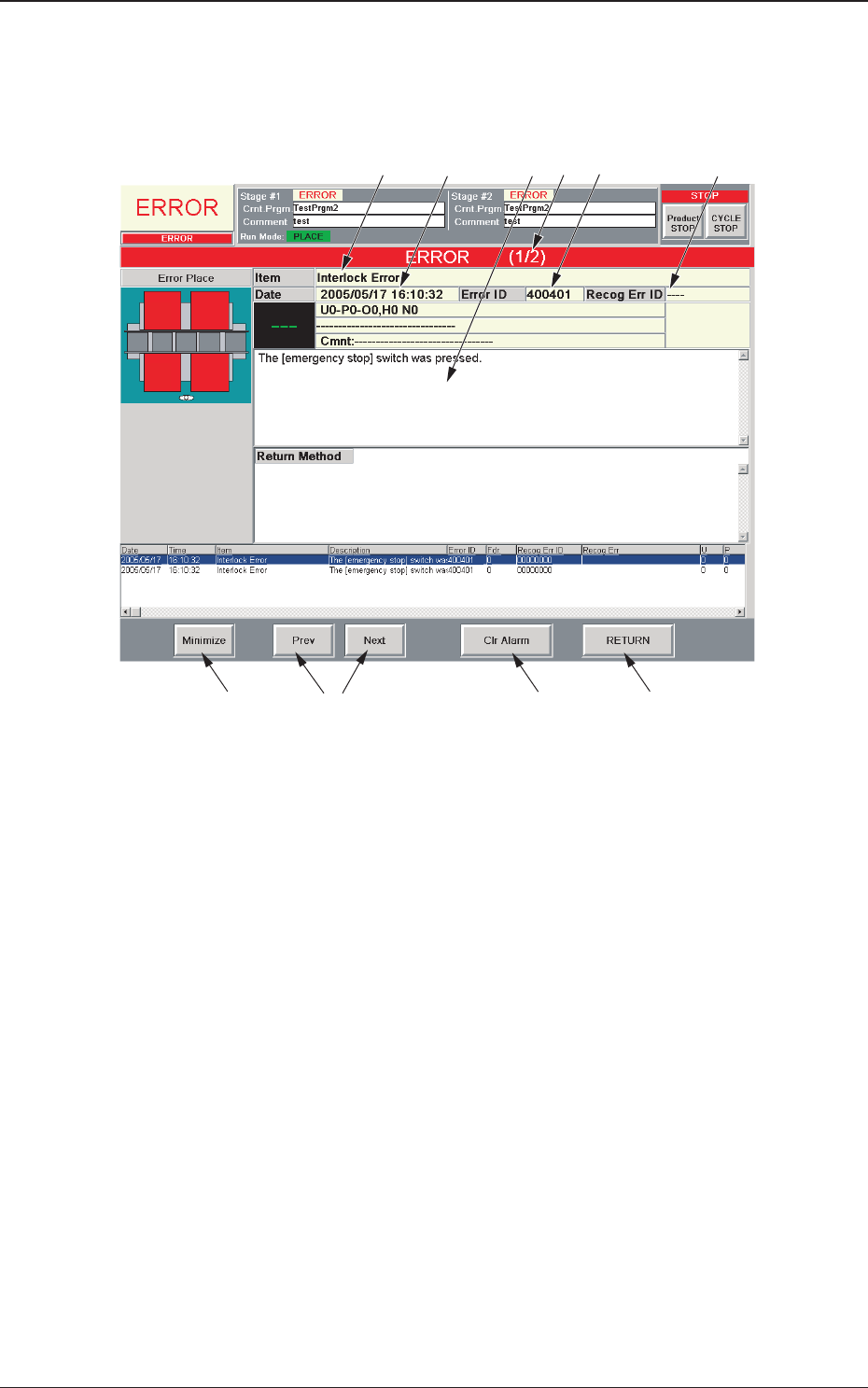
When the machine detects an error, the following "ERROR" window opens.
Fig. 38 Example of "ERROR" Window
[1] Error ID
Displayed is a string of alphanumeric characters (6 characters) that
identifies an error.
When an error has occurred, use this ID as an index and refer to
"Chapter 3 Troubleshooting from Error IDs" (Vol. 4) in the instruction
manual of GXH series machines for details.
[2] Recog Err ID
Displayed is a string of alphanumeric characters (8 characters) that
identifies an error.
When an error has occurred, use this ID as an index and refer to
"Chapter 4 Troubleshooting from Recognition Error IDs" (Vol. 4) in
the instruction manual of GXH series machines for details.
[3] Item
Displayed is a name of the classified element that caused an error.
7.1 "ERROR" Windows
[6]
[1]
[9]
[8]
[10]
[3] [5]
[4]
[2]
[7]
0606-002
50 AJBES-P
[4] Description
Displayed are the contents of the error and Return Method (Remedial
Procedure).
[5] Date and Time
Displayed are the date and time of error occurrence.
[6] Number of Pages
Displayed are the total number of pages and the number of the
current page.
Example: (3/5)
Total Number of Pages : 5
Number of Current Page : 3
[7] [Prev] and [Next] Buttons
[Prev] Button : When pressed, this button opens the previous page.
[Next] Button : When pressed, this button opens the next page.
[8] [Clr Alarm] Button
When pressed, this button cancels an alarm (sound) only.
[9] [RETURN] Button
When pressed, this button cancels an alarm (sound) and closes the
"ERROR" window. The original window resumes.
[10] [Minimize] Button
When pressed, this button minimizes the "ERROR" window and
moves to the bottom left of the window.
Double-click the minimized window to return it to the size before it
was minimized.
• Reset Procedure from "ERROR" Window
(1) Take a note of "Error ID", "Item", and "Description" in the "ERROR"
window.
When you have forgotten an error message, refer to the list of
errors in the "Machine Error Recall" window. (Operation Sequence:
[RECALL MSG.] Button (Submenu) Æ "Machine Error Recall"
Window)
(2) Press the [RETURN] button to resume the original window.
(3) Use the error ID as an index and refer to "Chapter 3 Troubleshooting
from Error IDs" (Vol. 4) or "Chapter 4 Troubleshooting from
Recognition Error IDs" (Vol. 4) of GXH series for details.
7.1 "ERROR" Windows
Notice
0606-002
51 AJBES-P
7.2 Description of Recognition Error ID (Example)
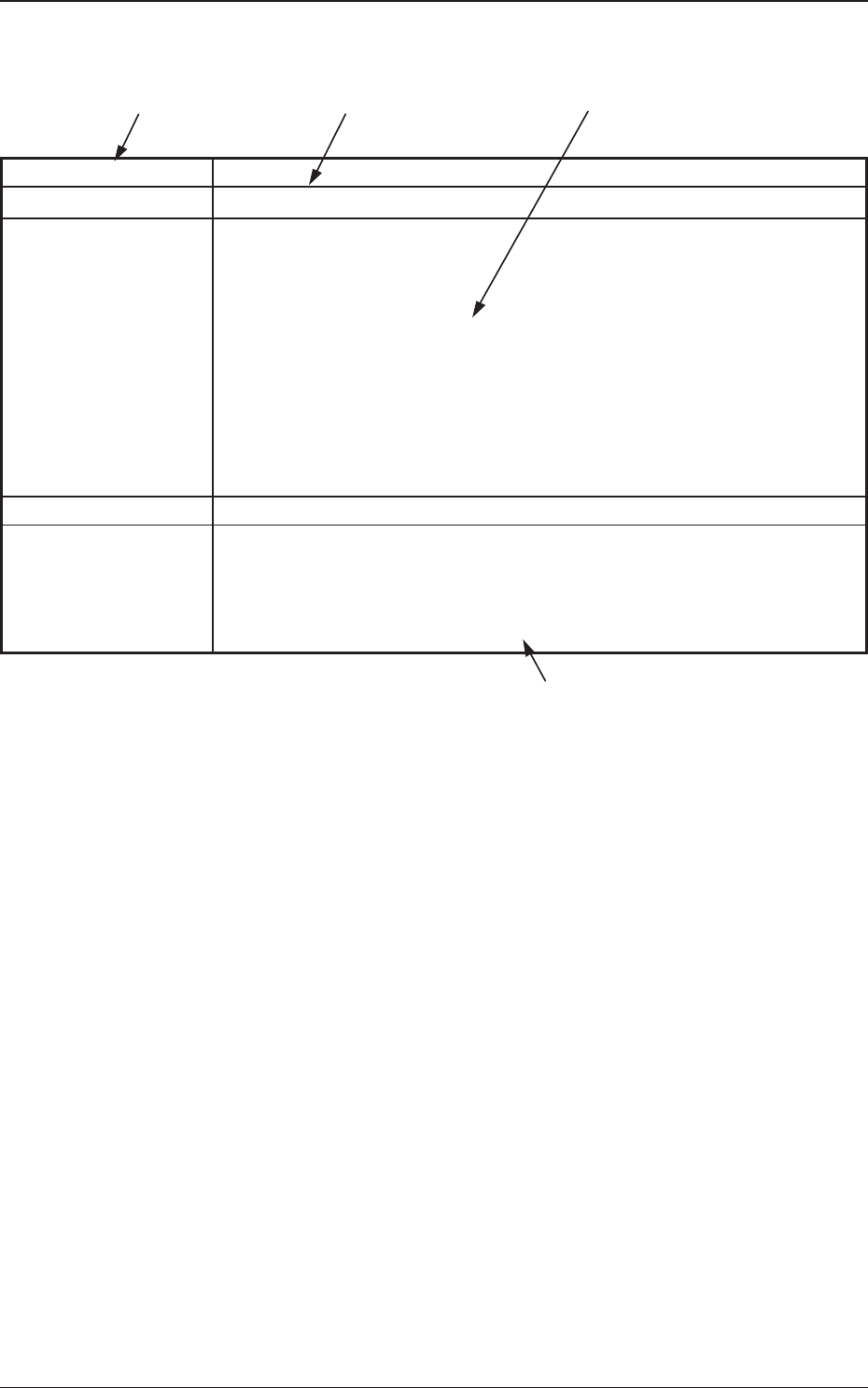
Table 15
Recognition Error ID Description of Recognition Error, Cause, and Remedy
0 5 0 ** 001 Component was not found
(Cause 1) Check if the feeder is loaded with components other than
the specified ones (the components to be used).
(Cause 2) The vacuum suction force is too weak.
(Cause 3) An improper nozzle is selected for the components or
vice versa.
(Remedy 1) Check if proper components are used.
(Remedy 2) Check the vacuum pressure.
(Remedy 3) Check the parameters in the nozzle type data and the
component library data.
0 5 1 ** 001 Component was not detected.
(Cause)
(Remedy)
(Continued to the next page.)
[1 ] Recognition Error ID
The recognition error IDs (IDs displayed in the "ERROR" window)
are described in the numerical order.
[2] Error Name and Description
Described are the error name (item) and the description in the
"ERROR" window.
[3] Cause and Remedy
Described are the causes and remedial procedures of the errors in
"[2] Error Name and Description".
The causes and remedies are correlated as follows.
(Cause 1) Æ (Remedy 1)
(Cause 2) Æ (Remedy 2)
(Cause 3) Æ (Remedy 3)
[4] Continued to the next page
This indicates that the related contents are described subsequently on
the next page.
[4]
[1]
[3]
0606-002
7.2 Description of Recognition Error ID (Example)
[2]