Maintenance Reference(CP45FV) Eng.pdf - 第20页
Samsung Component Placer CP45FV Series Maintenance Refer ence About W arranty The warranty is issued to cover the fo llowing machine faults and malfunctions: What is covered by the warranty If any part of the equipment f…
Preface
vii
Internal Part of the Machine
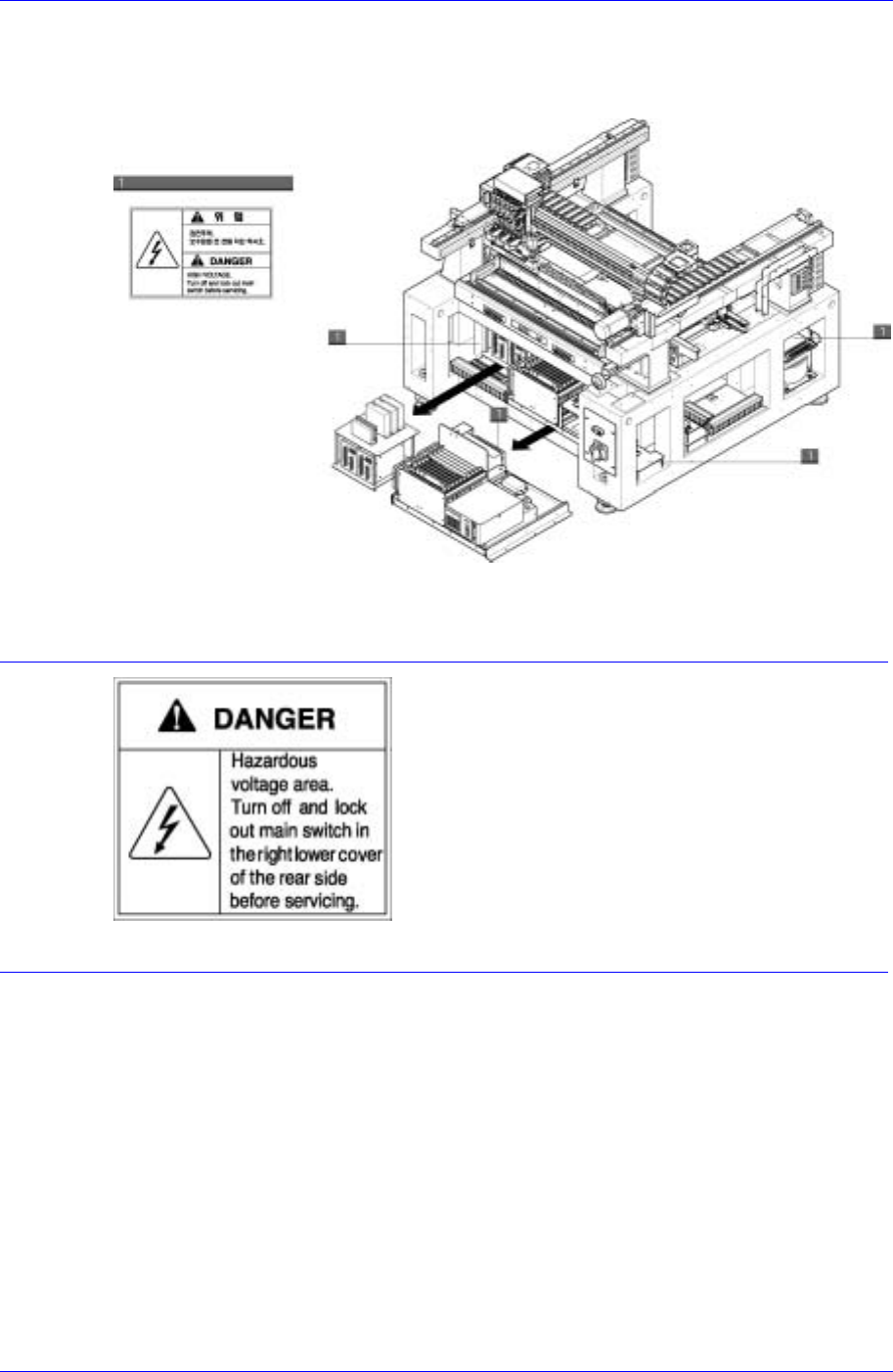
The following labels are attached on the internal part of this machine.
Figure 0-3. Safety labels attached on the internal part of the machine
Where this label is attached is
hazardous voltage area, it could
result in an electric shock.
Before repair or maintenance, turn
off the main switch in the right lower
cover of the rear side, wait a little
while, and remove the cover.

Samsung Component Placer CP45FV Series Maintenance Reference
About Warranty
The warranty is issued to cover the following machine faults and malfunctions:
What is covered by
the warranty
If any part of the equipment fails to function properly under normal usage
due to defects in material or workmanship, it will be repaired by
Samsung Techwin Co., Ltd. at no charge for either parts or labor.
Time period of the
warranty
The term of this warranty shall expire for any of the following cases.
18 months have elapsed after the delivery of the product
1 year has elapsed after installation of the product
2,400 hours have elapsed after the commencement of operation.
What is not covered
by the warranty
Any of the following cases are not covered by this warranty
Data lost due to HDD damage. Back up is desirable.
Malfunction of the machine due to running applications, which are not
any part of the machine, or infected by any computer viruses.
Normal wear and tear due to long-term use or faults arising from
normal use (natural fading of coating and plating, wearing-out of
parts, etc.)
Delicate changes do not affect the functional quality of the product
(such as noise of an operating controller, sound of a rotating motor,
etc.)
Faults due to the ambient conditions (moisture, impurities, dust on the
machine, oil mist, etc.)
Faults resulting from the following cases are not covered by this warranty
as well:
Natural disasters such as earthquake, typhoon, flood, lightning strike,
etc., or accident, and fire.
Reconstruction which is not approved by our company or agents.
Not performing back up for the data stored in the equipment.
Use of parts or lubricating oil which are not designated
Insufficient or faulty maintenance or inspection.
Adjustments performed by persons other than designated agents.
However, the contents of the warranty stipulated at the time of purchase take precedence
over the above coverage.
viii
Preface
ix
About This Manual
Related manuals
Manuals related to this manual are listed below:
Operations manual of this machine.
Overview, Programming Guide
Reference Manual of this machine.
Maintenance Guide, Troubleshooting Guide
Typographical conventions
A number of typographical features and conventions used in this manual.
Text indicated in italics in quotation marks (" ") denotes the title of a manual, or
the title of a chapter or section included in reference. If the title of a section is to
be referred to, the corresponding page number is also shown.
Please refer to "Chapter 1. Menu Structure of MMI" of "Operations Manual".
Please refer to "1.1 MMI of this Machine (page 1-1)".
Characters in quotation marks (" ") denote the title of a dialog box or message
box encountered while operating MMI.
An "open" dialog box is taken as an example.
Characters in angle brackets (< >) denote a button within a dialog box or
message box, or a button or icon to be clicked in the title, keyboard, or teaching
box. When explaining about a dialog box or message box, titles within a box are
shown along with a distinct sign (, , , etc.).
Click <OK> button.
The following texts are entered in the <Code Description>.
Description Code
<OK> button
Characters in brackets([ ]) denote keys to be pressed simultaneously on the
keyboard or in the teaching box. Each key is coupled by a plus (+) sign.
New command [Ctrl + N]