00196806-01_IM_EDM_1.9_EN.pdf - 第62页
Installation Manu al SIPLACE Engine ering Data Manag er (EDM) Version 1 .9 Issue 02/2009 62 Figure 24 Configuration of a single rule Every condition c heck s a subset of th e properties of the not ification. T his set is…
Installation Manual SIPLACE Engineering Data Manager (EDM) Version 1.9 02/2011 Edition
61 / 65
• individual properties of objects/subobjects
• type of change to the object
• name of the changed object. This restriction is implemented using regular expressions.
In the standard installation, a filter configuration is created that captures all irrelevant changes made during
optimization. Changes to NotificationFilterConfig.xml should only be made on the basis of these default
settings.
This part of the system is highly sensitive. In extreme cases, incorrect settings can lead to the loss of
important changes or, on the other hand, the data preparation engineer can be "bombarded" by
notifications regarding irrelevant changes.
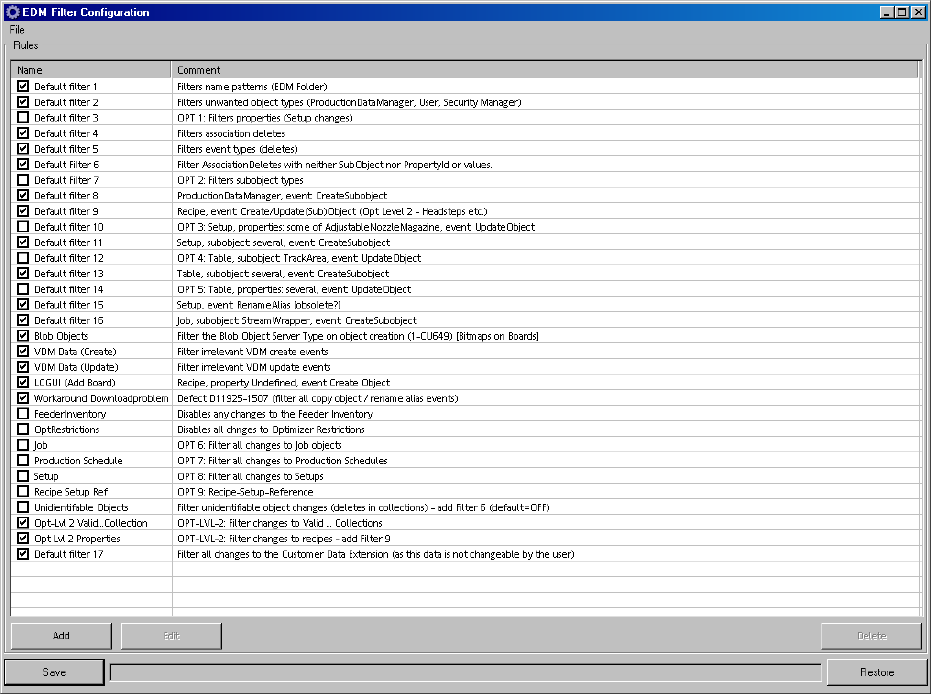
Figure 23 Configuration of the notification filter
The filter configuration comprises a set of ORed rules (see Figure 23 Configuration of the notification filter).
This means that as soon as at least one of the defined conditions applies to the incoming notification, the
notification is rejected (no comment dialog box is opened and the notification is not transferred to the
Master Server). A defined rule is enabled if the associated box is checked.
Installation Manual SIPLACE Engineering Data Manager (EDM) Version 1.9 Issue 02/2009
62
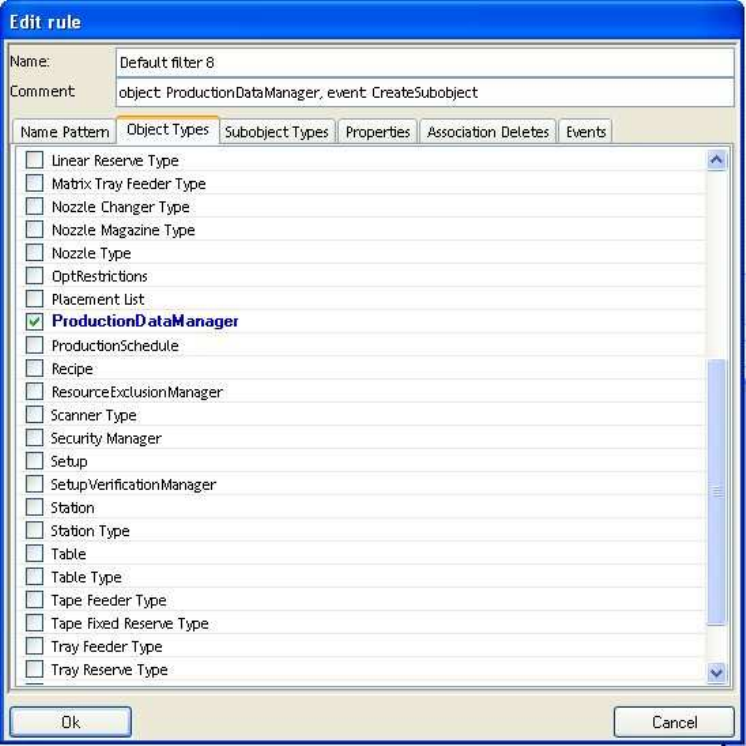
Figure 24 Configuration of a single rule
Every condition checks a subset of the properties of the notification. This set is ANDed, i.e. only when all
the properties checked by the condition have the values specified in the condition is the notification
rejected by this condition.
The following properties can be assessed by a condition:
• Name (regular expression)
• Object type
• Subobject type
• Property of object or subobject
• Deletion of subobjects of a particular object (association delete)
• Type of notification
There is a separate tab for each of these properties. If no value is selected in any of the tabs, this property
is not checked. If one or more values are selected, the value of the property in the notification must match
one of the values for the notification to be filtered.
5.6 Handling incoming change notifications
5.6.1 Saving the changed objects in the Clearing Pool
This is the default handling method for incoming change notifications. It is used for changes to all objects
which
Installation Manual SIPLACE Engineering Data Manager (EDM) Version 1.9 02/2011 Edition
63 / 65
• were not imported directly into the master database as described in 5.4.3.
• were not rejected automatically as described in 5.4.4.
• have conflicting settings as described in 5.4.3 and 5.4.4.
• could not be imported directlz as described in 5.4.3 due to SIPLACE Pro version conflicts or
other problems.
A notification is sent for all the alternatives as per the email configuration settings.
5.6.2 Direct import of changed objects to the master database
For configuration see 5.4.3.
5.6.3 Automatic rejection of the changes
For configuration see 5.4.4.