00196806-01_IM_EDM_1.9_EN.pdf - 第63页
Installation Manu al SIPLACE Engine ering Data Manag er (EDM) Version 1 .9 02/2011 Edition 63 / 65 • were not im ported direct ly into the m aster databas e as descr ibed in 5.4.3. • were not rejected autom atically as d…
Installation Manual SIPLACE Engineering Data Manager (EDM) Version 1.9 Issue 02/2009
62
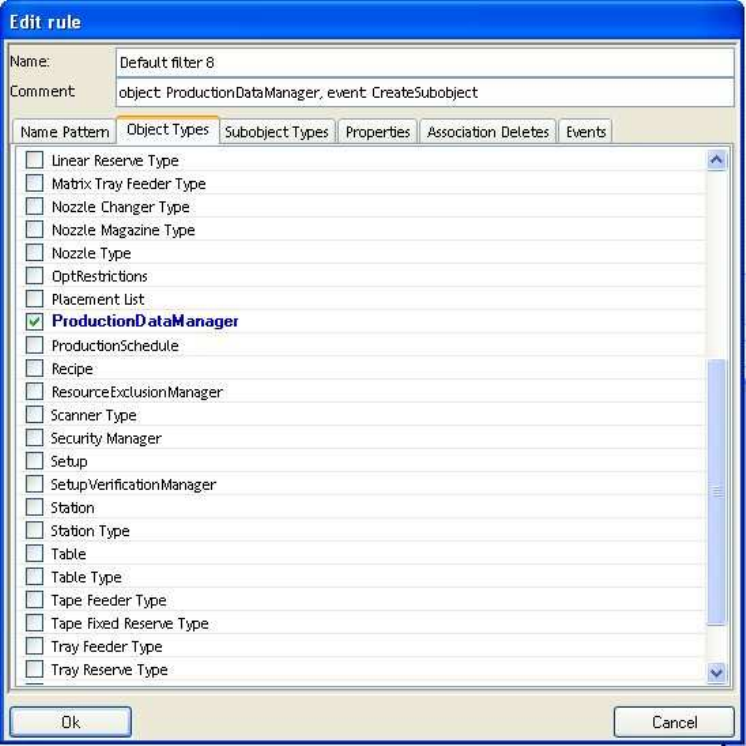
Figure 24 Configuration of a single rule
Every condition checks a subset of the properties of the notification. This set is ANDed, i.e. only when all
the properties checked by the condition have the values specified in the condition is the notification
rejected by this condition.
The following properties can be assessed by a condition:
• Name (regular expression)
• Object type
• Subobject type
• Property of object or subobject
• Deletion of subobjects of a particular object (association delete)
• Type of notification
There is a separate tab for each of these properties. If no value is selected in any of the tabs, this property
is not checked. If one or more values are selected, the value of the property in the notification must match
one of the values for the notification to be filtered.
5.6 Handling incoming change notifications
5.6.1 Saving the changed objects in the Clearing Pool
This is the default handling method for incoming change notifications. It is used for changes to all objects
which
Installation Manual SIPLACE Engineering Data Manager (EDM) Version 1.9 02/2011 Edition
63 / 65
• were not imported directly into the master database as described in 5.4.3.
• were not rejected automatically as described in 5.4.4.
• have conflicting settings as described in 5.4.3 and 5.4.4.
• could not be imported directlz as described in 5.4.3 due to SIPLACE Pro version conflicts or
other problems.
A notification is sent for all the alternatives as per the email configuration settings.
5.6.2 Direct import of changed objects to the master database
For configuration see 5.4.3.
5.6.3 Automatic rejection of the changes
For configuration see 5.4.4.
Installation Manual SIPLACE Engineering Data Manager (EDM) Version 1.9 Issue 02/2009
64
6 Glossary
Action A special program component executed in the context of a transition.
Application template
Configuration file used to control the data transfer between the Master Server and Line Servers
Blob Illumination parameters for line and station
Data preparation engineer
Person responsible for the data in Production Preparation
EDM Engineering Data Manager
Event Triggers a transition
Filter Configuration
Part of the workflow description that describes the changes for which no notification is to be sent to
the Master Server. None of the objects affected by the restrictions defined will appear in the
Clearing Pool.
GUI Graphical User Interface
Line Engineer
Person responsible for one or more lines
Module One or more transitions that make a certain function available in the EDM Client workflow
Process A sequence of operations
State "Memory" of a finite state machine
Transition Switch from one state to another
UML Unified Modeling Language
Workflow IT implementation of a process
Workflow description
Here: the set of all configuration settings needed for a functioning EDM installation consisting of
client workflow configuration, application configuration, EDM notifications configuration, filter
configuration and application templates
XML eXtensible Markup Language
7 Default configuration
7.1 EDM.config
You will find more details under [EDM installation folder]\config\EDM.config
7.2 clientWorkflow.xml
You will find more details under [EDM installation folder]\config\clientWorkflow.xml