200823.TR3000-IRV English Manual.pdf - 第15页
IR AUT O BGA R ework S tation TR3000-IRV Kukjetrading Co., Ltd. 15 ② Graph W indow: Graph in blue [SV] is a gra ph for the pr ofile which is c urrently set. Gr aph in green[PV] is a temperature control profile for an i…
IR AUTO BGA Rework Station TR3000-IRV
Kukjetrading Co., Ltd.
14
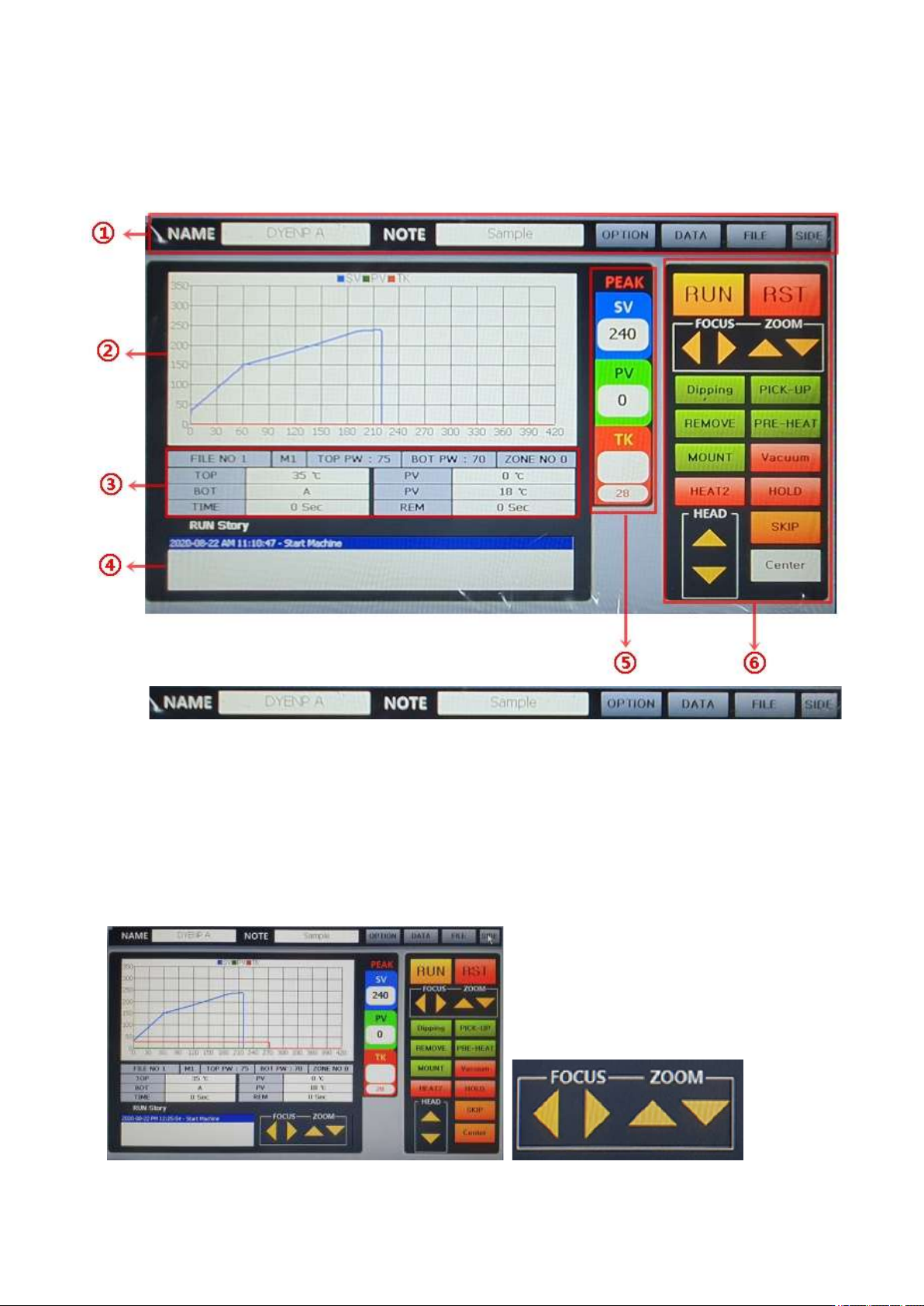
5. Controller Screen
①
NAME: Name of a file which is currently in operation is displayed in text on a screen.
NOTE: Memo is displayed in text.
OPTION: Possible to change options of the device. Vision calibration, temperature correction by mode,
communication environment setting can be changed. This function is protected with a password. An initial
password is “1234”.
DATA: It is possible to analyze a period of time by heating section of the profile which has been created.
Enter the temeprature range to be analyzed.
FILE: It is for controlling the temperature profile. It is possible to create, delete and edit the temperature
profile as well as file number.
SIDE: A button to show or hide the window for controlling the zoom and focus of the side camera.
IR AUTO BGA Rework Station TR3000-IRV
Kukjetrading Co., Ltd.
15
②
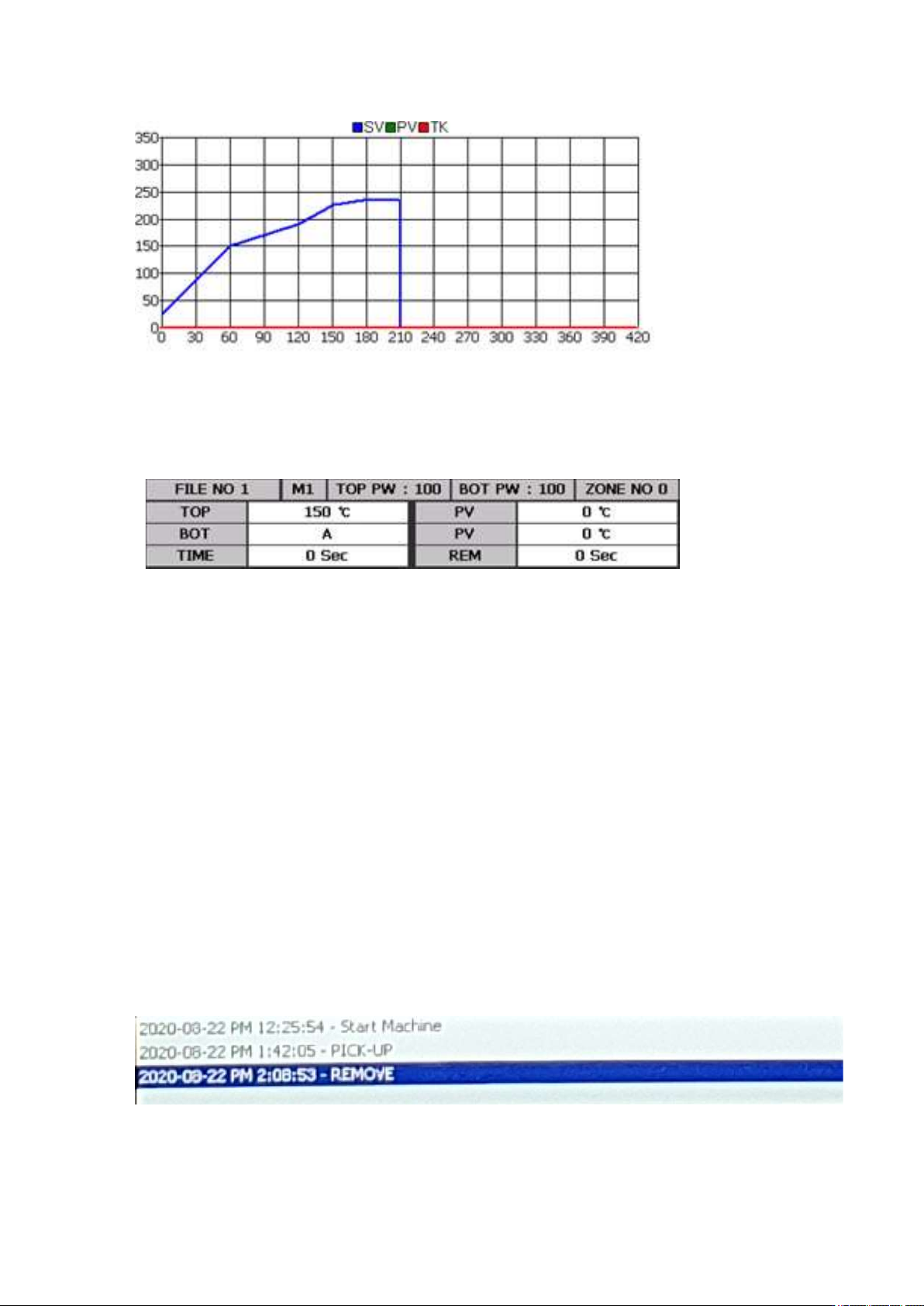
Graph Window: Graph in blue [SV] is a graph for the profile which is currently set. Graph in green[PV]
is a temperature control profile for an infrared sensor or K sensor of M4 which is currently in operation.
Graph in red [TK] is displayed when a K sensor is accessed to the TK and it is for measuring the actual
temperature profile.
③
FILE NO # : The file number is 1. Up to 100 files from 0 to 99 can be used.
M #: The operation mode number is 1. There are 4 operation modes- 1, 2, 3 and 4.
1~3are control modes using a non-contact infrared sensor and M4 is an operation mode using a contact K
sensor.
TOP PW: It display the output of the Top Heater. Standard is 70.
BOT PW: It display the output of the Bottom Heater. Standard is 100.
ZONE NO 0: It indicates a ZONE number. The zone number shown in this table is 0. As for the zone,
there are 9 levels from 0 to 9. ZONE. In general, zones 0~5 are used. If necessary, levels can be extended.
TOP: Top temperature which has been set. The available temperature range is 0 to 290 Celsius degrees.
PV: Actual upper temperature.
BOT: Bottom temperature which has been set. The available temperature range is 0~499 Celsius degrees.
When it is set as 500, ‘A’ is displayed. ‘A’ is the auto mode for automatic operation at up to 350 Celsius
degrees. When 500 Celsius degrees is entered at the zone 0, it would be applied to all zones. However, if
temperature less than 499 Celsius degrees is entered, the temperature must be entered for each of zones.
The bottom heater is cont
The bottom heater controls with a K sensor and this value indicates the temperature of the heater surface.
This value is the maximum temperature for each zone.
Actual temperature of the PV-bottom heater.
TIME: It displays the time of each zone. It gets down-counted when the operation starts.
REM: It displays the total operation time. It gets down-counted when the operation starts.
④
IR AUTO BGA Rework Station TR3000-IRV
Kukjetrading Co., Ltd.
16
RUN Story : It displays the operation history. It records operation circumstances in order and when there
is an alarm, the history of alarms would be displayed. When it gets to the last stage, alarm turns on. In
occurrence of error, alarm turns on, and an error message gets displayed on the run story.
It is for displaying the operation history of the device, and this RUN story automatically saves it as a text
file which can be used for finding a cause of a problem.
Operations and alarming messages should be saved as a TXT file by date. .
This file can be saved for 1 month at a minimum and 2 months at a maximum.
As for messages related with the warning, please refer to “7. Safety Device”.
⑤
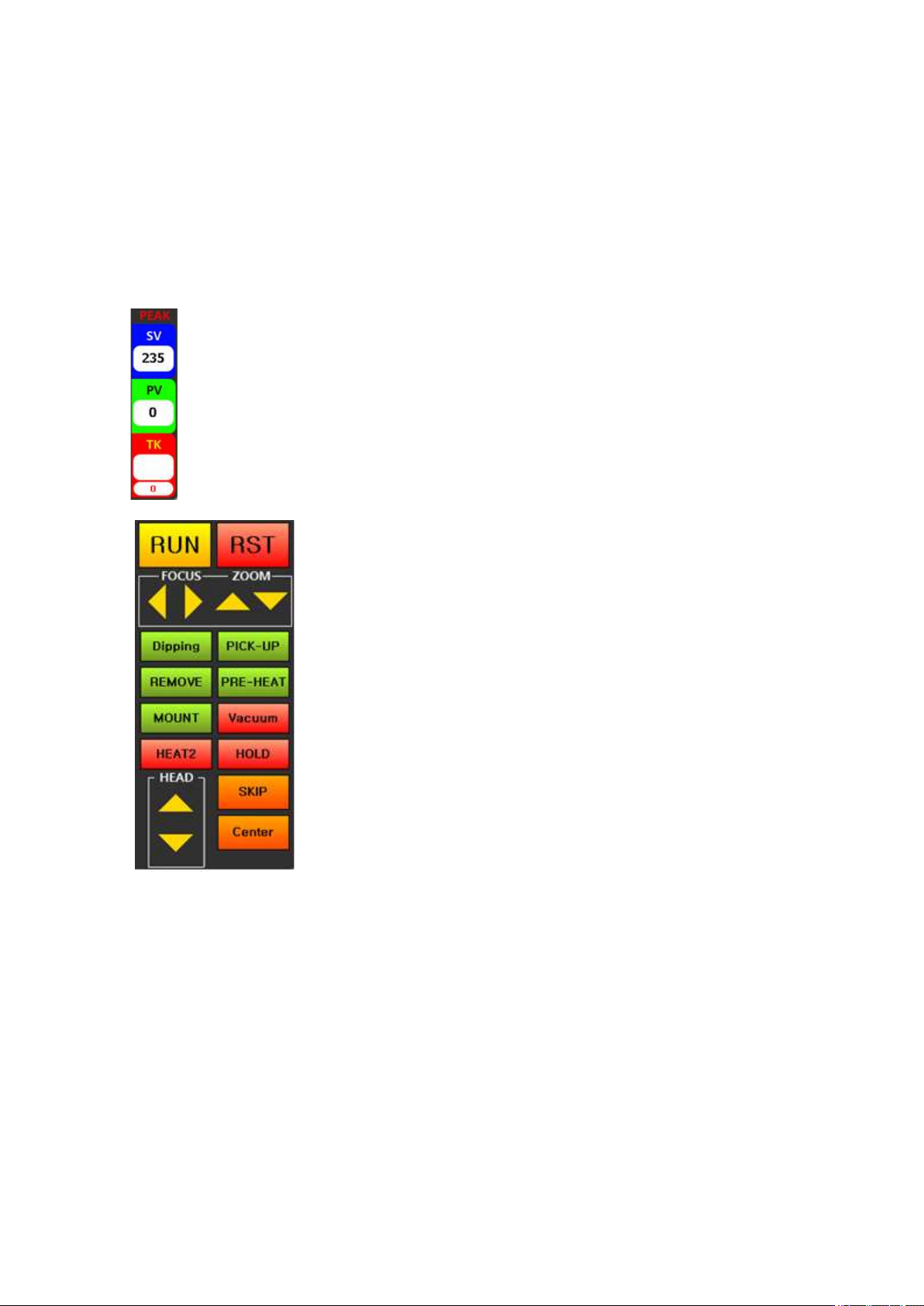
PEAK: It displays peak values for the SV-temperature, PV-
control
temperature and actual temperature measured by a TK-K sensor.
⑥
RUN: It is a button for starting an operation.
When this
button is pressed, a head would des
cend automatically and
an operation
would start with the current temperature profile.
RST:
It is a reset button. When this button is pressed during
operation, the operation would get canceled and a cooling
fan would operate after 7 seconds. During stand-b
y, a
cooling fan can be turned on/off.
Right and left and top and bottom arrows:
<When a vision is being used>
Right and left arrows are for
moving a vision camera right and left, and top and bottom
arrows are for moving a head up and down.
<During heating>
Right and left arrows are for
reducing/increasing the temperature by 1 Celsius degree. Up
and down arrows are for increasing/decreasing time by 5
seconds..
<Stand-By> No Function
Dipping: It is used for dipping into low-viscosity solder or gel flux. After placing a dipping jig onto the
left of a vision head, place a solder and then print. Then, place a BGA on the center of the right side of a
vision head. When a dipping button is pressed, a vision head would move to pick up a BGA and dip it into
solder cream and then place at the center of a vision part.
PICK-UP: After absorbing parts from a part tray, placing them onto the center of a vision part. When flux
is applied on a board, it is easier to pick up parts with a vision.
REMOVE: It is used for removing parts from a board. When this button is pressed, a head automatically
descends until a vacuum bit touches a part and then elevates back to a heating position and starts heating.
If the upper side of the BGA is in a form of a flip chip, there is a high risk of absorption failure when the
absorption position is not accurate. Therefore, a vacuum bit must be adjusted to be at the center upon
descending of the head.