200823.TR3000-IRV English Manual.pdf - 第16页
IR AUT O BGA R ework S tation TR3000-IRV Kukjetrading Co., Ltd. 16 RUN Stor y : It displays th e operation history . It records operati on circumstances in order and wh en there is an al arm, the hi story o f alarms wo…
IR AUTO BGA Rework Station TR3000-IRV
Kukjetrading Co., Ltd.
15
②
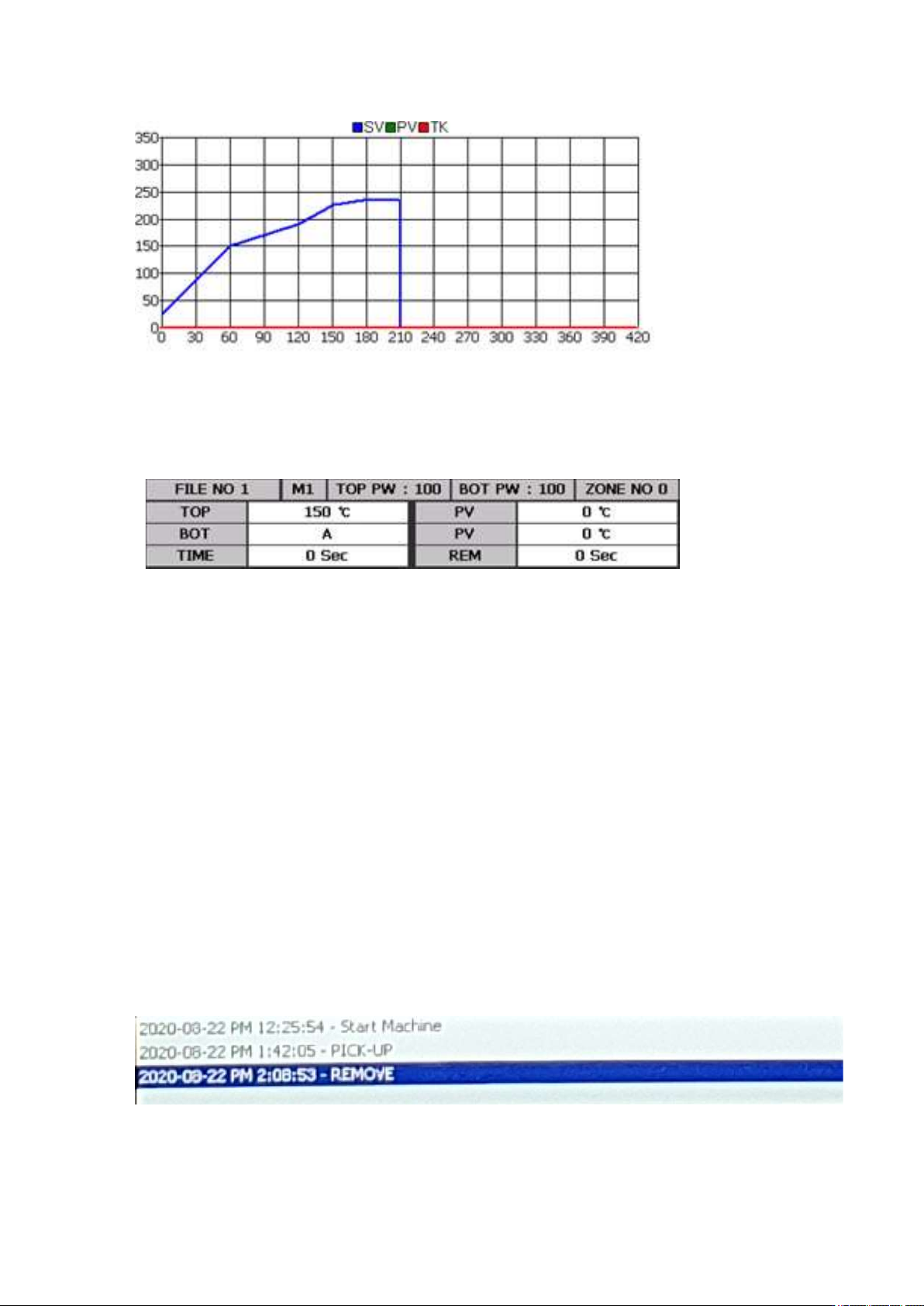
Graph Window: Graph in blue [SV] is a graph for the profile which is currently set. Graph in green[PV]
is a temperature control profile for an infrared sensor or K sensor of M4 which is currently in operation.
Graph in red [TK] is displayed when a K sensor is accessed to the TK and it is for measuring the actual
temperature profile.
③
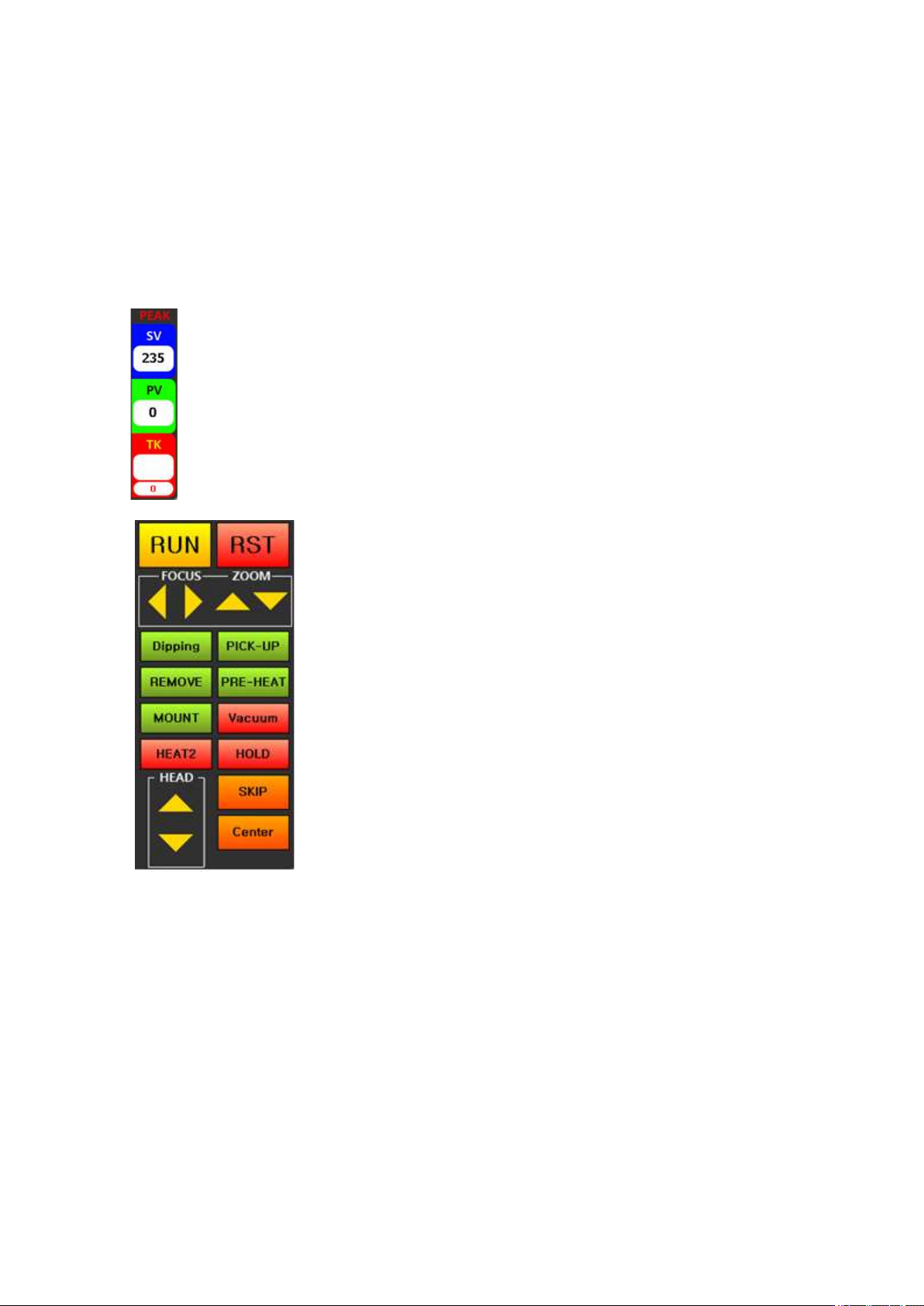
FILE NO # : The file number is 1. Up to 100 files from 0 to 99 can be used.
M #: The operation mode number is 1. There are 4 operation modes- 1, 2, 3 and 4.
1~3are control modes using a non-contact infrared sensor and M4 is an operation mode using a contact K
sensor.
TOP PW: It display the output of the Top Heater. Standard is 70.
BOT PW: It display the output of the Bottom Heater. Standard is 100.
ZONE NO 0: It indicates a ZONE number. The zone number shown in this table is 0. As for the zone,
there are 9 levels from 0 to 9. ZONE. In general, zones 0~5 are used. If necessary, levels can be extended.
TOP: Top temperature which has been set. The available temperature range is 0 to 290 Celsius degrees.
PV: Actual upper temperature.
BOT: Bottom temperature which has been set. The available temperature range is 0~499 Celsius degrees.
When it is set as 500, ‘A’ is displayed. ‘A’ is the auto mode for automatic operation at up to 350 Celsius
degrees. When 500 Celsius degrees is entered at the zone 0, it would be applied to all zones. However, if
temperature less than 499 Celsius degrees is entered, the temperature must be entered for each of zones.
The bottom heater is cont
The bottom heater controls with a K sensor and this value indicates the temperature of the heater surface.
This value is the maximum temperature for each zone.
Actual temperature of the PV-bottom heater.
TIME: It displays the time of each zone. It gets down-counted when the operation starts.
REM: It displays the total operation time. It gets down-counted when the operation starts.
④
IR AUTO BGA Rework Station TR3000-IRV
Kukjetrading Co., Ltd.
16
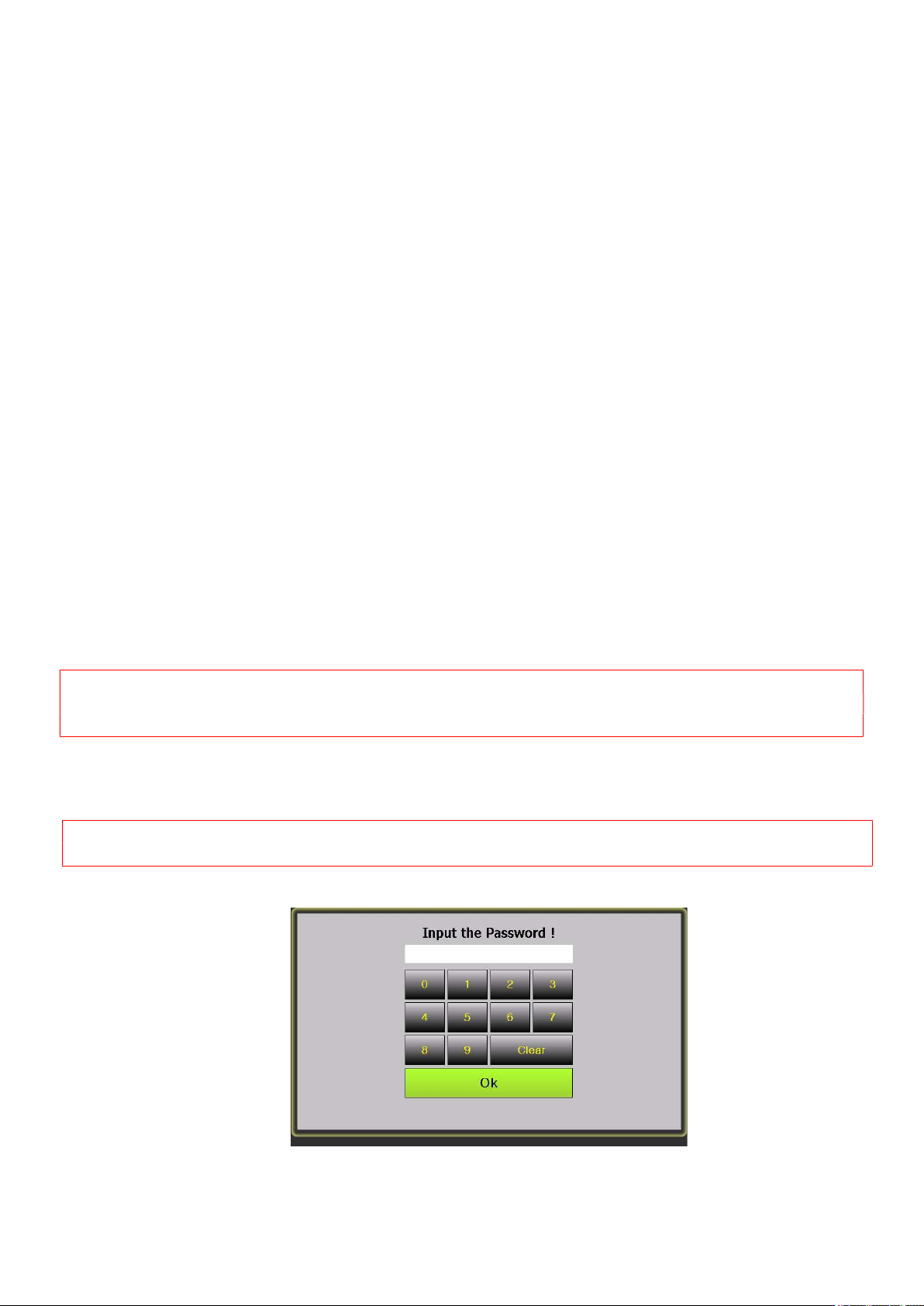
RUN Story : It displays the operation history. It records operation circumstances in order and when there
is an alarm, the history of alarms would be displayed. When it gets to the last stage, alarm turns on. In
occurrence of error, alarm turns on, and an error message gets displayed on the run story.
It is for displaying the operation history of the device, and this RUN story automatically saves it as a text
file which can be used for finding a cause of a problem.
Operations and alarming messages should be saved as a TXT file by date. .
This file can be saved for 1 month at a minimum and 2 months at a maximum.
As for messages related with the warning, please refer to “7. Safety Device”.
⑤
PEAK: It displays peak values for the SV-temperature, PV-
control
temperature and actual temperature measured by a TK-K sensor.
⑥
RUN: It is a button for starting an operation.
When this
button is pressed, a head would des
cend automatically and
an operation
would start with the current temperature profile.
RST:
It is a reset button. When this button is pressed during
operation, the operation would get canceled and a cooling
fan would operate after 7 seconds. During stand-b
y, a
cooling fan can be turned on/off.
Right and left and top and bottom arrows:
<When a vision is being used>
Right and left arrows are for
moving a vision camera right and left, and top and bottom
arrows are for moving a head up and down.
<During heating>
Right and left arrows are for
reducing/increasing the temperature by 1 Celsius degree. Up
and down arrows are for increasing/decreasing time by 5
seconds..
<Stand-By> No Function
Dipping: It is used for dipping into low-viscosity solder or gel flux. After placing a dipping jig onto the
left of a vision head, place a solder and then print. Then, place a BGA on the center of the right side of a
vision head. When a dipping button is pressed, a vision head would move to pick up a BGA and dip it into
solder cream and then place at the center of a vision part.
PICK-UP: After absorbing parts from a part tray, placing them onto the center of a vision part. When flux
is applied on a board, it is easier to pick up parts with a vision.
REMOVE: It is used for removing parts from a board. When this button is pressed, a head automatically
descends until a vacuum bit touches a part and then elevates back to a heating position and starts heating.
If the upper side of the BGA is in a form of a flip chip, there is a high risk of absorption failure when the
absorption position is not accurate. Therefore, a vacuum bit must be adjusted to be at the center upon
descending of the head.
IR AUTO BGA Rework Station TR3000-IRV
Kukjetrading Co., Ltd.
17
PRE-HEAT: When this button is pressed, only the bottom heater starts the heating and its temperature
maintains to be at 250 Celsius degrees. [Temperature which has been set can be changed at the
OPTION.] This function is good for removal of any residual of lead on the PCB of which parts have been
removed. If the ironing operation is executed while preheating of the PCB, the PCB can be cleaned without
any damage on PCB patterns.
MOUNT: When this button is pressed after positioning of parts with the dipping or pick-up function, a
head automatically descends to mount parts on top of the PCB and then restores back to its original position.
Operators should check whether the parts which have been mounted are in alignment. If the parts are not
in alignment, calibration is required.
VACUUM: It is used for manually turning on/off of vacuum. When DIPPING, PICK-UP, and REMOVE
are pressed, vacuum automatically turns on/off.
HEAT 2: It supplies power to all 8 bottom heaters. It is very effective when it is worked with a large board
or residual lead on the PCB is removed by pressing BOTTOM.
HOLD: If you press the botton, the time and temp is holded. If you want to heat contine, you can use this
botton.
SKIP: When this button is pressed, it skips to the last stage. When an operator presses this button after
checking a melting point for lead during operation, it skips to the last stage. For example, if it is currently
in operation by pressing REMOVE, turn on vacuum and remove parts and then, cool it down. When SKIP
is pressed if it is currently in operation by pressing Run, the operation stops immediately and a cooling
mode starts.
Center: It is used for aligning the center of an operation. When this button is pressed, a vision head moves
to be in alignment with a top head. Since a vision image is on the monitor, it gets easier to make a vacuum
bit in alignment with a BGA. When CENTER, or RUN or REMOVE is pressed after the alignment, a
vision head moves back to an original position and the next operation starts.
5.1 OPTION ( Setting of equipment)
<Caution>
The device is at factory default setting. If users change settings arbitrarily, there could be a risk of
malfunction. Please fully understand of every function before changing settings.
-. When an option key is touched on the standby screen, the following screen would appear. Then, enter a 4-digit
password. The initial password is 1234.
<Caution> Upon entering of a password, the same button cannot be entered quickly due to delay time. Press
keys slowly.
1234