200823.TR3000-IRV English Manual.pdf - 第21页
IR AUT O BGA R ework S tation TR3000-IRV Kukjetrading Co., Ltd. 21 ⑫ As for this da ta, click Save and th en use th e key shown as f ollo ws to register and s ave a file name . However , such data file is saved onto a SD…
IR AUTO BGA Rework Station TR3000-IRV
Kukjetrading Co., Ltd.
20
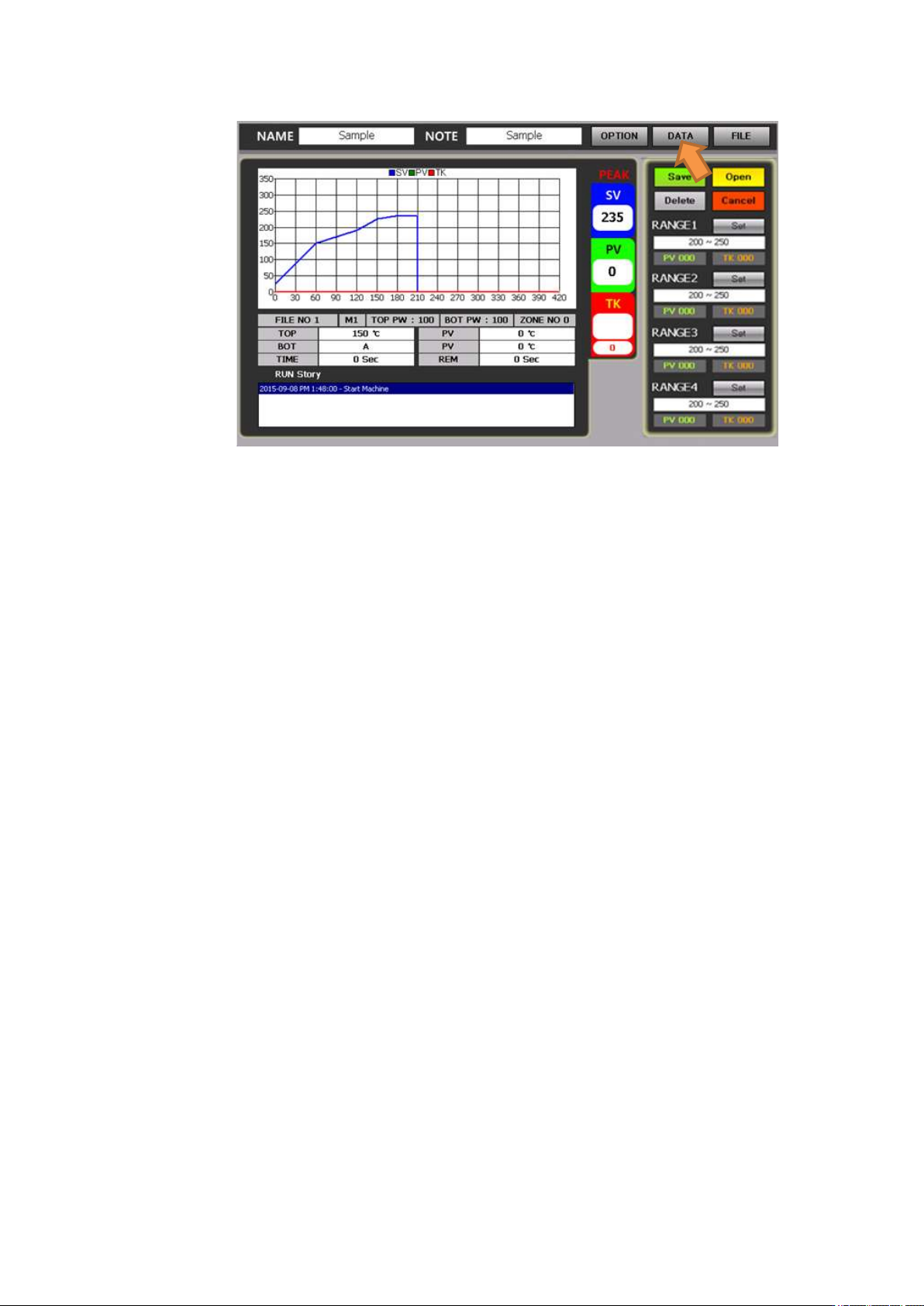
When the data is touched, a range window appears on the right.
It can analyze 4 ranges from the range 1 to 4 which are on the right of the screen. .
Touch set keys next to the range 1 to 4 to click a triangle table for each of the range 1 and the range 2 to
set a temperature range to be analyzed.
When an OK button is touched, elapse time for the corresponding zone is displayed in number next to
the PV and TK.
With a save button or a delete button, it is possible to save or delete data onto the file.
5.2.1 Use DATA
① Adhere the end of a K-type wire sensor to a part to be worked with by using heat resistant tape and insert
a connector to a TK socket on the front of the device.
② After mounting a PCB onto a table, fasten it with screws which are used for fixing of space. During the
process, it becomes much easier if a board is fixed with a laminated-board fastening jig and a bottom
bending-prevention jig.
③ Press a center button to operate a vision camera.
④ Move a slide table to adjust the center of a vacuum bit to the center of a part. .
⑤ Check if a button of the heater 1 has been pressed. A large board should be selected by pressing up to the
heater 2.
⑥ Adjust the width of a splashback of an upper heater.
⑦ Press a RUN button to start heating.
⑧ The device operates in accordance with profile conditions and on the screen, PV values and TK values
are displayed in number and graphs are shown.
⑨ The operation is completed in accordance with the selected profile conditions and while a head elevates,
a cooling fan operates.
⑩ Press a “DATA” button, on the upper right of a screen, to select.
⑪ The initial temperature range is displayed on options. From the range 1~4, touch a set key to set a
temperature range to be changed and then, press OK. Then, elapse time within the preset temperature
range is displayed in a unit of second.
IR AUTO BGA Rework Station TR3000-IRV
Kukjetrading Co., Ltd.
21
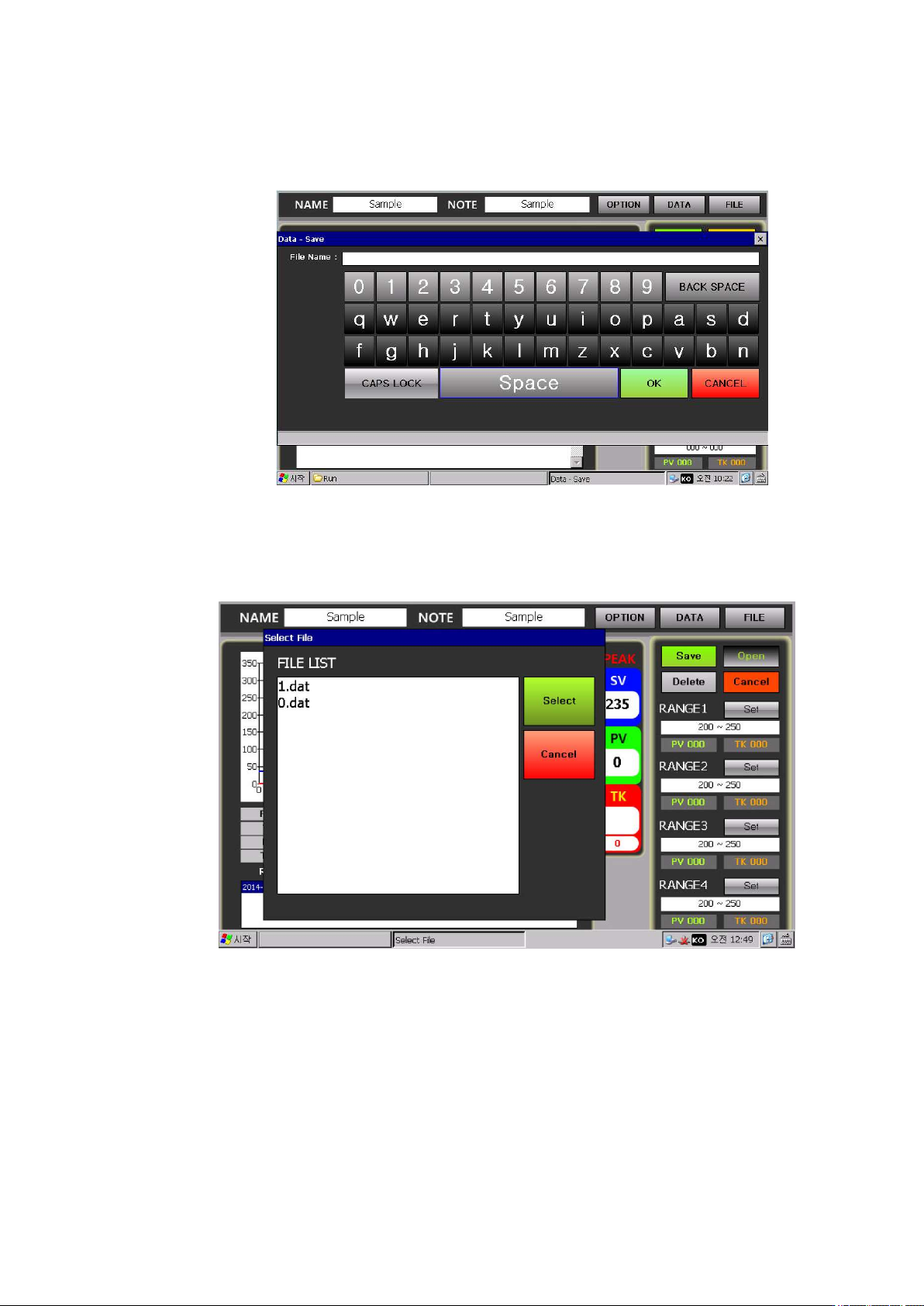
⑫ As for this data, click Save and then use the key shown as follows to register and save a file name.
However, such data file is saved onto a SD card in general and if there is no SD card, it gets saved onto
a NandFlash Memory.
⑬ Since the memory capacity of a Nand Flash is limited, try not to save a lot of data files.
⑭ To call the saved Data file, click OPEN. Then, a list of data files which have been saved is displayed as
File List shown as follows. Select one file from the file list and then press Select. Then, the selected data
would be opened and its graph and analysis data would be displayed.
IR AUTO BGA Rework Station TR3000-IRV
Kukjetrading Co., Ltd.
22
5.3 About FILE
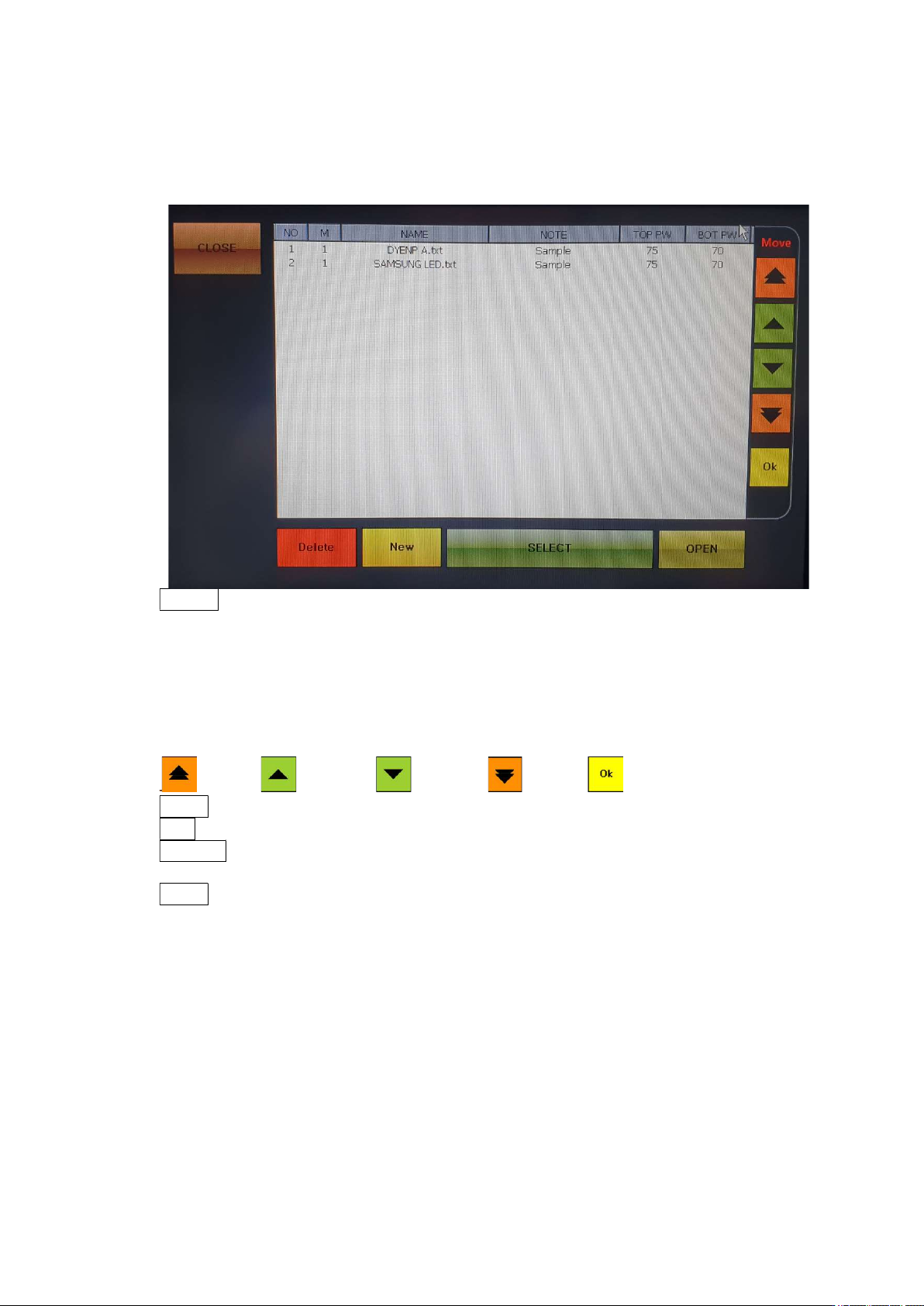
When a FILE button, which is on the upper right of the screen, is cliked, the following screen would
appear.
CLOSE: Close a window.
NO: File number. Up to 100 files from 0 to 99 can be used.
M: Operation mode. There are 4 operation modes- 1, 2, 3 and 4
NAME: File name.
NOTE: Note.
TOP PW: Displays the output of the upper heater.
BOT PW: Displays the output of the bottom heater.
MOVE: File number move funtion, If you want to save after change, you have to push OK button.
to Top to above to down to End Save
Delete: It is for deleting a file. Select a file to be deleted and then press DELETE to delete.
New: It is for creating a new profile. A new no. is created on the last line.
SELECT: It is for selecting a profile. Select a file number to be switched over and then press
SELECT to switch over to the selected file. .
OPEN: It is for editing a profile. Select a file number and then press OPEN to modify or edit the
temperature profile or save it under a different file name.