200823.TR3000-IRV English Manual.pdf - 第23页
IR AUT O BGA R ework S tation TR3000-IRV Kukjetrading Co., Ltd. 23 5.3.1 Registration of New T empera ture Profil e ① Click a File button on the upper ri ght side. ② Cl ick a New ke y in y el low , on the l ower le f t s…
IR AUTO BGA Rework Station TR3000-IRV
Kukjetrading Co., Ltd.
22
5.3 About FILE
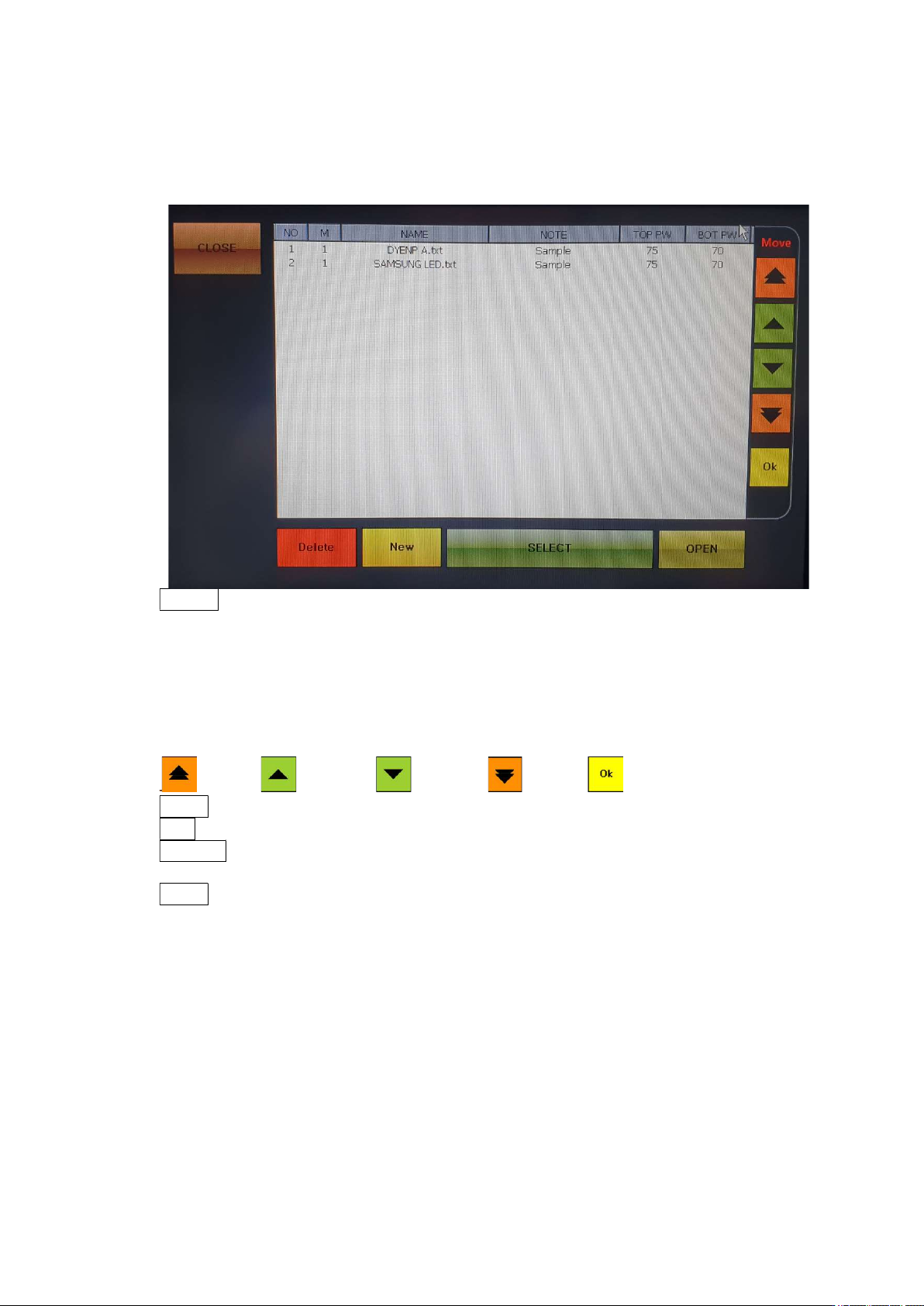
When a FILE button, which is on the upper right of the screen, is cliked, the following screen would
appear.
CLOSE: Close a window.
NO: File number. Up to 100 files from 0 to 99 can be used.
M: Operation mode. There are 4 operation modes- 1, 2, 3 and 4
NAME: File name.
NOTE: Note.
TOP PW: Displays the output of the upper heater.
BOT PW: Displays the output of the bottom heater.
MOVE: File number move funtion, If you want to save after change, you have to push OK button.
to Top to above to down to End Save
Delete: It is for deleting a file. Select a file to be deleted and then press DELETE to delete.
New: It is for creating a new profile. A new no. is created on the last line.
SELECT: It is for selecting a profile. Select a file number to be switched over and then press
SELECT to switch over to the selected file. .
OPEN: It is for editing a profile. Select a file number and then press OPEN to modify or edit the
temperature profile or save it under a different file name.
IR AUTO BGA Rework Station TR3000-IRV
Kukjetrading Co., Ltd.
23
5.3.1 Registration of New Temperature Profile
①
Click a File button on the upper right side.
② Click a New key in yellow, on the lower left side.
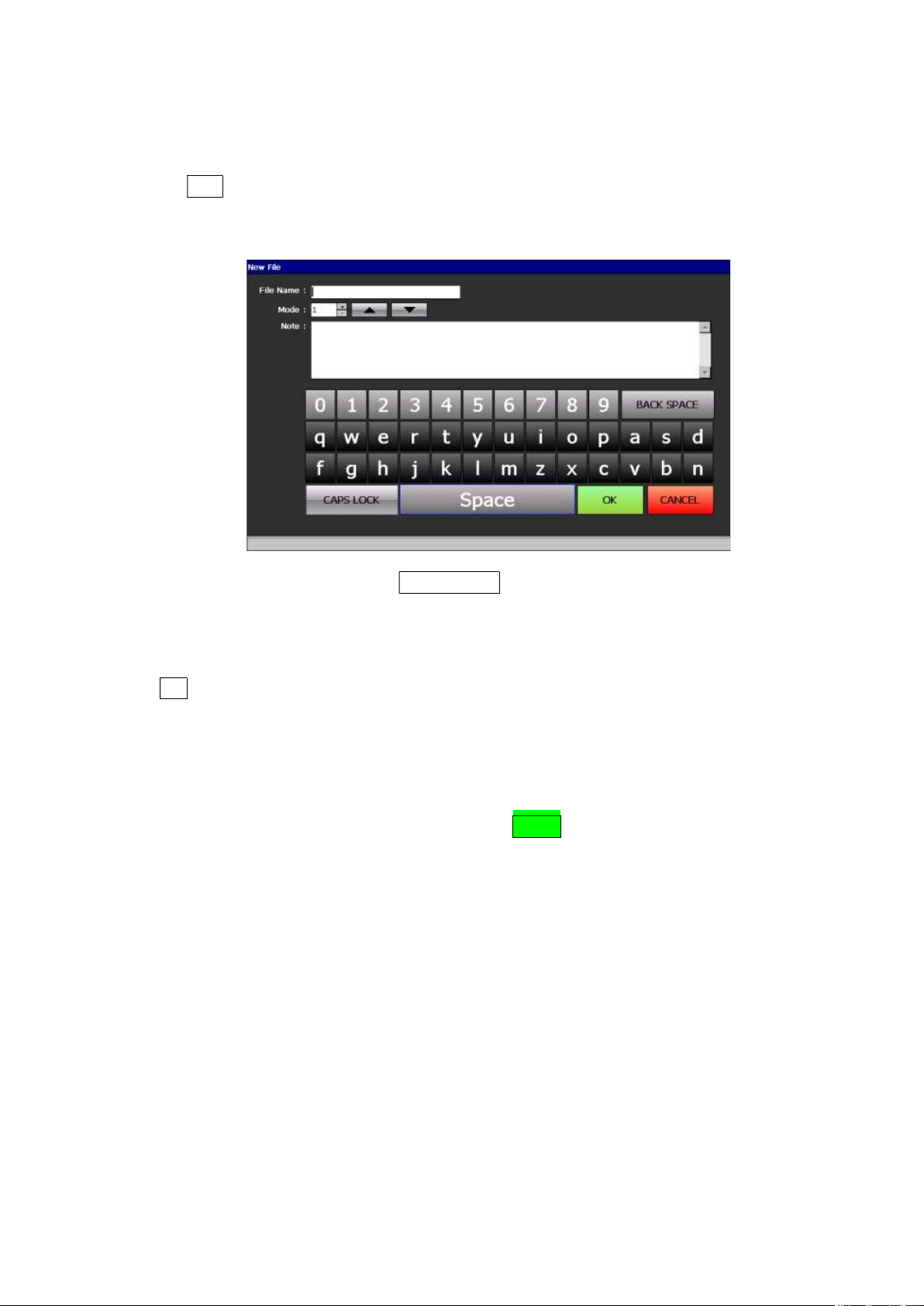
Then, a new file window would appear as
follows.
File Name: Enter a file name. Touch a rectangular box to have a keyboard on the bottom. Enter a
name on the keyboard. With the CAPS LOCK, the keyboard can be switched from capital letters
to lower case letters.
Mode: It is for selecting an operation mode. By clicking up/down arrows, select the desired mode.
There are 4 operation modes and the standard mode is 1.
Note: Enter a note.
OK: Save
CANCEL: Cancel
③ Enter cautions or special conditions onto [File Name], [Mode] and [Note], and then press “OK”, on the lower
right. Then, a new file would be created.
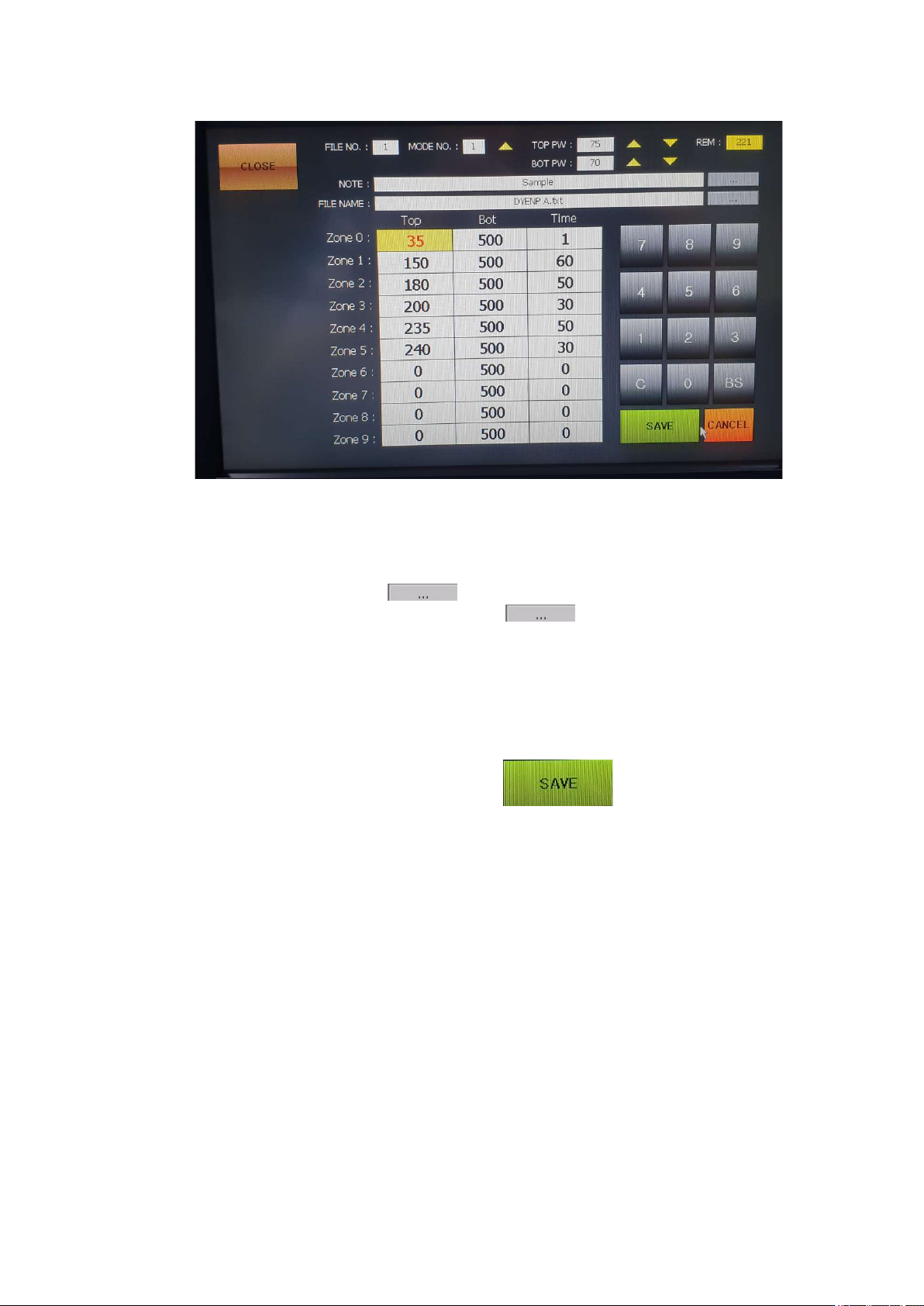
④ Select the file name which has been entered and then press OPEN. Then, the following screen would appear.
IR AUTO BGA Rework Station TR3000-IRV
Kukjetrading Co., Ltd.
24
FILE NO: It indicates a file number.
MODE NO: Press UP to select from 1 to 4.
TOP PW: Adjusts the output of the upper heater in the range of 30~100%.
BOT PW: Adjusts the output of the bottom heater in the range of 30~100%.
REM: It displays the total time.
NOTE: It is for a note. Press a button on the right to change its name.
FILE NAME: It indicates a file name. Press a button on the right to change its name.
When it is saved under a different name, all data of the file gets copied and saved.
Top: The available temperature range for the upper heater is 0 to 290 Celsius degrees
Bot: Bottom temperature which has been set. The available temperature range is 0~499 Celsius
degrees. When it is set as 500, ‘A’ is displayed. ‘A’ is the auto mode for automatic operation at up
to 350 Celsius degrees.
Time: 0~999 can be used for each level.
⑤ Enter every desired value to each of zones and then press button to save the entered values. .