Maintenance (Micron) workbook Iss07.pdf - 第12页
12 Issue 6, Nov 14 Objective MO3: Create a product file Using the board and stencil pr ovided by your instructor create a new product file. Creating a New Product File From an Existing File This is often the quickest way…
Issue 6, Nov 14
11
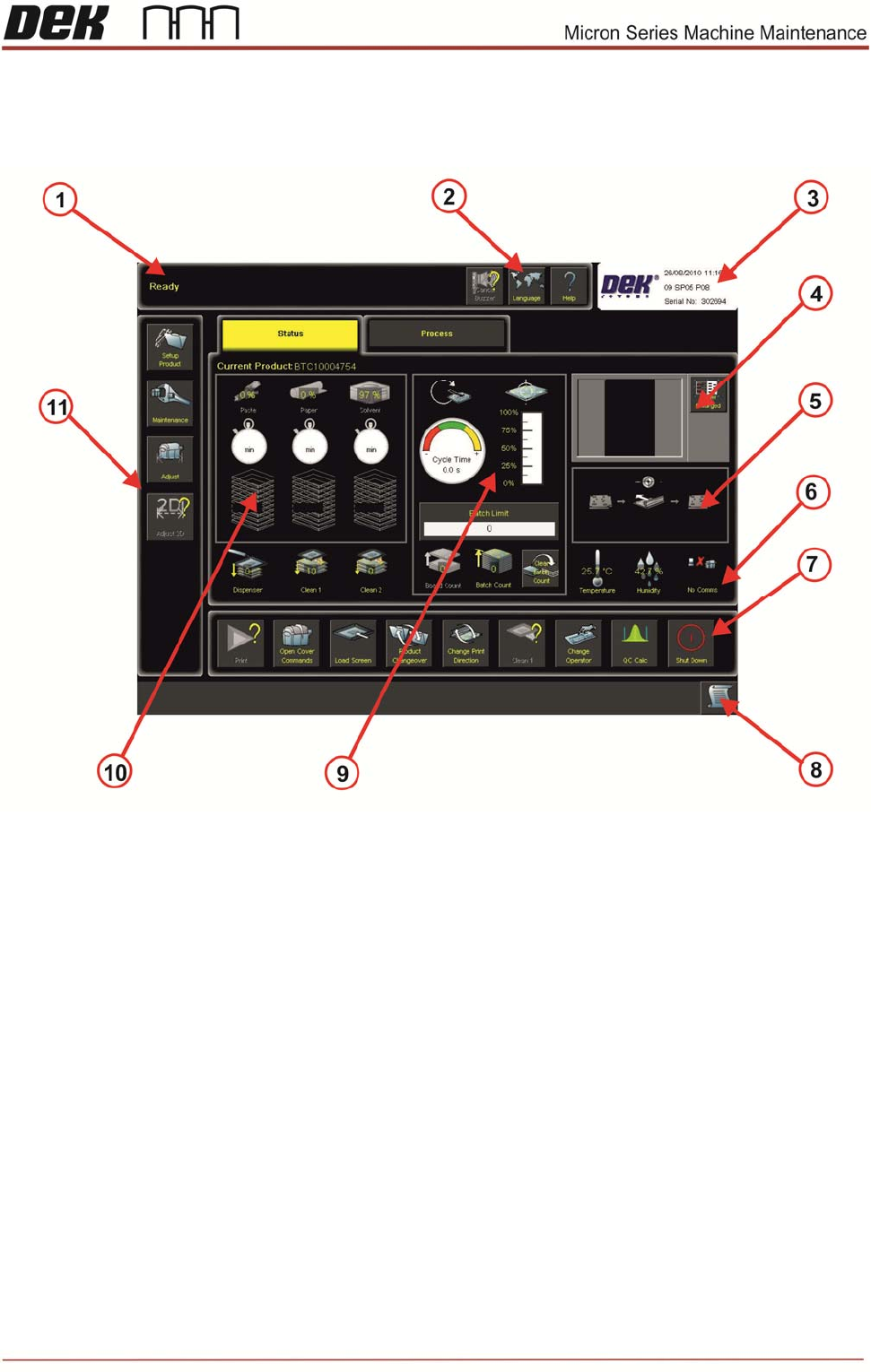
Objective MO2: State Monitor Areas
Identify the areas of the display below
12 Issue 6, Nov 14
Objective MO3: Create a product file
Using the board and stencil provided by your instructor create a new product file.
Creating a New Product File From an Existing File
This is often the quickest way to get started. It is the most efficient method if the new
product has similarities in size, process or 2Di to an existing one. There are however,
precautions to remember: always zero any offsets from the old file and never assume that
the under-screen cleaner or paste dispense strategies are transferable - these should
always be confirmed through test and observation.
The board dimensions are width, length and thickness. It is very important that these are
programmed accurately as the printer software uses these values as the basis for many
other board file and machine parameters.
For each board dimension state what other board file parameter or mechanical settings will
be automatically adjusted:
Board Width
Board Length
Board Thickness
NOTES:
Issue 6, Nov 14
13
NOTES: