SIPLACE S-23 HM.pdf - 第424页
12 Station Extensions / S oftware User M anual SIPLACE S -23 HM 12.2 GEM Interface Software Version SR.406.xx 02/00 US Edition 424 12. 2.2 Op er atio n 12.2.2.1 Setting the Control Mode The cont rol mode spec ifies ho w …
User Manual SIPLACE S-23 HM 12 Station Extensions / Software
Software Version SR.406.xx 02/00 US Edition 12.2 GEM Interface
423
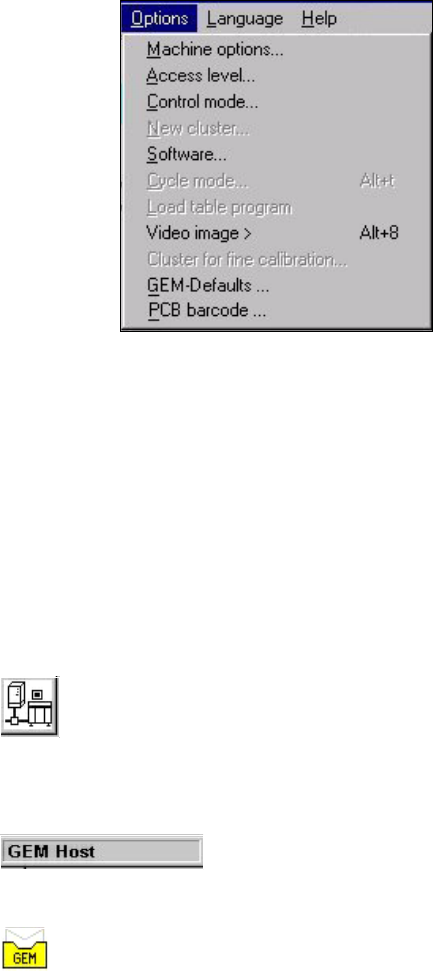
The figure below presents the "Options" menu which is present in the menu bar of the user inter-
face. This menu contains the options for the GEM interface settings. 12
12
Menu Options for the GEM Interface: 12
– Control mode...
This opens a dialog box which is used to set the control mode at the GEM computer.
– GEM-Defaults ...
This opens the window used to specify the default settings for the GEM interface.
Controls and Indicators in the GEM Interface 12
12
12
This button switches the user interface to "State view" mode. (Load placement program, send/re-
ceive message) 12
12
The current control mode is displayed in a separate area in the user interface’s information bar.12
12
The icon displayed in the user interface’s status area (on the right-hand side) indicates the current
status of the connection to the GEM computer. 12
12
12 Station Extensions / Software User Manual SIPLACE S-23 HM
12.2 GEM Interface Software Version SR.406.xx 02/00 US Edition
424
12.2.2 Operation
12.2.2.1 Setting the Control Mode
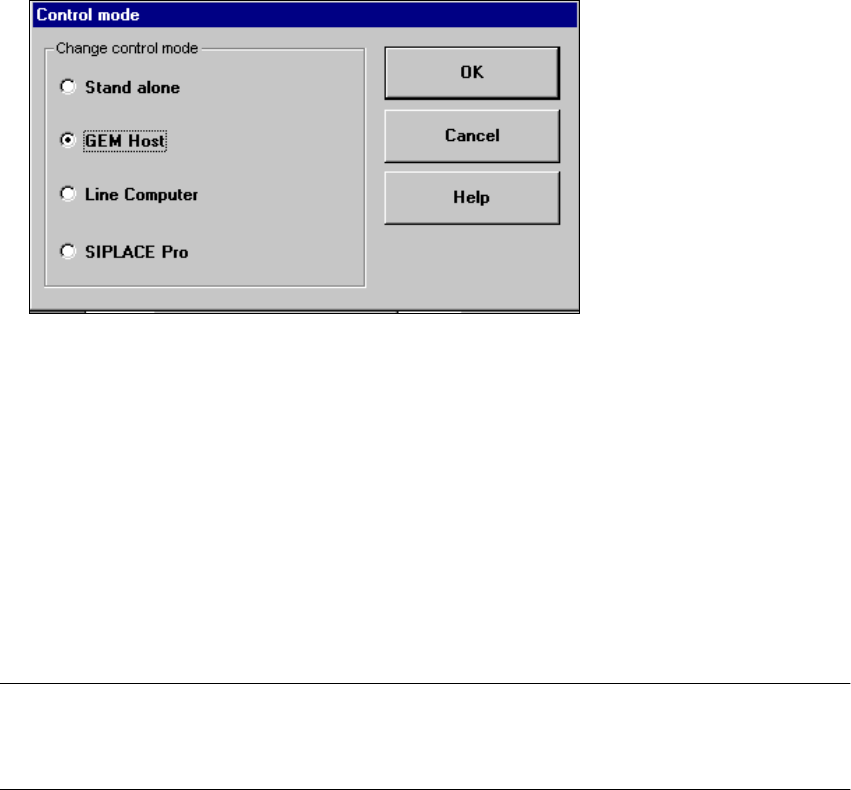
The control mode specifies how the station is supplied with the necessary placement data. 12
Å In the main view, select the Options menu and then choose the Control mode... option.
Å The following selection box appears.
Possible Settings: 12
Stand alone 12
(This control mode is used for test purposes only)
If a cluster is specified at the station, all necessary data will be loaded from the hard disk of the
station computer.
The data must be located on the station computer’s hard disk. 12
GEM Host 12
In this control mode only the host computer can specify the placement programs.
The data must be located on the host computer’s hard disk. 12
NOTE
This setting must be activated if you wish to download placement programs from the GEM
computer to the station computer. See also section 12.2.2.6. 12
Line Computer 12
If a cluster is specified at the station, all necessary data will be loaded from the line computer. The
data must be located on the line computer’s hard disk. 12
User Manual SIPLACE S-23 HM 12 Station Extensions / Software
Software Version SR.406.xx 02/00 US Edition 12.2 GEM Interface
425
SIPLACE Pro 12
When a cluster is specified at the station, all the data required for this are loaded from the com-
puter specified in the configuration of the SIPLACE Pro connection. The data must be located on
the hard disk of this computer. 12
12
Å Select the button for the required control mode.
Å Click OK to confirm and activate this setting.
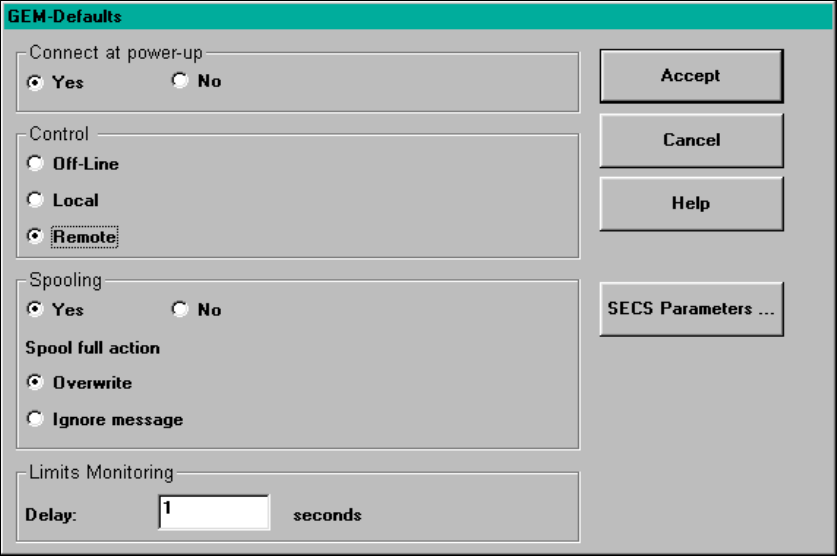
12.2.2.2 Defining the GEM default Settings
You use the "GEM default settings..." menu option to make various settings which will be used at
power-up as default parameters for the station. 12
Å In the main view select the Options menu and then select the option GEM default settings....
The following window is displayed.
12
Fig. 12.2 - 2 "GEM-Defaults" window